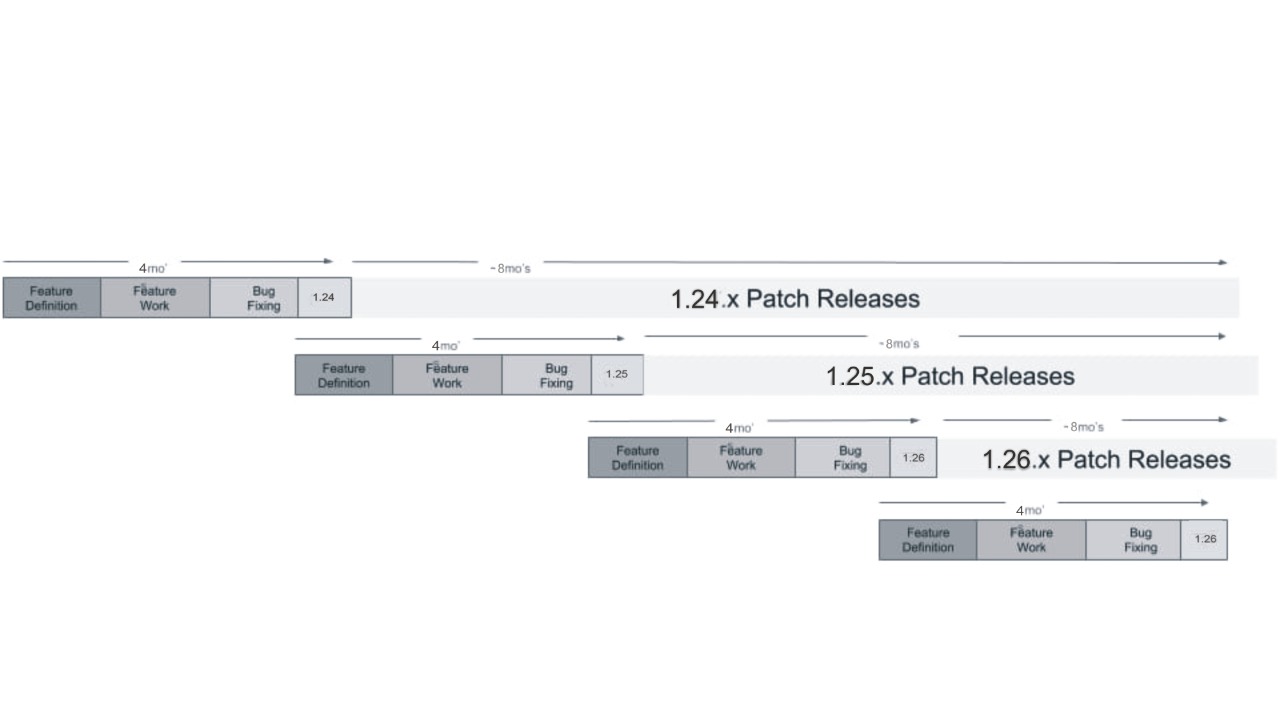
The Kubernetes project maintains release branches for the most recent three minor releases (1.35, 1.34, 1.33). Kubernetes 1.19 and newer receive approximately 1 year of patch support. Kubernetes 1.18 and older received approximately 9 months of patch support.
Kubernetes versions are expressed as x.y.z, where x is the major version, y is the minor version, and z is the patch version, following Semantic Versioning terminology.
More information in the version skew policy document.
Older Kubernetes releases that are no longer maintained are listed below.
| Minor Version | Final Patch Release | End Of Life Date | Note |
|---|---|---|---|
| 1.32 | 1.32.13 | ||
| 1.31 | 1.31.14 | ||
| 1.30 | 1.30.14 | ||
| 1.29 | 1.29.14 | ||
| 1.28 | 1.28.15 | ||
| 1.27 | 1.27.16 | ||
| 1.26 | 1.26.15 | 1.26.15 was released in March 2024 (after the EOL date) to pick up a new version of Go to address several Go CVEs | |
| 1.25 | 1.25.16 | 1.25.16 was released in November 2023 (after the EOL date) to fix CVE-2023-5528 | |
| 1.24 | 1.24.17 | 1.24.17 was released in August 2023 (after the EOL date) to fix CVE-2023-3676 and CVE-2023-3955 | |
| 1.23 | 1.23.17 | ||
| 1.22 | 1.22.17 | 1.22.17 was released in December 2022 (after the EOL date) to backport registry changes and fix two critical issues. | |
| 1.21 | 1.21.14 | ||
| 1.20 | 1.20.15 | ||
| 1.19 | 1.19.16 | ||
| 1.18 | 1.18.20 | Created to solve regression introduced in 1.18.19 | |
| 1.17 | 1.17.17 | ||
| 1.16 | 1.16.15 | ||
| 1.15 | 1.15.12 | ||
| 1.14 | 1.14.10 | ||
| 1.13 | 1.13.12 | ||
| 1.12 | 1.12.10 | ||
| 1.11 | 1.11.10 | ||
| 1.10 | 1.10.13 | ||
| 1.9 | 1.9.11 | ||
| 1.8 | 1.8.15 | ||
| 1.7 | 1.7.16 | ||
| 1.6 | 1.6.13 | ||
| 1.5 | 1.5.8 | ||
| 1.4 | 1.4.12 | ||
| 1.3 | 1.3.10 | ||
| 1.2 | 1.2.7 |
Check out the schedule for the upcoming 1.36 Kubernetes release!
Refer to the Kubernetes Release Team resources for key information on roles and the release process.
Kubernetes ships binaries for each component as well as a standard set of client applications to bootstrap or interact with a cluster. Components like the API server are capable of running within container images inside of a cluster. Those components are also shipped in container images as part of the official release process. All binaries as well as container images are available for multiple operating systems as well as hardware architectures.
The Kubernetes command-line tool, kubectl, allows you to run commands against Kubernetes clusters.
You can use kubectl to deploy applications, inspect and manage cluster resources,
and view logs. For more information including a complete list of kubectl operations, see the
kubectl reference documentation.
kubectl is installable on a variety of Linux platforms, macOS and Windows. Find your preferred operating system below.
All Kubernetes container images are deployed to the
registry.k8s.io container image registry.
| Container Image | Supported Architectures |
|---|---|
| registry.k8s.io/kube-apiserver:v1.35.0 | amd64, arm, arm64, ppc64le, s390x |
| registry.k8s.io/kube-controller-manager:v1.35.0 | amd64, arm, arm64, ppc64le, s390x |
| registry.k8s.io/kube-proxy:v1.35.0 | amd64, arm, arm64, ppc64le, s390x |
| registry.k8s.io/kube-scheduler:v1.35.0 | amd64, arm, arm64, ppc64le, s390x |
| registry.k8s.io/conformance:v1.35.0 | amd64, arm, arm64, ppc64le, s390x |
All container images are available for multiple architectures, whereas the
container runtime should choose the correct one based on the underlying
platform. It is also possible to pull a dedicated architecture by suffixing the
container image name, for example
registry.k8s.io/kube-apiserver-arm64:v1.35.0.
Kubernetes v1.26 [beta]
For Kubernetes v1.35, container images are signed using sigstore signatures:
The Kubernetes project publishes a list of signed Kubernetes container images in SPDX 2.3 format. You can fetch that list using:
curl -Ls "https://sbom.k8s.io/$(curl -Ls https://dl.k8s.io/release/stable.txt)/release" | grep "SPDXID: SPDXRef-Package-registry.k8s.io" | grep -v sha256 | cut -d- -f3- | sed 's/-/\//' | sed 's/-v1/:v1/'
To manually verify signed container images of Kubernetes core components, refer to Verify Signed Container Images.
If you pull a container image for a specific architecture, the single-architecture image is signed in the same way as for the multi-architecture manifest lists.
You can find links to download Kubernetes components (and their checksums) in the CHANGELOG files. Alternately, use downloadkubernetes.com to filter by version and architecture.
This content is auto-generated and links may not function. The source of the document is located here.
This document is focused on Kubernetes developers and contributors who need to create an enhancement, issue, or pull request which targets a specific release milestone.
The process for shepherding enhancements, issues, and pull requests into a Kubernetes release spans multiple stakeholders:
Information on workflows and interactions are described below.
As the owner of an enhancement, issue, or pull request (PR), it is your responsibility to ensure release milestone requirements are met. Automation and the Release Team will be in contact with you if updates are required, but inaction can result in your work being removed from the milestone. Additional requirements exist when the target milestone is a prior release (see cherry pick process for more information).
If you want your PR to get merged, it needs the following required labels and milestones, represented here by the Prow /commands it would take to add them:
Return to 'Normal Dev' phase requirements:
Merges into the 1.y branch are now via cherry picks, approved by Release Managers.
In the past, there was a requirement for a milestone-targeted pull requests to have an associated GitHub issue opened, but this is no longer the case. Features or enhancements are effectively GitHub issues or KEPs which lead to subsequent PRs.
The general labeling process should be consistent across artifact types.
issue owners: Creator, assignees, and user who moved the issue into a release milestone
Release Team: Each Kubernetes release has a team doing project management tasks described here.
The contact info for the team associated with any given release can be found here.
Y days: Refers to business days
enhancement: see "Is My Thing an Enhancement?"
Enhancements Freeze: the deadline by which KEPs have to be completed in order for enhancements to be part of the current release
Exception Request: The process of requesting an extension on the deadline for a particular Enhancement
Code Freeze: The period of ~4 weeks before the final release date, during which only critical bug fixes are merged into the release.
Pruning: The process of removing an Enhancement from a release milestone if it is not fully implemented or is otherwise considered not stable.
release milestone: semantic version string or
GitHub milestone
referring to a release MAJOR.MINOR vX.Y version.
See also release versioning.
release branch: Git branch release-X.Y created for the vX.Y milestone.
Created at the time of the vX.Y-rc.0 release and maintained after the
release for approximately 12 months with vX.Y.Z patch releases.
Note: releases 1.19 and newer receive 1 year of patch release support, and releases 1.18 and earlier received 9 months of patch release support.
Kubernetes releases currently happen approximately three times per year.
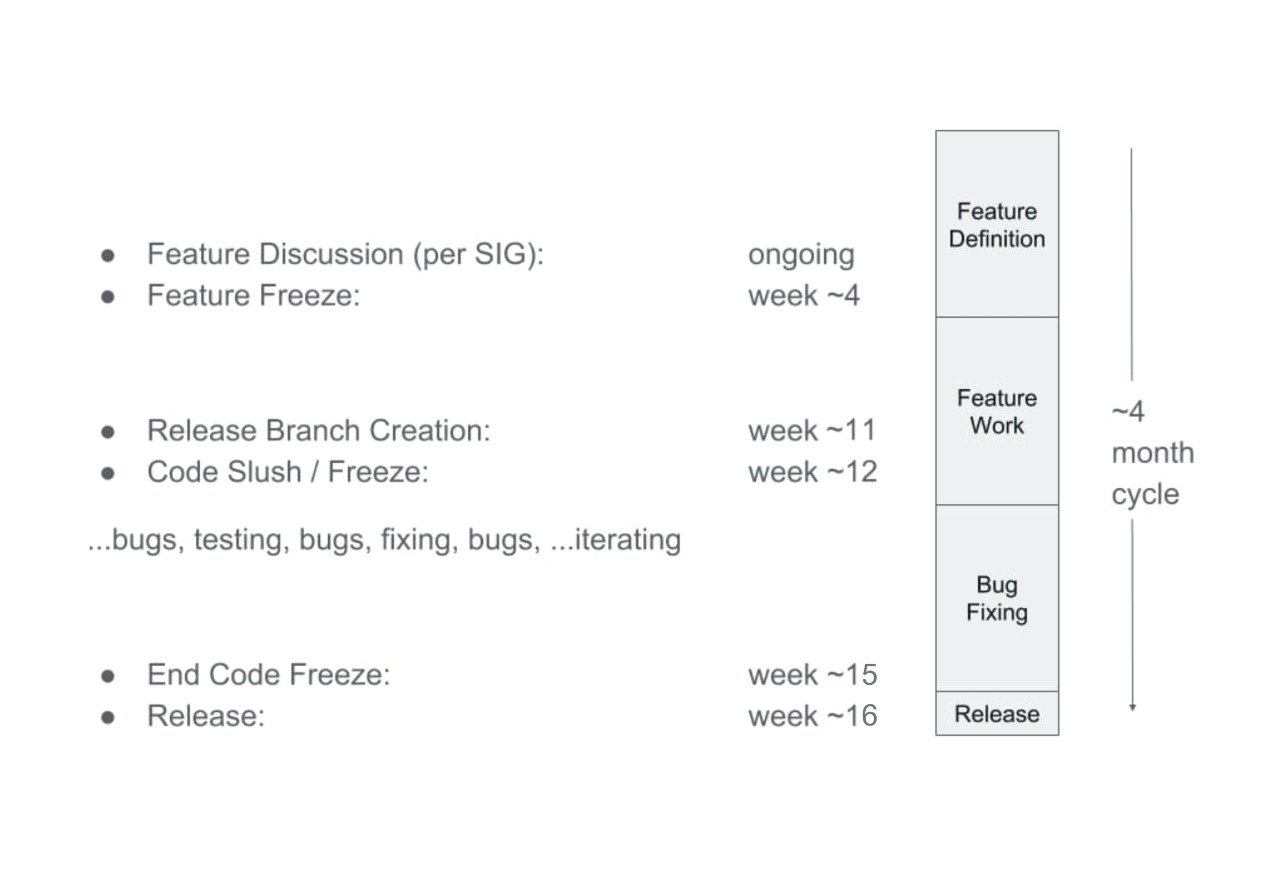
The release process can be thought of as having three main phases:
But in reality, this is an open source and agile project, with feature planning and implementation happening at all times. Given the project scale and globally distributed developer base, it is critical to project velocity to not rely on a trailing stabilization phase and rather have continuous integration testing which ensures the project is always stable so that individual commits can be flagged as having broken something.
With ongoing feature definition through the year, some set of items will bubble up as targeting a given release. Enhancements Freeze starts ~4 weeks into release cycle. By this point all intended feature work for the given release has been defined in suitable planning artifacts in conjunction with the Release Team's Enhancements Lead.
After Enhancements Freeze, tracking milestones on PRs and issues is important. Items within the milestone are used as a punchdown list to complete the release. On issues, milestones must be applied correctly, via triage by the SIG, so that Release Team can track bugs and enhancements (any enhancement-related issue needs a milestone).
There is some automation in place to help automatically assign milestones to PRs.
This automation currently applies to the following repos:
kubernetes/enhancementskubernetes/kuberneteskubernetes/releasekubernetes/sig-releasekubernetes/test-infraAt creation time, PRs against the master branch need humans to hint at which
milestone they might want the PR to target. Once merged, PRs against the
master branch have milestones auto-applied so from that time onward human
management of that PR's milestone is less necessary. On PRs against release
branches, milestones are auto-applied when the PR is created so no human
management of the milestone is ever necessary.
Any other effort that should be tracked by the Release Team that doesn't fall under that automation umbrella should be have a milestone applied.
Implementation and bug fixing is ongoing across the cycle, but culminates in a code freeze period.
Code Freeze starts in week ~12 and continues for ~2 weeks. Only critical bug fixes are accepted into the release codebase during this time.
There are approximately two weeks following Code Freeze, and preceding release, during which all remaining critical issues must be resolved before release. This also gives time for documentation finalization.
When the code base is sufficiently stable, the master branch re-opens for general development and work begins there for the next release milestone. Any remaining modifications for the current release are cherry picked from master back to the release branch. The release is built from the release branch.
Each release is part of a broader Kubernetes lifecycle:
Before getting too far into the process for adding an item to the milestone, please note:
Members of the Release Team may remove issues from the milestone if they or the responsible SIG determine that the issue is not actually blocking the release and is unlikely to be resolved in a timely fashion.
Members of the Release Team may remove PRs from the milestone for any of the following, or similar, reasons:
While members of the Release Team will help with labelling and contacting SIG(s), it is the responsibility of the submitter to categorize PRs, and to secure support from the relevant SIG to guarantee that any breakage caused by the PR will be rapidly resolved.
Where additional action is required, an attempt at human to human escalation will be made by the Release Team through the following channels:
The members of the milestone-maintainers
GitHub team are entrusted with the responsibility of specifying the release
milestone on GitHub artifacts.
This group is maintained by SIG Release and has representation from the various SIGs' leadership.
Adding the in-progress release milestone to pull requests after the Code Freeze is strictly prohibited, as it can compromise the stability of the release. Prior to making such changes, approval must be obtained from both the Release Team Lead and the Emeritus Advisor(s).
Feature planning and definition takes many forms today, but a typical example might be a large piece of work described in a KEP, with associated task issues in GitHub. When the plan has reached an implementable state and work is underway, the enhancement or parts thereof are targeted for an upcoming milestone by creating GitHub issues and marking them with the Prow "/milestone" command.
For the first ~4 weeks into the release cycle, the Release Team's Enhancements Lead will interact with SIGs and feature owners via GitHub, Slack, and SIG meetings to capture all required planning artifacts.
If you have an enhancement to target for an upcoming release milestone, begin a conversation with your SIG leadership and with that release's Enhancements Lead.
Issues are marked as targeting a milestone via the Prow "/milestone" command.
The Release Team's Bug Triage Lead and overall community watch incoming issues and triage them, as described in the contributor guide section on issue triage.
Marking issues with the milestone provides the community better visibility regarding when an issue was observed and by when the community feels it must be resolved. During Code Freeze, a milestone must be set to merge a PR.
An open issue is no longer required for a PR, but open issues and associated PRs should have synchronized labels. For example a high priority bug issue might not have its associated PR merged if the PR is only marked as lower priority.
PRs are marked as targeting a milestone via the Prow "/milestone" command.
This is a blocking requirement during Code Freeze as described above.
Here is the list of labels and their use and purpose.
The SIG owner label defines the SIG to which we escalate if a milestone issue is languishing or needs additional attention. If there are no updates after escalation, the issue may be automatically removed from the milestone.
These are added with the Prow "/sig" command. For example to add the label
indicating SIG Storage is responsible, comment with /sig storage.
Priority labels are used to determine an escalation path before moving issues out of the release milestone. They are also used to determine whether or not a release should be blocked on the resolution of the issue.
priority/critical-urgent: Never automatically move out of a release
milestone; continually escalate to contributor and SIG through all available
channels.
priority/important-soon: Escalate to the issue owners and SIG owner; move
out of milestone after several unsuccessful escalation attempts.
priority/important-longterm: Escalate to the issue owners; move out of the
milestone after 1 attempt.
priority/important-soonpriority/important-soonThe issue kind is used to help identify the types of changes going into the release over time. This may allow the Release Team to develop a better understanding of what sorts of issues we would miss with a faster release cadence.
For release targeted issues, including pull requests, one of the following issue kind labels must be set:
kind/api-change: Adds, removes, or changes an APIkind/bug: Fixes a newly discovered bug.kind/cleanup: Adding tests, refactoring, fixing old bugs.kind/design: Related to designkind/documentation: Adds documentationkind/failing-test: CI test case is failing consistently.kind/feature: New functionality.kind/flake: CI test case is showing intermittent failures.Schedule and team contact information for Kubernetes patch releases.
For general information about Kubernetes release cycle, see the release process description.
Our typical patch release cadence is monthly. It is commonly a bit faster (1 to 2 weeks) for the earliest patch releases after a 1.X minor release. Critical bug fixes may cause a more immediate release outside of the normal cadence. We also aim to not make releases during major holiday periods.
See the Release Managers page for full contact details on the Patch Release Team.
Please give us a business day to respond - we may be in a different timezone!
In between releases the team is looking at incoming cherry pick requests on a weekly basis. The team will get in touch with submitters via GitHub PR, SIG channels in Slack, and direct messages in Slack and email if there are questions on the PR.
Please follow the cherry pick process.
Cherry picks must be merge-ready in GitHub with proper labels (e.g.,
approved, lgtm, release-note) and passing CI tests ahead of the
cherry pick deadline. This is typically two days before the target
release, but may be more. Earlier PR readiness is better, as we
need time to get CI signal after merging your cherry picks ahead
of the actual release.
Cherry pick PRs which miss merge criteria will be carried over and tracked for the next patch release.
In accordance with the yearly support KEP, the Kubernetes Community will support active patch release series for a period of roughly fourteen (14) months.
The first twelve months of this timeframe will be considered the standard period.
Towards the end of the twelve month, the following will happen:
During the two-month maintenance mode period, Release Managers may cut additional maintenance releases to resolve:
At the end of the two-month maintenance mode period, the patch release series will be considered EOL (end of life) and cherry picks to the associated branch are to be closed soon afterwards.
Note that the 28th of the month was chosen for maintenance mode and EOL target dates for simplicity (every month has it).
Timelines may vary with the severity of bug fixes, but for easier planning we will target the following monthly release points. Unplanned, critical releases may also occur in between these.
| Monthly Patch Release | Cherry Pick Deadline | Target Date |
|---|---|---|
| April 2026 | ||
| May 2026 | ||
| June 2026 |
Next patch release is 1.35.4.
Kubernetes 1.35 enters maintenance mode on ; the End of Life date for Kubernetes 1.35 is .
| Patch Release | Cherry Pick Deadline | Target Date | Note |
|---|---|---|---|
| 1.35.3 | |||
| 1.35.2 | Out of band patch release to pick up a new version of Go to address several Go CVEs. No other changes. | ||
| 1.35.1 | January 2026 patches consolidated with February |
Next patch release is 1.34.7.
Kubernetes 1.34 enters maintenance mode on ; the End of Life date for Kubernetes 1.34 is .
| Patch Release | Cherry Pick Deadline | Target Date | Note |
|---|---|---|---|
| 1.34.6 | |||
| 1.34.5 | Out of band patch release to pick up a new version of Go to address several Go CVEs. No other changes. | ||
| 1.34.4 | January 2026 patches consolidated with February | ||
| 1.34.3 | |||
| 1.34.2 | October 2025 patches consolidated with November | ||
| 1.34.1 | |||
| 1.34.0 | - |
Next patch release is 1.33.11.
Kubernetes 1.33 enters maintenance mode on ; the End of Life date for Kubernetes 1.33 is .
| Patch Release | Cherry Pick Deadline | Target Date | Note |
|---|---|---|---|
| 1.33.10 | |||
| 1.33.9 | Out of band patch release to pick up a new version of Go to address several Go CVEs. No other changes. | ||
| 1.33.8 | January 2026 patches consolidated with February | ||
| 1.33.7 | |||
| 1.33.6 | October 2025 patches consolidated with November | ||
| 1.33.5 | |||
| 1.33.4 | |||
| 1.33.3 | |||
| 1.33.2 | |||
| 1.33.1 |
These releases are no longer supported.
| Minor Version | Final Patch Release | End Of Life Date | Note |
|---|---|---|---|
| 1.32 | 1.32.13 | ||
| 1.31 | 1.31.14 | ||
| 1.30 | 1.30.14 | ||
| 1.29 | 1.29.14 | ||
| 1.28 | 1.28.15 | ||
| 1.27 | 1.27.16 | ||
| 1.26 | 1.26.15 | 1.26.15 was released in March 2024 (after the EOL date) to pick up a new version of Go to address several Go CVEs | |
| 1.25 | 1.25.16 | 1.25.16 was released in November 2023 (after the EOL date) to fix CVE-2023-5528 | |
| 1.24 | 1.24.17 | 1.24.17 was released in August 2023 (after the EOL date) to fix CVE-2023-3676 and CVE-2023-3955 | |
| 1.23 | 1.23.17 | ||
| 1.22 | 1.22.17 | 1.22.17 was released in December 2022 (after the EOL date) to backport registry changes and fix two critical issues. | |
| 1.21 | 1.21.14 | ||
| 1.20 | 1.20.15 | ||
| 1.19 | 1.19.16 | ||
| 1.18 | 1.18.20 | Created to solve regression introduced in 1.18.19 | |
| 1.17 | 1.17.17 | ||
| 1.16 | 1.16.15 | ||
| 1.15 | 1.15.12 | ||
| 1.14 | 1.14.10 | ||
| 1.13 | 1.13.12 | ||
| 1.12 | 1.12.10 | ||
| 1.11 | 1.11.10 | ||
| 1.10 | 1.10.13 | ||
| 1.9 | 1.9.11 | ||
| 1.8 | 1.8.15 | ||
| 1.7 | 1.7.16 | ||
| 1.6 | 1.6.13 | ||
| 1.5 | 1.5.8 | ||
| 1.4 | 1.4.12 | ||
| 1.3 | 1.3.10 | ||
| 1.2 | 1.2.7 |
"Release Managers" is an umbrella term that encompasses the set of Kubernetes contributors responsible for maintaining release branches and creating releases by using the tools SIG Release provides.
The responsibilities of each role are described below.
| Mailing List | Slack | Visibility | Usage | Membership |
|---|---|---|---|---|
| release-managers@kubernetes.io | #release-management (channel) / @release-managers (user group) | Public | Public discussion for Release Managers | All Release Managers (including Associates, and SIG Chairs) |
| release-managers-private@kubernetes.io | N/A | Private | Private discussion for privileged Release Managers | Release Managers, SIG Release leadership |
| security-release-team@kubernetes.io | #security-release-team (channel) / @security-rel-team (user group) | Private | Security release coordination with the Security Response Committee | security-discuss-private@kubernetes.io, release-managers-private@kubernetes.io |
Some information about releases is subject to embargo and we have defined policy about how those embargoes are set. Please refer to the Security Embargo Policy for more information.
NOTE: The Patch Release Team and Branch Manager handbooks will be de-duplicated at a later date.
Note: The documentation might refer to the Patch Release Team and the Branch Management role. Those two roles were consolidated into the Release Managers role.
Minimum requirements for Release Managers and Release Manager Associates are:
git and associated
git command line invocations.Release Managers are responsible for:
x.y.z, where z > 0)x.y.z, where z = 0)This team at times works in close conjunction with the Security Response Committee and therefore should abide by the guidelines set forth in the Security Release Process.
GitHub Access Controls: @kubernetes/release-managers
GitHub Mentions: @kubernetes/release-engineering
To become a Release Manager, one must first serve as a Release Manager Associate. Associates graduate to Release Manager by actively working on releases over several cycles and:
Release Manager Associates are apprentices to the Release Managers, formerly referred to as Release Manager shadows. They are responsible for:
GitHub Mentions: @kubernetes/release-engineering
Contributors can become Associates by demonstrating the following:
SIG Release Chairs and Technical Leads are responsible for:
They are mentioned explicitly here as they are owners of the various communications channels and permissions groups (GitHub teams, GCP access) for each role. As such, they are highly privileged community members and privy to some private communications, which can at times relate to Kubernetes security disclosures.
GitHub team: @kubernetes/sig-release-leads
Past Branch Managers, can be found in the releases directory
of the kubernetes/sig-release repository within release-x.y/release_team.md.
Example: 1.15 Release Team
Release notes can be found by reading the Changelog that matches your Kubernetes version. View the changelog for 1.35 on GitHub.
Alternately, release notes can be searched and filtered online at: relnotes.k8s.io. View filtered release notes for 1.35 on relnotes.k8s.io.
This document describes the maximum version skew supported between various Kubernetes components. Specific cluster deployment tools may place additional restrictions on version skew.
Kubernetes versions are expressed as x.y.z, where x is the major version, y is the minor version, and z is the patch version, following Semantic Versioning terminology. For more information, see Kubernetes Release Versioning.
The Kubernetes project maintains release branches for the most recent three minor releases (1.35, 1.34, 1.33). Kubernetes 1.19 and newer receive approximately 1 year of patch support. Kubernetes 1.18 and older received approximately 9 months of patch support.
Applicable fixes, including security fixes, may be backported to those three release branches, depending on severity and feasibility. Patch releases are cut from those branches at a regular cadence, plus additional urgent releases, when required.
The Release Managers group owns this decision.
For more information, see the Kubernetes patch releases page.
In highly-available (HA) clusters,
the newest and oldest kube-apiserver instances must be within one minor version.
Example:
kube-apiserver is at 1.35kube-apiserver instances are supported at 1.35 and 1.34kubelet must not be newer than kube-apiserver.kubelet may be up to three minor versions older than kube-apiserver (kubelet < 1.25 may only be up to two minor versions older than kube-apiserver).Example:
kube-apiserver is at 1.35kubelet is supported at 1.35, 1.34,
1.33, and 1.32kube-apiserver instances in an HA cluster, this narrows the allowed kubelet versions.Example:
kube-apiserver instances are at 1.35 and 1.34kubelet is supported at 1.34, 1.33,
and 1.32 (1.35 is not supported because that
would be newer than the kube-apiserver instance at version 1.34)kube-proxy must not be newer than kube-apiserver.kube-proxy may be up to three minor versions older than kube-apiserver
(kube-proxy < 1.25 may only be up to two minor versions older than kube-apiserver).kube-proxy may be up to three minor versions older or newer than the kubelet instance
it runs alongside (kube-proxy < 1.25 may only be up to two minor versions older or newer
than the kubelet instance it runs alongside).Example:
kube-apiserver is at 1.35kube-proxy is supported at 1.35, 1.34,
1.33, and 1.32kube-apiserver instances in an HA cluster, this narrows the allowed kube-proxy versions.Example:
kube-apiserver instances are at 1.35 and 1.34kube-proxy is supported at 1.34, 1.33,
and 1.32 (1.35 is not supported because that would
be newer than the kube-apiserver instance at version 1.34)kube-controller-manager, kube-scheduler, and cloud-controller-manager must not be newer than the
kube-apiserver instances they communicate with. They are expected to match the kube-apiserver minor version,
but may be up to one minor version older (to allow live upgrades).
Example:
kube-apiserver is at 1.35kube-controller-manager, kube-scheduler, and cloud-controller-manager are supported
at 1.35 and 1.34kube-apiserver instances in an HA cluster, and these components
can communicate with any kube-apiserver instance in the cluster (for example, via a load balancer),
this narrows the allowed versions of these components.Example:
kube-apiserver instances are at 1.35 and 1.34kube-controller-manager, kube-scheduler, and cloud-controller-manager communicate with a load balancer
that can route to any kube-apiserver instancekube-controller-manager, kube-scheduler, and cloud-controller-manager are supported at
1.34 (1.35 is not supported
because that would be newer than the kube-apiserver instance at version 1.34)kubectl is supported within one minor version (older or newer) of kube-apiserver.
Example:
kube-apiserver is at 1.35kubectl is supported at 1.36, 1.35,
and 1.34kube-apiserver instances in an HA cluster, this narrows the supported kubectl versions.Example:
kube-apiserver instances are at 1.35 and 1.34kubectl is supported at 1.35 and 1.34
(other versions would be more than one minor version skewed from one of the kube-apiserver components)The supported version skew between components has implications on the order in which components must be upgraded. This section describes the order in which components must be upgraded to transition an existing cluster from version 1.34 to version 1.35.
Optionally, when preparing to upgrade, the Kubernetes project recommends that you do the following to benefit from as many regression and bug fixes as possible during your upgrade:
For example, if you're running version 1.34, ensure that you're on the most recent patch version. Then, upgrade to the most recent patch version of 1.35.
Pre-requisites:
kube-apiserver instance is 1.34kube-apiserver instances are at 1.34 or
1.35 (this ensures maximum skew of 1 minor version between the oldest and newest kube-apiserver instance)kube-controller-manager, kube-scheduler, and cloud-controller-manager instances that
communicate with this server are at version 1.34
(this ensures they are not newer than the existing API server version, and are within 1 minor version of the new API server version)kubelet instances on all nodes are at version 1.34 or 1.33
(this ensures they are not newer than the existing API server version, and are within 2 minor versions of the new API server version)kube-apiserver instance will send them:
ValidatingWebhookConfiguration and MutatingWebhookConfiguration objects are updated to include
any new versions of REST resources added in 1.35
(or use the matchPolicy: Equivalent option available in v1.15+)Upgrade kube-apiserver to 1.35
kube-apiserver to not skip minor versions when upgrading, even in single-instance clusters.Pre-requisites:
kube-apiserver instances these components communicate with are at 1.35
(in HA clusters in which these control plane components can communicate with any kube-apiserver
instance in the cluster, all kube-apiserver instances must be upgraded before upgrading these components)Upgrade kube-controller-manager, kube-scheduler, and
cloud-controller-manager to 1.35. There is no
required upgrade order between kube-controller-manager, kube-scheduler, and
cloud-controller-manager. You can upgrade these components in any order, or
even simultaneously.
Pre-requisites:
kube-apiserver instances the kubelet communicates with are at 1.35Optionally upgrade kubelet instances to 1.35 (or they can be left at
1.34, 1.33, or 1.32)
kubelet upgrade, drain pods from that node.
In-place minor version kubelet upgrades are not supported.kubelet instances that are persistently three minor versions behind
kube-apiserver means they must be upgraded before the control plane can be upgraded.Pre-requisites:
kube-apiserver instances kube-proxy communicates with are at 1.35Optionally upgrade kube-proxy instances to 1.35
(or they can be left at 1.34, 1.33,
or 1.32)
kube-proxy instances that are persistently three minor versions behind
kube-apiserver means they must be upgraded before the control plane can be upgraded.