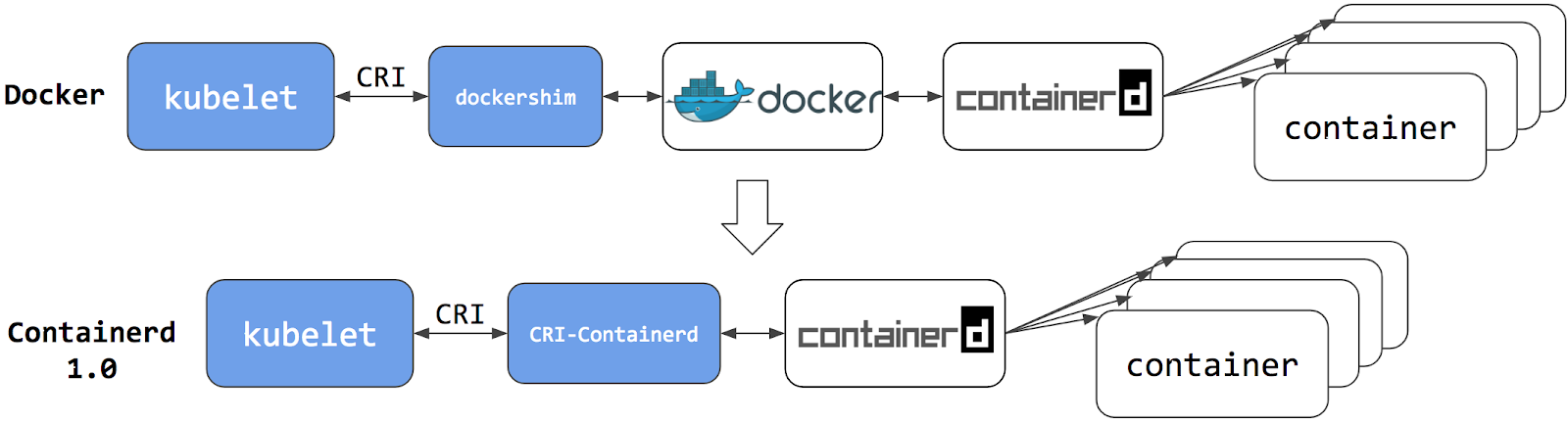
This section presents information you need to know when migrating from dockershim to other container runtimes.
Since the announcement of dockershim deprecation in Kubernetes 1.20, there were questions on how this will affect various workloads and Kubernetes installations. Our Dockershim Removal FAQ is there to help you to understand the problem better.
Dockershim was removed from Kubernetes with the release of v1.24. If you use Docker Engine via dockershim as your container runtime and wish to upgrade to v1.24, it is recommended that you either migrate to another runtime or find an alternative means to obtain Docker Engine support. Check out the container runtimes section to know your options.
The version of Kubernetes with dockershim (1.23) is out of support and the v1.24 will run out of support soon. Make sure to report issues you encountered with the migration so the issues can be fixed in a timely manner and your cluster would be ready for dockershim removal. After v1.24 running out of support, you will need to contact your Kubernetes provider for support or upgrade multiple versions at a time if there are critical issues affecting your cluster.
Your cluster might have more than one kind of node, although this is not a common configuration.
These tasks will help you to migrate:
This task outlines the steps needed to update your container runtime to containerd from Docker. It is applicable for cluster operators running Kubernetes 1.23 or earlier. This also covers an example scenario for migrating from dockershim to containerd. Alternative container runtimes can be picked from this page.
Install containerd. For more information see containerd's installation documentation and for specific prerequisite follow the containerd guide.
kubectl drain <node-to-drain> --ignore-daemonsets
Replace <node-to-drain> with the name of your node you are draining.
systemctl stop kubelet
systemctl disable docker.service --now
Follow the guide for detailed steps to install containerd.
Install the containerd.io package from the official Docker repositories.
Instructions for setting up the Docker repository for your respective Linux distribution and
installing the containerd.io package can be found at
Getting started with containerd.
Configure containerd:
sudo mkdir -p /etc/containerd
containerd config default | sudo tee /etc/containerd/config.toml
Restart containerd:
sudo systemctl restart containerd
Start a Powershell session, set $Version to the desired version (ex: $Version="1.4.3"), and
then run the following commands:
Download containerd:
curl.exe -L https://github.com/containerd/containerd/releases/download/v$Version/containerd-$Version-windows-amd64.tar.gz -o containerd-windows-amd64.tar.gz
tar.exe xvf .\containerd-windows-amd64.tar.gz
Extract and configure:
Copy-Item -Path ".\bin\" -Destination "$Env:ProgramFiles\containerd" -Recurse -Force
cd $Env:ProgramFiles\containerd\
.\containerd.exe config default | Out-File config.toml -Encoding ascii

# Review the configuration. Depending on setup you may want to adjust:
# - the sandbox_image (Kubernetes pause image)
# - cni bin_dir and conf_dir locations
Get-Content config.toml

# (Optional - but highly recommended) Exclude containerd from Windows Defender Scans
Add-MpPreference -ExclusionProcess "$Env:ProgramFiles\containerd\containerd.exe"
Start containerd:
.\containerd.exe --register-service
Start-Service containerd
Edit the file /var/lib/kubelet/kubeadm-flags.env and add the containerd runtime to the flags;
--container-runtime-endpoint=unix:///run/containerd/containerd.sock.
Users using kubeadm should be aware that the kubeadm tool stores the host's CRI socket in the
/var/lib/kubelet/instance-config.yaml file on each node. You can create this /var/lib/kubelet/instance-config.yaml file on the node.
The /var/lib/kubelet/instance-config.yaml file allows setting the containerRuntimeEndpoint parameter.
You can set this parameter's value to the path of your chosen CRI socket (for example unix:///run/containerd/containerd.sock).
systemctl start kubelet
Run kubectl get nodes -o wide and containerd appears as the runtime for the node we just changed.
If the node appears healthy, remove Docker.
sudo yum remove docker-ce docker-ce-cli
sudo apt-get purge docker-ce docker-ce-cli
sudo dnf remove docker-ce docker-ce-cli
sudo apt-get purge docker-ce docker-ce-cli
The preceding commands don't remove images, containers, volumes, or customized configuration files on your host. To delete them, follow Docker's instructions to Uninstall Docker Engine.
kubectl uncordon <node-to-uncordon>
Replace <node-to-uncordon> with the name of your node you previously drained.
This page outlines steps to find out what container runtime the nodes in your cluster use.
Depending on the way you run your cluster, the container runtime for the nodes may
have been pre-configured or you need to configure it. If you're using a managed
Kubernetes service, there might be vendor-specific ways to check what container runtime is
configured for the nodes. The method described on this page should work whenever
the execution of kubectl is allowed.
Install and configure kubectl. See Install Tools section for details.
Use kubectl to fetch and show node information:
kubectl get nodes -o wide
The output is similar to the following. The column CONTAINER-RUNTIME outputs
the runtime and its version.
For Docker Engine, the output is similar to this:
NAME         STATUS   VERSION    CONTAINER-RUNTIME
node-1       Ready    v1.16.15   docker://19.3.1
node-2       Ready    v1.16.15   docker://19.3.1
node-3       Ready    v1.16.15   docker://19.3.1
If your runtime shows as Docker Engine, you still might not be affected by the removal of dockershim in Kubernetes v1.24. Check the runtime endpoint to see if you use dockershim. If you don't use dockershim, you aren't affected.
For containerd, the output is similar to this:
NAME         STATUS   VERSION   CONTAINER-RUNTIME
node-1       Ready    v1.19.6   containerd://1.4.1
node-2       Ready    v1.19.6   containerd://1.4.1
node-3       Ready    v1.19.6   containerd://1.4.1
Find out more information about container runtimes on Container Runtimes page.
The container runtime talks to the kubelet over a Unix socket using the CRI protocol, which is based on the gRPC framework. The kubelet acts as a client, and the runtime acts as the server. In some cases, you might find it useful to know which socket your nodes use. For example, with the removal of dockershim in Kubernetes v1.24 and later, you might want to know whether you use Docker Engine with dockershim.
cri-dockerd, you aren't
affected by the dockershim removal.You can check which socket you use by checking the kubelet configuration on your nodes.
Read the starting commands for the kubelet process:
tr \\0 ' ' < /proc/"$(pgrep kubelet)"/cmdline
If you don't have tr or pgrep, check the command line for the kubelet
process manually.
In the output, look for the --container-runtime flag and the
--container-runtime-endpoint flag.
--container-runtime flag is not remote,
you use the dockershim socket with Docker Engine. The --container-runtime command line
argument is not available in Kubernetes v1.27 and later.--container-runtime-endpoint flag is present, check the socket
name to find out which runtime you use. For example,
unix:///run/containerd/containerd.sock is the containerd endpoint.If you want to change the Container Runtime on a Node from Docker Engine to containerd,
you can find out more information on migrating from Docker Engine to containerd,
or, if you want to continue using Docker Engine in Kubernetes v1.24 and later, migrate to a
CRI-compatible adapter like cri-dockerd.
To avoid CNI plugin-related errors, verify that you are using or upgrading to a container runtime that has been tested to work correctly with your version of Kubernetes.
Service issues exist for pod CNI network setup and tear down in containerd v1.6.0-v1.6.3 when the CNI plugins have not been upgraded and/or the CNI config version is not declared in the CNI config files. The containerd team reports, "these issues are resolved in containerd v1.6.4."
With containerd v1.6.0-v1.6.3, if you do not upgrade the CNI plugins and/or declare the CNI config version, you might encounter the following "Incompatible CNI versions" or "Failed to destroy network for sandbox" error conditions.
If the version of your CNI plugin does not correctly match the plugin version in the config because the config version is later than the plugin version, the containerd log will likely show an error message on startup of a pod similar to:
incompatible CNI versions; config is \"1.0.0\", plugin supports [\"0.1.0\" \"0.2.0\" \"0.3.0\" \"0.3.1\" \"0.4.0\"]"
To fix this issue, update your CNI plugins and CNI config files.
If the version of the plugin is missing in the CNI plugin config, the pod may run. However, stopping the pod generates an error similar to:
ERROR[2022-04-26T00:43:24.518165483Z] StopPodSandbox for "b" failed
error="failed to destroy network for sandbox \"bbc85f891eaf060c5a879e27bba9b6b06450210161dfdecfbb2732959fb6500a\": invalid version \"\": the version is empty"
This error leaves the pod in the not-ready state with a network namespace still attached. To recover from this problem, edit the CNI config file to add the missing version information. The next attempt to stop the pod should be successful.
If you're using containerd v1.6.0-v1.6.3 and encountered "Incompatible CNI versions" or "Failed to destroy network for sandbox" errors, consider updating your CNI plugins and editing the CNI config files.
Here's an overview of the typical steps for each node:
After stopping your container runtime and kubelet services, perform the following upgrade operations:
containerd, ensure that you have installed the latest version (v1.0.0 or later)
of the CNI loopback plugin.Bring the node back into your cluster by restarting your container runtime
and kubelet. Uncordon the node (kubectl uncordon <nodename>).
The following example shows a configuration for containerd runtime v1.6.x,
which supports a recent version of the CNI specification (v1.0.0).
Please see the documentation from your plugin and networking provider for further instructions on configuring your system.
On Kubernetes, containerd runtime adds a loopback interface, lo, to pods as a
default behavior. The containerd runtime configures the loopback interface via a
CNI plugin, loopback. The loopback plugin is distributed as part of the
containerd release packages that have the cni designation. containerd
v1.6.0 and later includes a CNI v1.0.0-compatible loopback plugin as well as
other default CNI plugins. The configuration for the loopback plugin is done
internally by containerd, and is set to use CNI v1.0.0. This also means that the
version of the loopback plugin must be v1.0.0 or later when this newer version
containerd is started.
The following bash command generates an example CNI config. Here, the 1.0.0
value for the config version is assigned to the cniVersion field for use when
containerd invokes the CNI bridge plugin.
cat << EOF | tee /etc/cni/net.d/10-containerd-net.conflist
{
 "cniVersion": "1.0.0",
 "name": "containerd-net",
 "plugins": [
   {
     "type": "bridge",
     "bridge": "cni0",
     "isGateway": true,
     "ipMasq": true,
     "promiscMode": true,
     "ipam": {
       "type": "host-local",
       "ranges": [
         [{
           "subnet": "10.88.0.0/16"
         }],
         [{
           "subnet": "2001:db8:4860::/64"
         }]
       ],
       "routes": [
         { "dst": "0.0.0.0/0" },
         { "dst": "::/0" }
       ]
     }
   },
   {
     "type": "portmap",
     "capabilities": {"portMappings": true},
     "externalSetMarkChain": "KUBE-MARK-MASQ"
   }
 ]
}
EOF
Update the IP address ranges in the preceding example with ones that are based on your use case and network addressing plan.
The dockershim component of Kubernetes allows the use of Docker as a Kubernetes's
container runtime.
Kubernetes' built-in dockershim component was removed in release v1.24.
This page explains how your cluster could be using Docker as a container runtime,
provides details on the role that dockershim plays when in use, and shows steps
you can take to check whether any workloads could be affected by dockershim removal.
If you are using Docker for building your application containers, you can still run these containers on any container runtime. This use of Docker does not count as a dependency on Docker as a container runtime.
When alternative container runtime is used, executing Docker commands may either not work or yield unexpected output. This is how you can find whether you have a dependency on Docker:
docker ps),
restart the Docker service (commands such as systemctl restart docker.service),
or modify Docker-specific files such as /etc/docker/daemon.json./etc/docker/daemon.json). Those typically need to
be reconfigured for another container runtime.A container runtime is software that can execute the containers that make up a Kubernetes pod. Kubernetes is responsible for orchestration and scheduling of Pods; on each node, the kubelet uses the container runtime interface as an abstraction so that you can use any compatible container runtime.
In its earliest releases, Kubernetes offered compatibility with one container runtime: Docker.
Later in the Kubernetes project's history, cluster operators wanted to adopt additional container runtimes.
The CRI was designed to allow this kind of flexibility - and the kubelet began supporting CRI. However,
because Docker existed before the CRI specification was invented, the Kubernetes project created an
adapter component, dockershim. The dockershim adapter allows the kubelet to interact with Docker as
if Docker were a CRI compatible runtime.
You can read about it in Kubernetes Containerd integration goes GA blog post.
Switching to Containerd as a container runtime eliminates the middleman. All the same containers can be run by container runtimes like Containerd as before. But now, since containers schedule directly with the container runtime, they are not visible to Docker. So any Docker tooling or fancy UI you might have used before to check on these containers is no longer available.
You cannot get container information using docker ps or docker inspect
commands. As you cannot list containers, you cannot get logs, stop containers,
or execute something inside a container using docker exec.
You can still pull images or build them using docker build command. But images
built or pulled by Docker would not be visible to container runtime and
Kubernetes. They needed to be pushed to some registry to allow them to be used
by Kubernetes.
The Kubelet /metrics/cadvisor endpoint provides Prometheus metrics,
as documented in Metrics for Kubernetes system components.
If you install a metrics collector that depends on that endpoint, you might see the following issues:
k8s_<container-name>_<pod-name>_<namespace>_<pod-uid>_<restart-count>
but the format on other runtime is different. For example, on containerd node it is <container-id>.container_fs_inodes_free
container_fs_inodes_total
container_fs_io_current
container_fs_io_time_seconds_total
container_fs_io_time_weighted_seconds_total
container_fs_limit_bytes
container_fs_read_seconds_total
container_fs_reads_merged_total
container_fs_sector_reads_total
container_fs_sector_writes_total
container_fs_usage_bytes
container_fs_write_seconds_total
container_fs_writes_merged_total
You can mitigate this issue by using cAdvisor as a standalone daemonset.
vX.Y.Z-containerd-cri (for example, v0.42.0-containerd-cri)./metrics endpoint
which provides the full set of
Prometheus container metrics.Alternatives:
/stats/summary.Kubernetes' support for direct integration with Docker Engine is deprecated and has been removed. Most apps do not have a direct dependency on runtime hosting containers. However, there are still a lot of telemetry and monitoring agents that have a dependency on Docker to collect containers metadata, logs, and metrics. This document aggregates information on how to detect these dependencies as well as links on how to migrate these agents to use generic tools or alternative runtimes.
Within a Kubernetes cluster there are a few different ways to run telemetry or security agents. Some agents have a direct dependency on Docker Engine when they run as DaemonSets or directly on nodes.
Historically, Kubernetes was written to work specifically with Docker Engine. Kubernetes took care of networking and scheduling, relying on Docker Engine for launching and running containers (within Pods) on a node. Some information that is relevant to telemetry, such as a pod name, is only available from Kubernetes components. Other data, such as container metrics, is not the responsibility of the container runtime. Early telemetry agents needed to query the container runtime and Kubernetes to report an accurate picture. Over time, Kubernetes gained the ability to support multiple runtimes, and now supports any runtime that is compatible with the container runtime interface.
Some telemetry agents rely specifically on Docker Engine tooling. For example, an agent
might run a command such as
docker ps
or docker top to list
containers and processes or docker logs
to receive streamed logs. If nodes in your existing cluster use
Docker Engine, and you switch to a different container runtime,
these commands will not work any longer.
If a pod wants to make calls to the dockerd running on the node, the pod must either:
For example: on COS images, Docker exposes its Unix domain socket at
/var/run/docker.sock This means that the pod spec will include a
hostPath volume mount of /var/run/docker.sock.
Here's a sample shell script to find Pods that have a mount directly mapping the
Docker socket. This script outputs the namespace and name of the pod. You can
remove the grep '/var/run/docker.sock' to review other mounts.
kubectl get pods --all-namespaces \
-o=jsonpath='{range .items[*]}{"\n"}{.metadata.namespace}{":\t"}{.metadata.name}{":\t"}{range .spec.volumes[*]}{.hostPath.path}{", "}{end}{end}' \
| sort \
| grep '/var/run/docker.sock'
/var/run may be mounted instead of the full path (like in this
example).
The script above only detects the most common uses.If your cluster nodes are customized and install additional security and telemetry agents on the node, check with the agent vendor to verify whether it has any dependency on Docker.
This section is intended to aggregate information about various telemetry and security agents that may have a dependency on container runtimes.
We keep the work in progress version of migration instructions for various telemetry and security agent vendors in Google doc. Please contact the vendor to get up to date instructions for migrating from dockershim.
No changes are needed: everything should work seamlessly on the runtime switch.
How to migrate: Docker deprecation in Kubernetes The pod that accesses Docker Engine may have a name containing any of:
datadog-agentdatadogdd-agentHow to migrate: Migrating from Docker-only to generic container metrics in Dynatrace
Containerd support announcement: Get automated full-stack visibility into containerd-based Kubernetes environments
CRI-O support announcement: Get automated full-stack visibility into your CRI-O Kubernetes containers (Beta)
The pod accessing Docker may have name containing:
dynatrace-oneagentHow to migrate:
Migrate Falco from dockershim Falco supports any CRI-compatible runtime (containerd is used in the default configuration); the documentation explains all details. The pod accessing Docker may have name containing:
falcoCheck documentation for Prisma Cloud, under the "Install Prisma Cloud on a CRI (non-Docker) cluster" section. The pod accessing Docker may be named like:
twistlock-defender-dsThe SignalFx Smart Agent (deprecated) uses several different monitors for Kubernetes including
kubernetes-cluster, kubelet-stats/kubelet-metrics, and docker-container-stats.
The kubelet-stats monitor was previously deprecated by the vendor, in favor of kubelet-metrics.
The docker-container-stats monitor is the one affected by dockershim removal.
Do not use the docker-container-stats with container runtimes other than Docker Engine.
How to migrate from dockershim-dependent agent:
docker-container-stats from the list of configured monitors.
Note, keeping this monitor enabled with non-dockershim runtime will result in incorrect metrics
being reported when docker is installed on node and no metrics when docker is not installed.kubelet-metrics monitor.The Pod accessing Docker may be named something like:
signalfx-agentFlame does not support container runtimes other than Docker. See https://github.com/yahoo/kubectl-flame/issues/51