Anyone can review a documentation pull request. Visit the pull requests
section in the Kubernetes website repository to see open pull requests.
Reviewing documentation pull requests is a great way to introduce yourself to the Kubernetes
community. It helps you learn the code base and build trust with other contributors.
Comment on positive aspects of PRs as well as changes.
Be empathetic and mindful of how your review may be received.
Assume good intent and ask clarifying questions.
Experienced contributors, consider pairing with new contributors whose work requires extensive changes.
Review process
In general, review pull requests for content and style in English. Figure 1 outlines the steps for
the review process. The details for each step follow.
flowchart LR
subgraph fourth[Start review]
direction TB
S[ ] -.-
M[add comments] --> N[review changes]
N --> O[new contributors should choose Comment]
end
subgraph third[Select PR]
direction TB
T[ ] -.-
J[read description and comments]--> K[preview changes in Netlify preview build]
end
A[Review open PR list]--> B[Filter open PRs by label]
B --> third --> fourth
classDef grey fill:#dddddd,stroke:#ffffff,stroke-width:px,color:#000000, font-size:15px;
classDef white fill:#ffffff,stroke:#000,stroke-width:px,color:#000,font-weight:bold
classDef spacewhite fill:#ffffff,stroke:#fff,stroke-width:0px,color:#000
class A,B,J,K,M,N,O grey
class S,T spacewhite
class third,fourth white
Filter the open PRs using one or all of the following labels:
cncf-cla: yes (Recommended): PRs submitted by contributors who have not signed the CLA
cannot be merged. See Sign the CLA
for more information.
language/en (Recommended): Filters for english language PRs only.
size/<size>: filters for PRs of a certain size. If you're new, start with smaller PRs.
Additionally, ensure the PR isn't marked as a work in progress. PRs using the work in progress label are not ready for review yet.
Once you've selected a PR to review, understand the change by:
Reading the PR description to understand the changes made, and read any linked issues
Reading any comments by other reviewers
Clicking the Files changed tab to see the files and lines changed
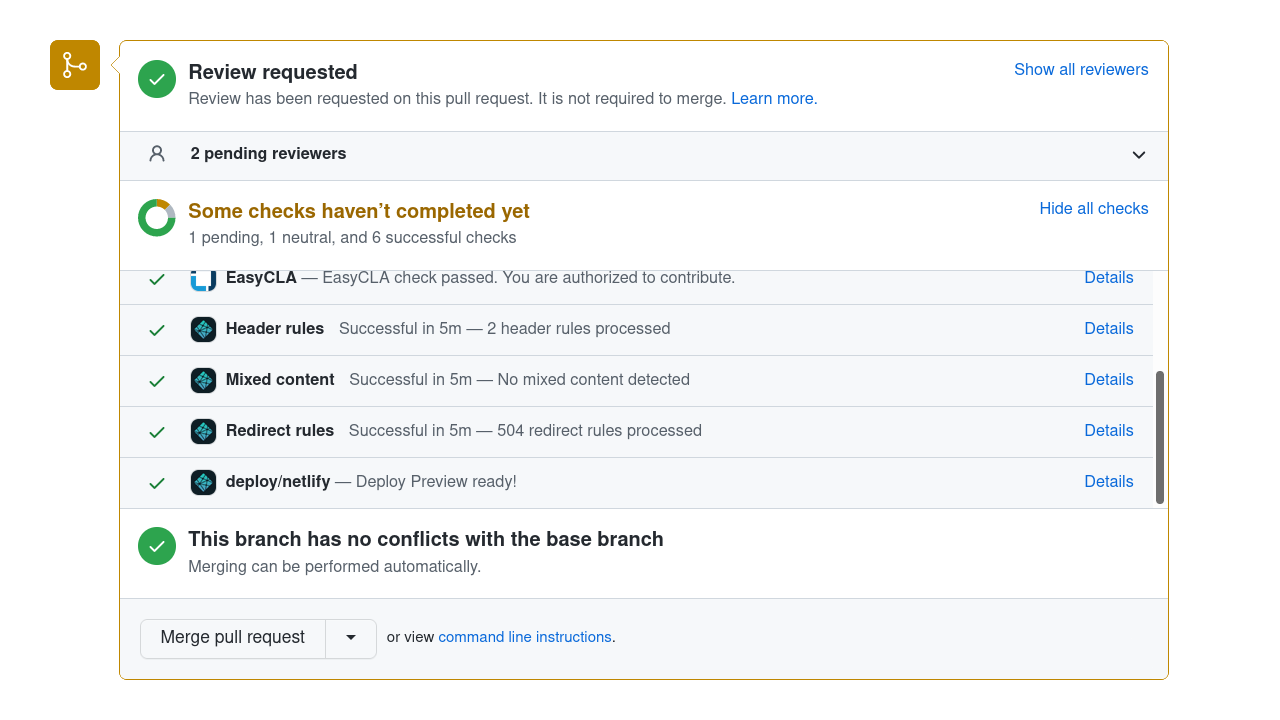
Previewing the changes in the Netlify preview build by scrolling to the PR's build check
section at the bottom of the Conversation tab.
Here's a screenshot (this shows GitHub's desktop site; if you're reviewing
on a tablet or smartphone device, the GitHub web UI is slightly different):
To open the preview, click on the Details link of the deploy/netlify line in the
list of checks.
Go to the Files changed tab to start your review.
Click on the + symbol beside the line you want to comment on.
Fill in any comments you have about the line and click either Add single comment
(if you have only one comment to make) or Start a review (if you have multiple comments to make).
When finished, click Review changes at the top of the page. Here, you can add
a summary of your review (and leave some positive comments for the contributor!).
Please always use the "Comment"
Avoid clicking the "Request changes" button when finishing your review.
If you want to block a PR from being merged before some further changes are made,
you can leave a "/hold" comment.
Mention why you are setting a hold, and optionally specify the conditions under
which the hold can be removed by you or other reviewers.
Avoid clicking the "Approve" button when finishing your review.
Leaving a "/approve" comment is recommended most of the time.
Reviewing checklist
When reviewing, use the following as a starting point.
Language and grammar
Are there any obvious errors in language or grammar? Is there a better way to phrase something?
Focus on the language and grammar of the parts of the page that the author is changing.
Unless the author is clearly aiming to update the entire page, they have no obligation to
fix every issue on the page.
When a PR updates an existing page, you should focus on reviewing the parts of
the page that are being updated. That changed content should be reviewed for technical
and editorial correctness.
If you find errors on the page that don't directly relate to what the PR author
is attempting to address, then it should be treated as a separate issue (check
that there isn't an existing issue about this first).
Watch out for pull requests that move content. If an author renames a page
or combines two pages, we (Kubernetes SIG Docs) usually avoid asking that author to fix every grammar or spelling nit
that we could spot within that moved content.
Are there any complicated or archaic words which could be replaced with a simpler word?
Are there any words, terms or phrases in use which could be replaced with a non-discriminatory alternative?
Does the word choice and its capitalization follow the style guide?
Are there long sentences which could be shorter or less complex?
Are there any long paragraphs which might work better as a list or table?
Content
Does similar content exist elsewhere on the Kubernetes site?
Does the content excessively link to off-site, individual vendor or non-open source documentation?
Documentation
Some checks to consider:
Did this PR change or remove a page title, slug/alias or anchor link? If so, are there broken
links as a result of this PR? Is there another option, like changing the page title without
changing the slug?
Does the PR introduce a new page? If so:
Is the page using the right page content type
and associated Hugo shortcodes?
Does the page appear correctly in the section's side navigation (or at all)?
Make sure you also know about evergreen articles
and how to decide if an article is evergreen.
Blog articles may contain direct quotes and
indirect speech. Avoid suggesting a rewording for
anything that is attributed to someone or part of a dialog that has happened - even if you think
the original speaker's grammar was not correct. For those cases, also, try to respect the article
author's suggested punctuation unless it is obviously wrong.
As a project, we only mark blog articles as maintained (evergreen: true in front matter) if the Kubernetes project
is happy to commit to maintaining them indefinitely.
Some blog articles absolutely merit this, and we always mark our release announcements evergreen. Check with other contributors if you are not sure how to review on this point.
The content guide applies unconditionally to blog articles and the PRs that add them. Bear in mind that some restrictions in the guide state that they are only relevant to documentation; those restrictions don't apply to blog articles.
Check if the Markdown source is using the right page content type and / or layout.
Other
Watch out for trivial edits;
if you see a change that you think is a trivial edit, please point out that policy
(it's still OK to accept the change if it is genuinely an improvement).
Encourage authors who are making whitespace fixes to do
so in the first commit of their PR, and then add other changes on top of that. This
makes both merges and reviews easier. Watch out especially for a trivial change that
happens in a single commit along with a large amount of whitespace cleanup
(and if you see that, encourage the author to fix it).
As a reviewer, if you identify small issues with a PR that aren't essential to the meaning,
such as typos or incorrect whitespace, prefix your comments with nit:.
This lets the author know that this part of your feedback is non-critical.
If you are considering a pull request for approval and all the remaining feedback is
marked as a nit, you can merge the PR anyway. In that case, it's often useful to open
an issue about the remaining nits. Consider whether you're able to meet the requirements
for marking that new issue as a Good First Issue; if you can, these are a good source.
2 - Reviewing for approvers and reviewers
SIG Docs Reviewers and
Approvers do a few extra things
when reviewing a change.
Every week a specific docs approver volunteers to triage and review pull requests.
This person is the "PR Wrangler" for the week. See the
PR Wrangler scheduler
for more information. To become a PR Wrangler, attend the weekly SIG Docs meeting
and volunteer. Even if you are not on the schedule for the current week, you can
still review pull requests (PRs) that are not already under active review.
In addition to the rotation, a bot assigns reviewers and approvers
for the PR based on the owners for the affected files.
Everything described in Reviewing a pull request
applies, but Reviewers and Approvers should also do the following:
Using the /assign Prow command to assign a specific reviewer to a PR as needed.
This is extra important when it comes to requesting technical review from code contributors.
Note:
Look at the reviewers field in the front-matter at the top of a Markdown file to see who can
provide technical review.
Making sure the PR follows the Content
and Style guides; link the author to the
relevant part of the guide(s) if it doesn't.
Using the GitHub Request Changes option when applicable to suggest changes to the PR author.
Changing your review status in GitHub using the /approve or /lgtm Prow commands,
if your suggestions are implemented.
Commit into another person's PR
Leaving PR comments is helpful, but there might be times when you need to commit
into another person's PR instead.
Do not "take over" for another person unless they explicitly ask
you to, or you want to resurrect a long-abandoned PR. While it may be faster
in the short term, it deprives the person of the chance to contribute.
The process you use depends on whether you need to edit a file that is already
in the scope of the PR, or a file that the PR has not yet touched.
You can't commit into someone else's PR if either of the following things is
true:
If the PR author pushed their branch directly to the
https://github.com/kubernetes/website/
repository. Only a reviewer with push access can commit to another user's PR.
Note:
Encourage the author to push their branch to their fork before
opening the PR next time.
The PR author explicitly disallows edits from approvers.
Prow commands for reviewing
Prow is
the Kubernetes-based CI/CD system that runs jobs against pull requests (PRs). Prow
enables chatbot-style commands to handle GitHub actions across the Kubernetes
organization, like adding and removing labels,
closing issues, and assigning an approver. Enter Prow commands as GitHub comments
using the /<command-name> format.
The most common prow commands reviewers and approvers use are:
Prow commands for reviewing
Prow Command
Role Restrictions
Description
/lgtm
Organization members
Signals that you've finished reviewing a PR and are satisfied with the changes.
/approve
Approvers
Approves a PR for merging.
/assign
Anyone
Assigns a person to review or approve a PR
/close
Organization members
Closes an issue or PR.
/hold
Anyone
Adds the do-not-merge/hold label, indicating the PR cannot be automatically merged.
This GitHub Issue filter
finds issues that might need triage.
Triaging an issue
Validate the issue
Make sure the issue is about website documentation. Some issues can be closed quickly by
answering a question or pointing the reporter to a resource. See the
Support requests or code bug reports section for details.
Assess whether the issue has merit.
Add the triage/needs-information label if the issue doesn't have enough
detail to be actionable or the template is not filled out adequately.
Close the issue if it has both the lifecycle/stale and triage/needs-information labels.
Issues are generally opened and closed quickly.
However, sometimes an issue is inactive after its opened.
Other times, an issue may need to remain open for longer than 90 days.
Issue lifecycle labels
Label
Description
lifecycle/stale
After 90 days with no activity, an issue is automatically labeled as stale. The issue will be automatically closed if the lifecycle is not manually reverted using the /remove-lifecycle stale command.
lifecycle/frozen
An issue with this label will not become stale after 90 days of inactivity. A user manually adds this label to issues that need to remain open for much longer than 90 days, such as those with a priority/important-longterm label.
Handling special issue types
SIG Docs encounters the following types of issues often enough to document how
to handle them.
Duplicate issues
If a single problem has one or more issues open for it, combine them into a single issue.
You should decide which issue to keep open (or
open a new issue), then move over all relevant information and link related issues.
Finally, label all other issues that describe the same problem with
triage/duplicate and close them. Only having a single issue to work on reduces confusion
and avoids duplicate work on the same problem.
Dead link issues
If the dead link issue is in the API or kubectl documentation, assign them
/priority critical-urgent until the problem is fully understood. Assign all
other dead link issues /priority important-longterm, as they must be manually fixed.
Blog issues
We expect Kubernetes Blog entries to become
outdated over time. Therefore, we only maintain blog entries less than a year old.
If an issue is related to a blog entry that is more than one year old,
you should typically close the issue without fixing.
It is OK to make an exception where a relevant justification applies.
Support requests or code bug reports
Some docs issues are actually issues with the underlying code, or requests for
assistance when something, for example a tutorial, doesn't work.
For issues unrelated to docs, close the issue with the kind/support label and a comment
directing the requester to support venues (Slack, Stack Overflow) and, if
relevant, the repository to file an issue for bugs with features (kubernetes/kubernetes
is a great place to start).
Sample response to a request for support:
This issue sounds more like a request for support and less
like an issue specifically for docs. I encourage you to bring
your question to the `#kubernetes-users` channel in
[Kubernetes slack](https://slack.k8s.io/). You can also search
resources like
[Stack Overflow](https://stackoverflow.com/questions/tagged/kubernetes)
for answers to similar questions.

You can also open issues for Kubernetes functionality in
https://github.com/kubernetes/kubernetes.

If this is a documentation issue, please re-open this issue.
Sample code bug report response:
This sounds more like an issue with the code than an issue with
the documentation. Please open an issue at
https://github.com/kubernetes/kubernetes/issues.

If this is a documentation issue, please re-open this issue.
Squashing
As an approver, when you review pull requests (PRs), there are various cases
where you might do the following:
Advise the contributor to squash their commits.
Squash the commits for the contributor.
Advise the contributor not to squash yet.
Prevent squashing.
Advising contributors to squash: A new contributor might not know that they
should squash commits in their pull requests (PRs). If this is the case, advise
them to do so, provide links to useful information, and offer to arrange help if
they need it. Some useful links:
Squashing commits for contributors: If a contributor might have difficulty
squashing commits or there is time pressure to merge a PR, you can perform the
squash for them:
In the PR, if the contributor enables maintainers to manage the PR, you can
squash their commits and update their fork with the result. Before you squash,
advise them to save and push their latest changes to the PR. After you squash,
advise them to pull the squashed commit to their local clone.
You can get GitHub to squash the commits by using a label so that Tide / GitHub
performs the squash or by clicking the Squash commits button when you merge the PR.
Advise contributors to avoid squashing
If one commit does something broken or unwise, and the last commit reverts this
error, don't squash the commits. Even though the "Files changed" tab in the PR
on GitHub and the Netlify preview will both look OK, merging this PR might create
rebase or merge conflicts for other folks. Intervene as you see fit to avoid that
risk to other contributors.
Never squash
If you're launching a localization or releasing the docs for a new version,
you are merging in a branch that's not from a user's fork, never squash the commits.
Not squashing is essential because you must maintain the commit history for those files.