Participating in SIG Docs
SIG Docs is one of the
special interest groups
within the Kubernetes project, focused on writing, updating, and maintaining
the documentation for Kubernetes as a whole. See
SIG Docs from the community github repo
for more information about the SIG.
SIG Docs welcomes content and reviews from all contributors. Anyone can open a
pull request (PR), and anyone is welcome to file issues about content or comment
on pull requests in progress.
You can also become a member,
reviewer, or
approver.
These roles require greater access and entail certain responsibilities for
approving and committing changes. See
community-membership
for more information on how membership works within the Kubernetes community.
The rest of this document outlines some unique ways these roles function within
SIG Docs, which is responsible for maintaining one of the most public-facing
aspects of Kubernetes -- the Kubernetes website and documentation.
SIG Docs chairperson
Each SIG, including SIG Docs, selects one or more SIG members to act as
chairpersons. These are points of contact between SIG Docs and other parts of
the Kubernetes organization. They require extensive knowledge of the structure
of the Kubernetes project as a whole and how SIG Docs works within it. See
Leadership
for the current list of chairpersons.
SIG Docs teams and automation
Automation in SIG Docs relies on two different mechanisms:
GitHub teams and OWNERS files.
GitHub teams
There are two categories of SIG Docs teams on GitHub:
@sig-docs-{language}-owners are approvers and leads@sig-docs-{language}-reviews are reviewers
Each can be referenced with their @name in GitHub comments to communicate with
everyone in that group.
Sometimes Prow and GitHub teams overlap without matching exactly. For
assignment of issues, pull requests, and to support PR approvals, the
automation uses information from OWNERS files.
OWNERS files and front-matter
The Kubernetes project uses an automation tool called prow for automation
related to GitHub issues and pull requests. The
Kubernetes website repository uses
two prow plugins:
These two plugins use the
OWNERS and
OWNERS_ALIASES
files in the top level of the kubernetes/website GitHub repository to control
how prow works within the repository.
An OWNERS file contains a list of people who are SIG Docs reviewers and
approvers. OWNERS files can also exist in subdirectories, and can override who
can act as a reviewer or approver of files in that subdirectory and its
descendants. For more information about OWNERS files in general, see
OWNERS.
In addition, an individual Markdown file can list reviewers and approvers in its
front-matter, either by listing individual GitHub usernames or GitHub groups.
The combination of OWNERS files and front-matter in Markdown files determines
the advice PR owners get from automated systems about who to ask for technical
and editorial review of their PR.
How merging works
When a pull request is merged to the branch used to publish content, that content is published to https://kubernetes.io. To ensure that
the quality of our published content is high, we limit merging pull requests to
SIG Docs approvers. Here's how it works.
- When a pull request has both the
lgtm and approve labels, has no hold
labels, and all tests are passing, the pull request merges automatically.
- Kubernetes organization members and SIG Docs approvers can add comments to
prevent automatic merging of a given pull request (by adding a
/hold comment
or withholding a /lgtm comment).
- Any Kubernetes member can add the
lgtm label by adding a /lgtm comment.
- Only SIG Docs approvers can merge a pull request
by adding an
/approve comment. Some approvers also perform additional
specific roles, such as PR Wrangler or
SIG Docs chairperson.
What's next
For more information about contributing to the Kubernetes documentation, see:
1 - Roles and responsibilities
Anyone can contribute to Kubernetes. As your contributions to SIG Docs grow,
you can apply for different levels of membership in the community.
These roles allow you to take on more responsibility within the community.
Each role requires more time and commitment. The roles are:
- Anyone: regular contributors to the Kubernetes documentation
- Members: can assign and triage issues and provide non-binding review on pull requests
- Reviewers: can lead reviews on documentation pull requests and can vouch for a change's quality
- Approvers: can lead reviews on documentation and merge changes
Anyone
Anyone with a GitHub account can contribute to Kubernetes. SIG Docs welcomes all new contributors!
Anyone can:
After signing the CLA, anyone can also:
- Open a pull request to improve existing content, add new content, or write a blog post or case study
- Create diagrams, graphics assets, and embeddable screencasts and videos
For more information, see contributing new content.
Members
A member is someone who has submitted multiple pull requests to
kubernetes/website. Members are a part of the
Kubernetes GitHub organization.
Members can:
-
Do everything listed under Anyone
-
Use the /lgtm comment to add the LGTM (looks good to me) label to a pull request
Note:
Using /lgtm triggers automation. If you want to provide non-binding
approval, commenting "LGTM" works too!
-
Use the /hold comment to block merging for a pull request
-
Use the /assign comment to assign a reviewer to a pull request
-
Provide non-binding review on pull requests
-
Use automation to triage and categorize issues
-
Document new features
Becoming a member
After submitting at least 5 substantial pull requests and meeting the other
requirements:
-
Find two reviewers or approvers to
sponsor your
membership.
Ask for sponsorship in the #sig-docs channel on Slack or on the
SIG Docs mailing list.
Note:
Don't send a direct email or Slack direct message to an individual
SIG Docs member. You must request sponsorship before submitting your application.
-
Open a GitHub issue in the
kubernetes/org repository. Use the
Organization Membership Request issue template.
-
Let your sponsors know about the GitHub issue. You can either:
-
Mention their GitHub username in an issue (@<GitHub-username>)
-
Send them the issue link using Slack or email.
Sponsors will approve your request with a +1 vote. Once your sponsors
approve the request, a Kubernetes GitHub admin adds you as a member.
Congratulations!
If your membership request is not accepted you will receive feedback.
After addressing the feedback, apply again.
-
Accept the invitation to the Kubernetes GitHub organization in your email account.
Note:
GitHub sends the invitation to the default email address in your account.
Reviewers
Reviewers are responsible for reviewing open pull requests. Unlike member
feedback, the PR author must address reviewer feedback. Reviewers are members of the
@kubernetes/sig-docs-{language}-reviews
GitHub team.
Reviewers can:
-
Do everything listed under Anyone and Members
-
Review pull requests and provide binding feedback
Note:
To provide non-binding feedback, prefix your comments with a phrase like "Optionally: ".
-
Edit user-facing strings in code
-
Improve code comments
You can be a SIG Docs reviewer, or a reviewer for docs in a specific subject area.
Assigning reviewers to pull requests
Automation assigns reviewers to all pull requests. You can request a
review from a specific person by commenting: /assign [@_github_handle].
If the assigned reviewer has not commented on the PR, another reviewer can
step in. You can also assign technical reviewers as needed.
Using /lgtm
LGTM stands for "Looks good to me" and indicates that a pull request is
technically accurate and ready to merge. All PRs need a /lgtm comment from a
reviewer and a /approve comment from an approver to merge.
A /lgtm comment from reviewer is binding and triggers automation that adds the lgtm label.
Becoming a reviewer
When you meet the
requirements,
you can become a SIG Docs reviewer. Reviewers in other SIGs must apply
separately for reviewer status in SIG Docs.
To apply:
-
Open a pull request that adds your GitHub username to a section of the
OWNERS_ALIASES file
in the kubernetes/website repository.
Note:
If you aren't sure where to add yourself, add yourself to sig-docs-en-reviews.
-
Assign the PR to one or more SIG-Docs approvers (usernames listed under
sig-docs-{language}-owners).
If approved, a SIG Docs lead adds you to the appropriate GitHub team. Once added,
K8s-ci-robot
assigns and suggests you as a reviewer on new pull requests.
Approvers
Approvers review and approve pull requests for merging. Approvers are members of the
@kubernetes/sig-docs-{language}-owners
GitHub teams.
Approvers can do the following:
- Everything listed under Anyone, Members and Reviewers
- Publish contributor content by approving and merging pull requests using the
/approve comment
- Propose improvements to the style guide
- Propose improvements to docs tests
- Propose improvements to the Kubernetes website or other tooling
If the PR already has a /lgtm, or if the approver also comments with
/lgtm, the PR merges automatically. A SIG Docs approver should only leave a
/lgtm on a change that doesn't need additional technical review.
Approving pull requests
Approvers and SIG Docs leads are the only ones who can merge pull requests
into the website repository. This comes with certain responsibilities.
-
Approvers can use the /approve command, which merges PRs into the repo.
Warning:
A careless merge can break the site, so be sure that when you merge something, you mean it.
-
Make sure that proposed changes meet the
documentation content guide.
If you ever have a question, or you're not sure about something, feel free
to call for additional review.
-
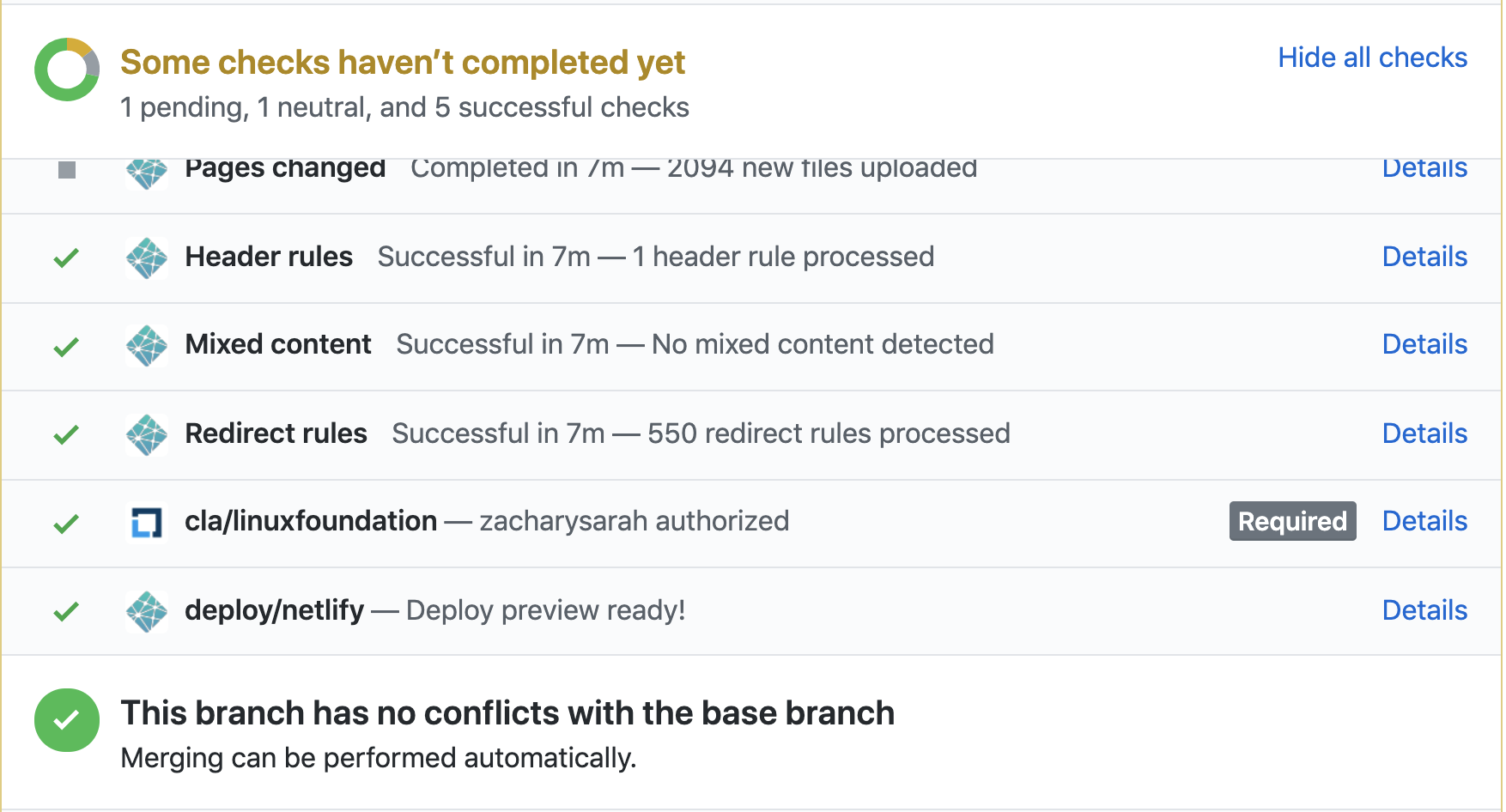
Verify that Netlify tests pass before you /approve a PR.
-
Visit the Netlify page preview for a PR to make sure things look good before approving.
-
Participate in the
PR Wrangler rotation schedule
for weekly rotations. SIG Docs expects all approvers to participate in this
rotation. See PR wranglers.
for more details.
Becoming an approver
When you meet the
requirements,
you can become a SIG Docs approver. Approvers in other SIGs must apply
separately for approver status in SIG Docs.
To apply:
-
Open a pull request adding yourself to a section of the
OWNERS_ALIASES
file in the kubernetes/website repository.
Note:
If you aren't sure where to add yourself, add yourself to `sig-docs-en-owners`.
-
Assign the PR to one or more current SIG Docs approvers.
If approved, a SIG Docs lead adds you to the appropriate GitHub team. Once added,
@k8s-ci-robot
assigns and suggests you as a reviewer on new pull requests.
What's next
- Read about PR wrangling, a role all approvers take on rotation.
2 - Issue Wranglers
Alongside the PR Wrangler, formal approvers,
reviewers and members of SIG Docs take week-long shifts
triaging and categorising issues
for the repository.
Duties
Each day in a week-long shift the Issue Wrangler will be responsible for:
- Triaging and tagging incoming issues daily. See
Triage and categorize issues
for guidelines on how SIG Docs uses metadata.
- Keeping an eye on stale & rotten issues within the kubernetes/website repository.
- Maintenance of the Issues board.
Requirements
- Must be an active member of the Kubernetes organization.
- A minimum of 15 non-trivial
contributions to Kubernetes (of which a certain amount should be directed towards kubernetes/website).
- Performing the role in an informal capacity already.
Helpful Prow commands for wranglers
Below are some commonly used commands for Issue Wranglers:
# reopen an issue
/reopen

# transfer issues that don't fit in k/website to another repository
/transfer[-issue]

# change the state of rotten issues
/remove-lifecycle rotten

# change the state of stale issues
/remove-lifecycle stale

# assign sig to an issue
/sig <sig_name>

# add specific area
/area <area_name>

# for beginner friendly issues
/good-first-issue

# issues that needs help
/help wanted

# tagging issue as support specific
/kind support

# to accept triaging for an issue
/triage accepted

# closing an issue we won't be working on and haven't fixed yet
/close not-planned
To find more Prow commands, refer to the Command Help documentation.
When to close Issues
For an open source project to succeed, good issue management is crucial.
But it is also critical to resolve issues in order to maintain the repository
and communicate clearly with contributors and users.
Close issues when:
- A similar issue is reported more than once. You will first need to tag it as
/triage duplicate;
link it to the main issue & then close it. It is also advisable to direct the users to the original issue.
- It is very difficult to understand and address the issue presented by the author with the information provided.
However, encourage the user to provide more details or reopen the issue if they can reproduce it later.
- The same functionality is implemented elsewhere. One can close this issue and direct user to the appropriate place.
- The reported issue is not currently planned or aligned with the project's goals.
- If the issue appears to be spam and is clearly unrelated.
- If the issue is related to an external limitation or dependency and is beyond the control of the project.
To close an issue, leave a /close comment on the issue.
3 - PR wranglers
SIG Docs approvers
take week-long shifts managing pull requests
for the repository.
This section covers the duties of a PR wrangler. For more information on giving good reviews,
see Reviewing changes.
Duties
Each day in a week-long shift as PR Wrangler:
- Review open pull requests for quality
and adherence to the Style and
Content guides.
- Start with the smallest PRs (
size/XS) first, and end with the largest (size/XXL).
Review as many PRs as you can.
- Make sure PR contributors sign the CLA.
- Use this script to remind contributors
that haven't signed the CLA to do so.
- Provide feedback on changes and ask for technical reviews from members of other SIGs.
- Provide inline suggestions on the PR for the proposed content changes.
- If you need to verify content, comment on the PR and request more details.
- Assign relevant
sig/ label(s).
- If needed, assign reviewers from the
reviewers: block in the file's front matter.
- You can also tag a SIG
for a review by commenting
@kubernetes/<sig>-pr-reviews on the PR.
- Use the
/approve comment to approve a PR for merging. Merge the PR when ready.
- PRs should have a
/lgtm comment from another member before merging.
- Consider accepting technically accurate content that doesn't meet the
style guidelines. As you approve the change,
open a new issue to address the style concern. You can usually write these style fix
issues as good first issues.
- Using style fixups as good first issues is a good way to ensure a supply of easier tasks
to help onboard new contributors.
- Also check for pull requests against the reference docs generator
code, and review those (or bring in help).
- Support the issue wrangler to
triage and tag incoming issues daily.
See Triage and categorize issues
for guidelines on how SIG Docs uses metadata.
Note:
PR wrangler duties do not apply to localization PRs (non-English PRs).
Localization teams have their own processes and teams for reviewing their language PRs.
However, it's often helpful to ensure language PRs are labeled correctly,
review small non-language dependent PRs (like a link update),
or tag reviewers or contributors in long-running PRs
(ones opened more than 6 months ago and have not been updated in a month or more).
Helpful GitHub queries for wranglers
The following queries are helpful when wrangling.
After working through these queries, the remaining list of PRs to review is usually small.
These queries exclude localization PRs. All queries are against the main branch except the last one.
- No CLA, not eligible to merge:
Remind the contributor to sign the CLA. If both the bot and a human have reminded them, close
the PR and remind them that they can open it after signing the CLA.
Do not review PRs whose authors have not signed the CLA!
- Needs LGTM:
Lists PRs that need an LGTM from a member. If the PR needs technical review,
loop in one of the reviewers suggested by the bot. If the content needs work,
add suggestions and feedback in-line.
- Has LGTM, needs docs approval:
Lists PRs that need an
/approve comment to merge.
- Quick Wins:
Lists PRs against the main branch with no clear blockers.
(change "XS" in the size label as you work through the PRs [XS, S, M, L, XL, XXL]).
- Not against the primary branch:
If the PR is against a
dev- branch, it's for an upcoming release. Assign the
docs release manager
using: /assign @<manager's_github-username>. If the PR is against an old branch,
help the author figure out whether it's targeted against the best branch.
Helpful Prow commands for wranglers
# add English label
/language en

# add squash label to PR if more than one commit
/label tide/merge-method-squash

# retitle a PR via Prow (such as a work-in-progress [WIP] or better detail of PR)
/retitle [WIP] <TITLE>
When to close Pull Requests
Reviews and approvals are one tool to keep our PR queue short and current. Another tool is closure.
Close PRs where:
-
The author hasn't signed the CLA for two weeks.
Authors can reopen the PR after signing the CLA. This is a low-risk way to make
sure nothing gets merged without a signed CLA.
-
The author has not responded to comments or feedback in 2 or more weeks.
Don't be afraid to close pull requests. Contributors can easily reopen and resume works in progress.
Often a closure notice is what spurs an author to resume and finish their contribution.
To close a pull request, leave a /close comment on the PR.
Note:
The
k8s-triage-robot bot marks issues
as stale after 90 days of inactivity. After 30 more days it marks issues as rotten
and closes them. PR wranglers should close issues after 14-30 days of inactivity.
PR Wrangler shadow program
In late 2021, SIG Docs introduced the PR Wrangler Shadow Program.
The program was introduced to help new contributors understand the PR wrangling process.
Become a shadow
-
If you are interested in shadowing as a PR wrangler, please visit the
PR Wranglers Wiki page
to see the PR wrangling schedule for this year and sign up.
-
Others can reach out on the #sig-docs Slack channel
for requesting to shadow an assigned PR Wrangler for a specific week. Feel free to reach out to one of
the SIG Docs co-chairs/leads.
-
Once you've signed up to shadow a PR Wrangler, introduce yourself to the PR Wrangler on the
Kubernetes Slack.