Concepts for keeping your cloud-native workload secure.
This section of the Kubernetes documentation aims to help you learn to run workloads more securely, and about the essential aspects of keeping a Kubernetes cluster secure.
Kubernetes is based on a cloud-native architecture, and draws on advice from the CNCF about good practice for cloud native information security.
Read Cloud Native Security and Kubernetes for the broader context about how to secure your cluster and the applications that you're running on it.
Kubernetes includes several APIs and security controls, as well as ways to define policies that can form part of how you manage information security.
A key security mechanism for any Kubernetes cluster is to control access to the Kubernetes API.
Kubernetes expects you to configure and use TLS to provide data encryption in transit within the control plane, and between the control plane and its clients. You can also enable encryption at rest for the data stored within Kubernetes control plane; this is separate from using encryption at rest for your own workloads' data, which might also be a good idea.
The Secret API provides basic protection for configuration values that require confidentiality.
Enforce Pod security standards to ensure that Pods and their containers are isolated appropriately. You can also use RuntimeClasses to define custom isolation if you need it.
Network policies let you control network traffic between Pods, or between Pods and the network outside your cluster.
You can deploy security controls from the wider ecosystem to implement preventative or detective controls around Pods, their containers, and the images that run in them.
Admission controllers are plugins that intercept Kubernetes API requests and can validate or mutate the requests based on specific fields in the request. Thoughtfully designing these controllers helps to avoid unintended disruptions as Kubernetes APIs change across version updates. For design considerations, see Admission Webhook Good Practices.
Kubernetes audit logging provides a security-relevant, chronological set of records documenting the sequence of actions in a cluster. The cluster audits the activities generated by users, by applications that use the Kubernetes API, and by the control plane itself.
If you are running a Kubernetes cluster on your own hardware or a different cloud provider, consult your documentation for security best practices. Here are links to some of the popular cloud providers' security documentation:
| IaaS Provider | Link |
|---|---|
| Alibaba Cloud | https://www.alibabacloud.com/trust-center |
| Amazon Web Services | https://aws.amazon.com/security |
| Google Cloud Platform | https://cloud.google.com/security |
| Huawei Cloud | https://www.huaweicloud.com/intl/en-us/securecenter/overallsafety |
| IBM Cloud | https://www.ibm.com/cloud/security |
| Microsoft Azure | https://docs.microsoft.com/en-us/azure/security/azure-security |
| Oracle Cloud Infrastructure | https://www.oracle.com/security |
| Tencent Cloud | https://www.tencentcloud.com/solutions/data-security-and-information-protection |
| VMware vSphere | https://www.vmware.com/solutions/security/hardening-guides |
You can define security policies using Kubernetes-native mechanisms, such as NetworkPolicy (declarative control over network packet filtering) or ValidatingAdmissionPolicy (declarative restrictions on what changes someone can make using the Kubernetes API).
However, you can also rely on policy implementations from the wider ecosystem around Kubernetes. Kubernetes provides extension mechanisms to let those ecosystem projects implement their own policy controls on source code review, container image approval, API access controls, networking, and more.
For more information about policy mechanisms and Kubernetes, read Policies.
Learn about related Kubernetes security topics:
Learn the context:
Get certified:
Read more in this section:
Kubernetes is based on a cloud native architecture and draws on advice from the CNCF about good practices for cloud native information security.
Read on for an overview of how Kubernetes is designed to help you deploy a secure cloud native platform.
The CNCF white paper on cloud native security defines security controls and practices that are appropriate to different lifecycle phases.
To achieve this, you can:
To achieve this, you can:
Ensure appropriate restrictions on what can be deployed, who can deploy it, and where it can be deployed. You can enforce measures from the distribute phase, such as verifying the cryptographic identity of container image artifacts.
You can deploy different applications and cluster components into different namespaces. Containers and namespaces both provide isolation mechanisms that are relevant to information security.
When you deploy Kubernetes, you also set the foundation for your applications' runtime environment: a Kubernetes cluster (or multiple clusters). That infrastructure must provide the security guarantees that higher layers expect.
The Runtime phase comprises three critical areas: access, compute, and storage.
The Kubernetes API is what makes your cluster work. Protecting this API is key to providing effective cluster security.
Other pages in the Kubernetes documentation have more detail about how to set up specific aspects of access control. The security checklist provides suggested basic checks for your cluster.
Beyond that, securing your cluster means implementing effective authentication and authorization for API access. Use ServiceAccounts to provide and manage security identities for workloads and cluster components.
Kubernetes uses TLS to protect API traffic; make sure to deploy the cluster using TLS (including for traffic between nodes and the control plane) and protect the encryption keys. If you use Kubernetes' own API for CertificateSigningRequests, pay special attention to restricting misuse there.
Containers provide two things: isolation between applications and a mechanism to combine those isolated applications to run on the same host computer. Those two aspects—isolation and aggregation—mean that runtime security involves identifying trade-offs and finding an appropriate balance.
Kubernetes relies on a container runtime to set up and run containers. The Kubernetes project does not recommend a specific container runtime, and you should make sure that the runtime(s) you choose meet your information security needs.
To protect your compute at runtime, you can:
Enforce Pod Security Standards for applications to help ensure they run with only the necessary privileges.
Run a specialized operating system on your nodes that is designed specifically for running containerized workloads. This is typically based on a read-only operating system (immutable image) that provides only the services essential for running containers.
Container-specific operating systems help isolate system components and present a reduced attack surface in case of a container escape.
Define ResourceQuotas to fairly allocate shared resources, and use mechanisms such as LimitRanges to ensure that Pods specify their resource requirements.
Partition workloads across different nodes to improve isolation. Use node isolation mechanisms, either from Kubernetes itself or from the ecosystem, to ensure that Pods with different trust contexts run on separate sets of nodes.
Use a container runtime that provides security restrictions.
On Linux nodes, use a Linux security module such as AppArmor or seccomp.
To protect storage for your cluster and the applications that run there, you can:
For encryption keys, generating these within specialized hardware provides the best protection against disclosure risks. A hardware security module can let you perform cryptographic operations without allowing the security key to be copied elsewhere.
You should also consider network security measures, such as NetworkPolicy or a service mesh. Some network plugins for Kubernetes provide encryption for your cluster network using technologies such as a virtual private network (VPN) overlay. By design, Kubernetes lets you use your own networking plugin for your cluster. If you use managed Kubernetes, the provider may have already selected a network plugin for you.
The network plugin you choose and the way you integrate it can have a strong impact on the security of information in transit.
Kubernetes lets you extend your cluster with extra tooling. You can set up third party solutions to help you monitor or troubleshoot your applications and the clusters they are running. You also get some basic observability features built in to Kubernetes itself. Your code running in containers can generate logs, publish metrics, or provide other observability data; at deploy time, you need to make sure your cluster provides an appropriate level of protection there.
If you set up a metrics dashboard or something similar, review the chain of components that populate data into that dashboard, as well as the dashboard itself. Make sure that the whole chain is designed with enough resilience and integrity protection that you can rely on it even during an incident where your cluster might be degraded.
Where appropriate, deploy security measures below the Kubernetes layer, such as cryptographically measured boot or authenticated distribution of time (which helps ensure the fidelity of logs and audit records).
For a high-assurance environment, deploy cryptographic protections to ensure that logs are both tamper-proof and confidential.
The Pod Security Standards define three different policies to broadly cover the security spectrum. These policies are cumulative and range from highly-permissive to highly-restrictive. This guide outlines the requirements of each policy.
| Profile | Description |
|---|---|
| Privileged | Unrestricted policy, providing the widest possible level of permissions. This policy allows for known privilege escalations. |
| Baseline | Minimally restrictive policy which prevents known privilege escalations. Allows the default (minimally specified) Pod configuration. |
| Restricted | Heavily restricted policy, following current Pod hardening best practices. |
The Privileged policy is purposely-open, and entirely unrestricted. This type of policy is typically aimed at system- and infrastructure-level workloads managed by privileged, trusted users.
The Privileged policy is defined by an absence of restrictions. If you define a Pod where the Privileged security policy applies, the Pod you define is able to bypass typical container isolation mechanisms. For example, you can define a Pod that has access to the node's host network.
The Baseline policy is aimed at ease of adoption for common containerized workloads while preventing known privilege escalations. This policy is targeted at application operators and developers of non-critical applications. The following listed controls should be enforced/disallowed:
*) indicate all elements in a list. For example,
spec.containers[*].securityContext refers to the Security Context object for all defined
containers. If any of the listed containers fails to meet the requirements, the entire pod will
fail validation.| Control | Policy |
|---|---|
| HostProcess |
Windows Pods offer the ability to run HostProcess containers which enables privileged access to the Windows host machine. Privileged access to the host is disallowed in the Baseline policy.
FEATURE STATE:
Kubernetes v1.26 [stable]
Restricted Fields
Allowed Values
|
| Host Namespaces |
Sharing the host namespaces must be disallowed. Restricted Fields
Allowed Values
|
| Privileged Containers |
Privileged Pods disable most security mechanisms and must be disallowed. Restricted Fields
Allowed Values
|
| Capabilities |
Adding additional capabilities beyond those listed below must be disallowed. Restricted Fields
Allowed Values
|
| HostPath Volumes |
HostPath volumes must be forbidden. Restricted Fields
Allowed Values
|
| Host Ports |
HostPorts should be disallowed entirely (recommended) or restricted to a known list Restricted Fields
Allowed Values
|
| Host Probes / Lifecycle Hooks (v1.34+) |
The Host field in probes and lifecycle hooks must be disallowed. Restricted Fields
Allowed Values
|
| AppArmor |
On supported hosts, the Restricted Fields
Allowed Values
Allowed Values
|
| SELinux |
Setting the SELinux type is restricted, and setting a custom SELinux user or role option is forbidden. Restricted Fields
Allowed Values
Restricted Fields
Allowed Values
|
/proc Mount Type |
The default Restricted Fields
Allowed Values
|
| Seccomp |
Seccomp profile must not be explicitly set to Restricted Fields
Allowed Values
|
| Sysctls |
Sysctls can disable security mechanisms or affect all containers on a host, and should be disallowed except for an allowed "safe" subset. A sysctl is considered safe if it is namespaced in the container or the Pod, and it is isolated from other Pods or processes on the same Node. Restricted Fields
Allowed Values
|
The Restricted policy is aimed at enforcing current Pod hardening best practices, at the expense of some compatibility. It is targeted at operators and developers of security-critical applications, as well as lower-trust users. The following listed controls should be enforced/disallowed:
*) indicate all elements in a list. For example,
spec.containers[*].securityContext refers to the Security Context object for all defined
containers. If any of the listed containers fails to meet the requirements, the entire pod will
fail validation.| Control | Policy |
| Everything from the Baseline policy | |
| Volume Types |
The Restricted policy only permits the following volume types. Restricted Fields
Allowed Values Every item in thespec.volumes[*] list must set one of the following fields to a non-null value:
|
| Privilege Escalation (v1.8+) |
Privilege escalation (such as via set-user-ID or set-group-ID file mode) should not be allowed. This is Linux only policy in v1.25+ Restricted Fields
Allowed Values
|
| Running as Non-root |
Containers must be required to run as non-root users. Restricted Fields
Allowed Values
nil if the pod-level
spec.securityContext.runAsNonRoot is set to true.
|
| Running as Non-root user (v1.23+) |
Containers must not set runAsUser to 0 Restricted Fields
Allowed Values
|
| Seccomp (v1.19+) |
Seccomp profile must be explicitly set to one of the allowed values. Both the Restricted Fields
Allowed Values
nil if the pod-level
spec.securityContext.seccompProfile.type field is set appropriately.
Conversely, the pod-level field may be undefined/nil if _all_ container-
level fields are set.
|
| Capabilities (v1.22+) |
Containers must drop Restricted Fields
Allowed Values
Restricted Fields
Allowed Values
|
Decoupling policy definition from policy instantiation allows for a common understanding and consistent language of policies across clusters, independent of the underlying enforcement mechanism.
As mechanisms mature, they will be defined below on a per-policy basis. The methods of enforcement of individual policies are not defined here.
Pod Security Admission Controller
Other alternatives for enforcing policies are being developed in the Kubernetes ecosystem, such as:
Kubernetes lets you use nodes that run either Linux or Windows. You can mix both kinds of
node in one cluster.
Windows in Kubernetes has some limitations and differentiators from Linux-based
workloads. Specifically, many of the Pod securityContext fields
have no effect on Windows.
Another important change, made in Kubernetes v1.25 is that the Restricted policy
has been updated to use the pod.spec.os.name field. Based on the OS name, certain policies that are specific
to a particular OS can be relaxed for the other OS.
Restrictions on the following controls are only required if .spec.os.name is not windows:
User Namespaces are a Linux-only feature to run workloads with increased isolation. How they work together with Pod Security Standards is described in the documentation for Pods that use user namespaces.
The three profiles defined here have a clear linear progression from most secure (Restricted) to least secure (Privileged), and cover a broad set of workloads. Privileges required above the Baseline policy are typically very application specific, so we do not offer a standard profile in this niche. This is not to say that the privileged profile should always be used in this case, but that policies in this space need to be defined on a case-by-case basis.
SIG Auth may reconsider this position in the future, should a clear need for other profiles arise.
Security Contexts configure Pods and Containers at runtime. Security contexts are defined as part of the Pod and container specifications in the Pod manifest, and represent parameters to the container runtime.
Security profiles are control plane mechanisms to enforce specific settings in the Security Context, as well as other related parameters outside the Security Context. As of July 2021, Pod Security Policies are deprecated in favor of the built-in Pod Security Admission Controller.
There is currently no API standard that controls whether a Pod is considered sandboxed or not. Sandbox Pods may be identified by the use of a sandboxed runtime (such as gVisor or Kata Containers), but there is no standard definition of what a sandboxed runtime is.
The protections necessary for sandboxed workloads can differ from others. For example, the need to restrict privileged permissions is lessened when the workload is isolated from the underlying kernel. This allows for workloads requiring heightened permissions to still be isolated.
Additionally, the protection of sandboxed workloads is highly dependent on the method of sandboxing. As such, no single recommended profile is recommended for all sandboxed workloads.
Kubernetes v1.25 [stable]
The Kubernetes Pod Security Standards define different isolation levels for Pods. These standards let you define how you want to restrict the behavior of pods in a clear, consistent fashion.
Kubernetes offers a built-in Pod Security admission controller to enforce the Pod Security Standards. Pod security restrictions are applied at the namespace level when pods are created.
This page is part of the documentation for Kubernetes v1.35. If you are running a different version of Kubernetes, consult the documentation for that release.
Pod Security admission places requirements on a Pod's Security
Context and other related fields according
to the three levels defined by the Pod Security
Standards: privileged, baseline, and
restricted. Refer to the Pod Security Standards
page for an in-depth look at those requirements.
Once the feature is enabled or the webhook is installed, you can configure namespaces to define the admission control mode you want to use for pod security in each namespace. Kubernetes defines a set of labels that you can set to define which of the predefined Pod Security Standard levels you want to use for a namespace. The label you select defines what action the control plane takes if a potential violation is detected:
| Mode | Description |
|---|---|
| enforce | Policy violations will cause the pod to be rejected. |
| audit | Policy violations will trigger the addition of an audit annotation to the event recorded in the audit log, but are otherwise allowed. |
| warn | Policy violations will trigger a user-facing warning, but are otherwise allowed. |
A namespace can configure any or all modes, or even set a different level for different modes.
For each mode, there are two labels that determine the policy used:
# The per-mode level label indicates which policy level to apply for the mode.
#
# MODE must be one of `enforce`, `audit`, or `warn`.
# LEVEL must be one of `privileged`, `baseline`, or `restricted`.
pod-security.kubernetes.io/<MODE>: <LEVEL>

# Optional: per-mode version label that can be used to pin the policy to the
# version that shipped with a given Kubernetes minor version (for example v1.35).
#
# MODE must be one of `enforce`, `audit`, or `warn`.
# VERSION must be a valid Kubernetes minor version, or `latest`.
pod-security.kubernetes.io/<MODE>-version: <VERSION>
Check out Enforce Pod Security Standards with Namespace Labels to see example usage.
Pods are often created indirectly, by creating a workload object such as a Deployment or Job. The workload object defines a Pod template and a controller for the workload resource creates Pods based on that template. To help catch violations early, both the audit and warning modes are applied to the workload resources. However, enforce mode is not applied to workload resources, only to the resulting pod objects.
You can define exemptions from pod security enforcement in order to allow the creation of pods that would have otherwise been prohibited due to the policy associated with a given namespace. Exemptions can be statically configured in the Admission Controller configuration.
Exemptions must be explicitly enumerated. Requests meeting exemption criteria are ignored by the
Admission Controller (all enforce, audit and warn behaviors are skipped). Exemption dimensions include:
system:serviceaccount:kube-system:replicaset-controller)
should generally not be exempted, as doing so would implicitly exempt any user that can create the
corresponding workload resource.Updates to the following pod fields are exempt from policy checks, meaning that if a pod update request only changes these fields, it will not be denied even if the pod is in violation of the current policy level:
seccomp.security.alpha.kubernetes.io/pod (deprecated)container.seccomp.security.alpha.kubernetes.io/* (deprecated)container.apparmor.security.beta.kubernetes.io/* (deprecated).spec.activeDeadlineSeconds.spec.tolerationsHere are the Prometheus metrics exposed by kube-apiserver:
pod_security_errors_total: This metric indicates the number of errors preventing normal evaluation.
Non-fatal errors may result in the latest restricted profile being used for enforcement.pod_security_evaluations_total: This metric indicates the number of policy evaluations that have occurred,
not counting ignored or exempt requests during exporting.pod_security_exemptions_total: This metric indicates the number of exempt requests, not counting ignored
or out of scope requests.If you are running an older version of Kubernetes and want to upgrade to a version of Kubernetes that does not include PodSecurityPolicies, read migrate from PodSecurityPolicy to the Built-In PodSecurity Admission Controller.
This page introduces the ServiceAccount object in Kubernetes, providing information about how service accounts work, use cases, limitations, alternatives, and links to resources for additional guidance.
A service account is a type of non-human account that, in Kubernetes, provides a distinct identity in a Kubernetes cluster. Application Pods, system components, and entities inside and outside the cluster can use a specific ServiceAccount's credentials to identify as that ServiceAccount. This identity is useful in various situations, including authenticating to the API server or implementing identity-based security policies.
Service accounts exist as ServiceAccount objects in the API server. Service accounts have the following properties:
Namespaced: Each service account is bound to a Kubernetes
namespace. Every namespace
gets a default ServiceAccount upon creation.
Lightweight: Service accounts exist in the cluster and are defined in the Kubernetes API. You can quickly create service accounts to enable specific tasks.
Portable: A configuration bundle for a complex containerized workload might include service account definitions for the system's components. The lightweight nature of service accounts and the namespaced identities make the configurations portable.
Service accounts are different from user accounts, which are authenticated human users in the cluster. By default, user accounts don't exist in the Kubernetes API server; instead, the API server treats user identities as opaque data. You can authenticate as a user account using multiple methods. Some Kubernetes distributions might add custom extension APIs to represent user accounts in the API server.
| Description | ServiceAccount | User or group |
|---|---|---|
| Location | Kubernetes API (ServiceAccount object) | External |
| Access control | Kubernetes RBAC or other authorization mechanisms | Kubernetes RBAC or other identity and access management mechanisms |
| Intended use | Workloads, automation | People |
When you create a cluster, Kubernetes automatically creates a ServiceAccount
object named default for every namespace in your cluster. The default
service accounts in each namespace get no permissions by default other than the
default API discovery permissions
that Kubernetes grants to all authenticated principals if role-based access control (RBAC) is enabled.
If you delete the default ServiceAccount object in a namespace, the
control plane
replaces it with a new one.
If you deploy a Pod in a namespace, and you don't
manually assign a ServiceAccount to the Pod, Kubernetes
assigns the default ServiceAccount for that namespace to the Pod.
As a general guideline, you can use service accounts to provide identities in the following scenarios:
example to read, list, and watch for Lease objects in
the kube-node-lease namespace.imagePullSecret.To use a Kubernetes service account, you do the following:
Create a ServiceAccount object using a Kubernetes
client like kubectl or a manifest that defines the object.
Grant permissions to the ServiceAccount object using an authorization mechanism such as RBAC.
Assign the ServiceAccount object to Pods during Pod creation.
If you're using the identity from an external service, retrieve the ServiceAccount token and use it from that service instead.
For instructions, refer to Configure Service Accounts for Pods.
You can use the built-in Kubernetes role-based access control (RBAC) mechanism to grant the minimum permissions required by each service account. You create a role, which grants access, and then bind the role to your ServiceAccount. RBAC lets you define a minimum set of permissions so that the service account permissions follow the principle of least privilege. Pods that use that service account don't get more permissions than are required to function correctly.
For instructions, refer to ServiceAccount permissions.
You can use RBAC to allow service accounts in one namespace to perform actions
on resources in a different namespace in the cluster. For example, consider a
scenario where you have a service account and Pod in the dev namespace and
you want your Pod to see Jobs running in the maintenance namespace. You could
create a Role object that grants permissions to list Job objects. Then,
you'd create a RoleBinding object in the maintenance namespace to bind the
Role to the ServiceAccount object. Now, Pods in the dev namespace can list
Job objects in the maintenance namespace using that service account.
To assign a ServiceAccount to a Pod, you set the spec.serviceAccountName
field in the Pod specification. Kubernetes then automatically provides the
credentials for that ServiceAccount to the Pod. In v1.22 and later, Kubernetes
gets a short-lived, automatically rotating token using the TokenRequest
API and mounts the token as a
projected volume.
By default, Kubernetes provides the Pod
with the credentials for an assigned ServiceAccount, whether that is the
default ServiceAccount or a custom ServiceAccount that you specify.
To prevent Kubernetes from automatically injecting
credentials for a specified ServiceAccount or the default ServiceAccount, set the
automountServiceAccountToken field in your Pod specification to false.
In versions earlier than 1.22, Kubernetes provides a long-lived, static token to the Pod as a Secret.
If you need the credentials for a ServiceAccount to mount in a non-standard location, or for an audience that isn't the API server, use one of the following methods:
For applications running outside your Kubernetes cluster, you might be considering
creating a long-lived ServiceAccount token that is stored in a Secret. This allows authentication, but the Kubernetes project recommends you avoid this approach.
Long-lived bearer tokens represent a security risk as, once disclosed, the token
can be misused. Instead, consider using an alternative. For example, your external
application can authenticate using a well-protected private key and a certificate,
or using a custom mechanism such as an authentication webhook that you implement yourself.
You can also use TokenRequest to obtain short-lived tokens for your external application.
Kubernetes v1.32 [deprecated]
kubernetes.io/enforce-mountable-secrets is deprecated since Kubernetes v1.32. Use separate namespaces to isolate access to mounted secrets.Kubernetes provides an annotation called kubernetes.io/enforce-mountable-secrets
that you can add to your ServiceAccounts. When this annotation is applied,
the ServiceAccount's secrets can only be mounted on specified types of resources,
enhancing the security posture of your cluster.
You can add the annotation to a ServiceAccount using a manifest:
apiVersion: v1
kind: ServiceAccount
metadata:
  annotations:
    kubernetes.io/enforce-mountable-secrets: "true"
  name: my-serviceaccount
  namespace: my-namespace
When this annotation is set to "true", the Kubernetes control plane ensures that the Secrets from this ServiceAccount are subject to certain mounting restrictions.
secrets field of the
Pod's ServiceAccount.envFrom in a Pod must also appear in the secrets
field of the Pod's ServiceAccount.imagePullSecrets in a Pod must also appear in the secrets
field of the Pod's ServiceAccount.By understanding and enforcing these restrictions, cluster administrators can maintain a tighter security profile and ensure that secrets are accessed only by the appropriate resources.
ServiceAccounts use signed
JSON Web Tokens (JWTs)
to authenticate to the Kubernetes API server, and to any other system where a
trust relationship exists. Depending on how the token was issued
(either time-limited using a TokenRequest or using a legacy mechanism with
a Secret), a ServiceAccount token might also have an expiry time, an audience,
and a time after which the token starts being valid. When a client that is
acting as a ServiceAccount tries to communicate with the Kubernetes API server,
the client includes an Authorization: Bearer <token> header with the HTTP
request. The API server checks the validity of that bearer token as follows:
The TokenRequest API produces bound tokens for a ServiceAccount. This binding is linked to the lifetime of the client, such as a Pod, that is acting as that ServiceAccount. See Token Volume Projection for an example of a bound pod service account token's JWT schema and payload.
For tokens issued using the TokenRequest API, the API server also checks that
the specific object reference that is using the ServiceAccount still exists,
matching by the unique ID of that
object. For legacy tokens that are mounted as Secrets in Pods, the API server
checks the token against the Secret.
For more information about the authentication process, refer to Authentication.
If you have services of your own that need to validate Kubernetes service account credentials, you can use the following methods:
The Kubernetes project recommends that you use the TokenReview API, because this method invalidates tokens that are bound to API objects such as Secrets, ServiceAccounts, Pods or Nodes when those objects are deleted. For example, if you delete the Pod that contains a projected ServiceAccount token, the cluster invalidates that token immediately and a TokenReview immediately fails. If you use OIDC validation instead, your clients continue to treat the token as valid until the token reaches its expiration timestamp.
Your application should always define the audience that it accepts, and should check that the token's audiences match the audiences that the application expects. This helps to minimize the scope of the token so that it can only be used in your application and nowhere else.
Use the SPIFFE CSI driver plugin to provide SPIFFE SVIDs as X.509 certificate pairs to Pods.
Use a service mesh such as Istio to provide certificates to Pods.
Instead of using PodSecurityPolicy, you can enforce similar restrictions on Pods using either or both:
For a migration guide, see Migrate from PodSecurityPolicy to the Built-In PodSecurity Admission Controller. For more information on the removal of this API, see PodSecurityPolicy Deprecation: Past, Present, and Future.
If you are not running Kubernetes v1.35, check the documentation for your version of Kubernetes.
This page describes security considerations and best practices specific to the Linux operating system.
On Linux nodes, memory-backed volumes (such as secret
volume mounts, or emptyDir with medium: Memory)
are implemented with a tmpfs filesystem.
If you have swap configured and use an older Linux kernel (or a current kernel and an unsupported configuration of Kubernetes), memory backed volumes can have data written to persistent storage.
The Linux kernel officially supports the noswap option from version 6.3,
therefore it is recommended the used kernel version is 6.3 or later,
or supports the noswap option via a backport, if swap is enabled on the node.
Read swap memory management for more info.
This page describes security considerations and best practices specific to the Windows operating system.
On Windows, data from Secrets are written out in clear text onto the node's local storage (as compared to using tmpfs / in-memory filesystems on Linux). As a cluster operator, you should take both of the following additional measures:
RunAsUsername can be specified for Windows Pods or containers to execute the container processes as specific user. This is roughly equivalent to RunAsUser.
Windows containers offer two default user accounts, ContainerUser and ContainerAdministrator. The differences between these two user accounts are covered in When to use ContainerAdmin and ContainerUser user accounts within Microsoft's Secure Windows containers documentation.
Local users can be added to container images during the container build process.
ContainerUser by defaultContainerAdministrator by defaultWindows containers can also run as Active Directory identities by utilizing Group Managed Service Accounts
Linux-specific pod security context mechanisms (such as SELinux, AppArmor, Seccomp, or custom POSIX capabilities) are not supported on Windows nodes.
Privileged containers are not supported on Windows. Instead HostProcess containers can be used on Windows to perform many of the tasks performed by privileged containers on Linux.
This page provides an overview of controlling access to the Kubernetes API.
Users access the Kubernetes API using kubectl,
client libraries, or by making REST requests. Both human users and
Kubernetes service accounts can be
authorized for API access.
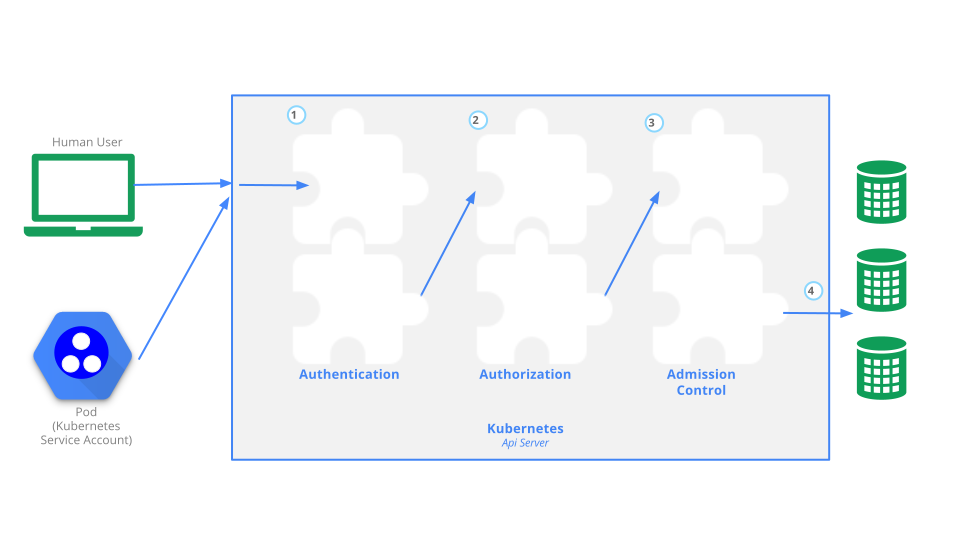
When a request reaches the API, it goes through several stages, illustrated in the
following diagram:
By default, the Kubernetes API server listens on port 6443 on the first non-localhost
network interface, protected by TLS. In a typical production Kubernetes cluster, the
API serves on port 443. The port can be changed with the --secure-port, and the
listening IP address with the --bind-address flag.
The API server presents a certificate. This certificate may be signed using
a private certificate authority (CA), or based on a public key infrastructure linked
to a generally recognized CA. The certificate and corresponding private key can be set
by using the --tls-cert-file and --tls-private-key-file flags.
If your cluster uses a private certificate authority, you need a copy of that CA
certificate configured into your ~/.kube/config on the client, so that you can
trust the connection and be confident it was not intercepted.
Your client can present a TLS client certificate at this stage.
Once TLS is established, the HTTP request moves to the Authentication step. This is shown as step 1 in the diagram. The cluster creation script or cluster admin configures the API server to run one or more Authenticator modules. Authenticators are described in more detail in Authentication.
The input to the authentication step is the entire HTTP request; however, it typically examines the headers and/or client certificate.
Authentication modules include client certificates, password, and plain tokens, bootstrap tokens, and JSON Web Tokens (used for service accounts).
Multiple authentication modules can be specified, in which case each one is tried in sequence, until one of them succeeds.
If the request cannot be authenticated, it is rejected with HTTP status code 401.
Otherwise, the user is authenticated as a specific username, and the user name
is available to subsequent steps to use in their decisions. Some authenticators
also provide the group memberships of the user, while other authenticators
do not.
While Kubernetes uses usernames for access control decisions and in request logging,
it does not have a User object nor does it store usernames or other information about
users in its API.
After the request is authenticated as coming from a specific user, the request must be authorized. This is shown as step 2 in the diagram.
A request must include the username of the requester, the requested action, and the object affected by the action. The request is authorized if an existing policy declares that the user has permissions to complete the requested action.
For example, if Bob has the policy below, then he can read pods only in the namespace projectCaribou:
{
    "apiVersion": "abac.authorization.kubernetes.io/v1beta1",
    "kind": "Policy",
    "spec": {
        "user": "bob",
        "namespace": "projectCaribou",
        "resource": "pods",
        "readonly": true
    }
}
If Bob makes the following request, the request is authorized because he is
allowed to read objects in the projectCaribou namespace:
{
  "apiVersion": "authorization.k8s.io/v1beta1",
  "kind": "SubjectAccessReview",
  "spec": {
    "resourceAttributes": {
      "namespace": "projectCaribou",
      "verb": "get",
      "group": "unicorn.example.org",
      "resource": "pods"
    }
  }
}
If Bob makes a request to write (create or update) to the objects in the
projectCaribou namespace, his authorization is denied. If Bob makes a request
to read (get) objects in a different namespace such as projectFish, then his authorization is denied.
Kubernetes authorization requires that you use common REST attributes to interact with existing organization-wide or cloud-provider-wide access control systems. It is important to use REST formatting because these control systems might interact with other APIs besides the Kubernetes API.
Kubernetes supports multiple authorization modules, such as ABAC mode, RBAC Mode, and Webhook mode. When an administrator creates a cluster, they configure the authorization modules that should be used in the API server. If more than one authorization modules are configured, Kubernetes checks each module, and if any module authorizes the request, then the request can proceed. If all of the modules deny the request, then the request is denied (HTTP status code 403).
To learn more about Kubernetes authorization, including details about creating policies using the supported authorization modules, see Authorization.
Admission Control modules are software modules that can modify or reject requests. In addition to the attributes available to Authorization modules, Admission Control modules can access the contents of the object that is being created or modified.
Admission controllers act on requests that create, modify, delete, or connect to (proxy) an object. Admission controllers do not act on requests that merely read objects. When multiple admission controllers are configured, they are called in order.
This is shown as step 3 in the diagram.
Unlike Authentication and Authorization modules, if any admission controller module rejects, then the request is immediately rejected.
In addition to rejecting objects, admission controllers can also set complex defaults for fields.
The available Admission Control modules are described in Admission Controllers.
Once a request passes all admission controllers, it is validated using the validation routines for the corresponding API object, and then written to the object store (shown as step 4).
Kubernetes auditing provides a security-relevant, chronological set of records documenting the sequence of actions in a cluster. The cluster audits the activities generated by users, by applications that use the Kubernetes API, and by the control plane itself.
For more information, see Auditing.
Read more documentation on authentication, authorization and API access control:
You can learn about:
Kubernetes RBAC is a key security control to ensure that cluster users and workloads have only the access to resources required to execute their roles. It is important to ensure that, when designing permissions for cluster users, the cluster administrator understands the areas where privilege escalation could occur, to reduce the risk of excessive access leading to security incidents.
The good practices laid out here should be read in conjunction with the general RBAC documentation.
Ideally, minimal RBAC rights should be assigned to users and service accounts. Only permissions explicitly required for their operation should be used. While each cluster will be different, some general rules that can be applied are :
cluster-admin accounts except where specifically needed.
Providing a low privileged account with
impersonation rights
can avoid accidental modification of cluster resources.system:masters group. Any user who is a member of this group
bypasses all RBAC rights checks and will always have unrestricted superuser access, which cannot be
revoked by removing RoleBindings or ClusterRoleBindings. As an aside, if a cluster is
using an authorization webhook, membership of this group also bypasses that webhook (requests
from users who are members of that group are never sent to the webhook)Ideally, pods shouldn't be assigned service accounts that have been granted powerful permissions (for example, any of the rights listed under privilege escalation risks). In cases where a workload requires powerful permissions, consider the following practices:
Kubernetes defaults to providing access which may not be required in every cluster. Reviewing
the RBAC rights provided by default can provide opportunities for security hardening.
In general, changes should not be made to rights provided to system: accounts some options
to harden cluster rights exist:
system:unauthenticated group and remove them where possible, as this gives
access to anyone who can contact the API server at a network level.automountServiceAccountToken: false. For more details, see
using default service account token.
Setting this value for a Pod will overwrite the service account setting, workloads
which require service account tokens can still mount them.It is vital to periodically review the Kubernetes RBAC settings for redundant entries and possible privilege escalations. If an attacker is able to create a user account with the same name as a deleted user, they can automatically inherit all the rights of the deleted user, especially the rights assigned to that user.
Within Kubernetes RBAC there are a number of privileges which, if granted, can allow a user or a service account to escalate their privileges in the cluster or affect systems outside the cluster.
This section is intended to provide visibility of the areas where cluster operators should take care, to ensure that they do not inadvertently allow for more access to clusters than intended.
It is generally clear that allowing get access on Secrets will allow a user to read their contents.
It is also important to note that list and watch access also effectively allow for users to reveal the Secret contents.
For example, when a List response is returned (for example, via kubectl get secrets -A -o yaml), the response
includes the contents of all Secrets.
Permission to create workloads (either Pods, or workload resources that manage Pods) in a namespace implicitly grants access to many other resources in that namespace, such as Secrets, ConfigMaps, and PersistentVolumes that can be mounted in Pods. Additionally, since Pods can run as any ServiceAccount, granting permission to create workloads also implicitly grants the API access levels of any service account in that namespace.
Users who can run privileged Pods can use that access to gain node access and potentially to further elevate their privileges. Where you do not fully trust a user or other principal with the ability to create suitably secure and isolated Pods, you should enforce either the Baseline or Restricted Pod Security Standard. You can use Pod Security admission or other (third party) mechanisms to implement that enforcement.
For these reasons, namespaces should be used to separate resources requiring different levels of trust or tenancy. It is still considered best practice to follow least privilege principles and assign the minimum set of permissions, but boundaries within a namespace should be considered weak.
If someone - or some application - is allowed to create arbitrary PersistentVolumes, that access
includes the creation of hostPath volumes, which then means that a Pod would get access
to the underlying host filesystem(s) on the associated node. Granting that ability is a security risk.
There are many ways a container with unrestricted access to the host filesystem can escalate privileges, including reading data from other containers, and abusing the credentials of system services, such as Kubelet.
You should only allow access to create PersistentVolume objects for:
Where access to persistent storage is required trusted administrators should create PersistentVolumes, and constrained users should use PersistentVolumeClaims to access that storage.
proxy subresource of NodesUsers with access to the nodes/proxy sub-resource have rights to the Kubelet API,
which allows for command execution on every pod on the node(s) to which they have rights.
This access bypasses audit logging and admission control, so care should be taken before
granting any rights to this resource.
These APIs can be exercised via websocket HTTP GET requests, which only requires authorization of the get verb.
This means that get permission on nodes/proxy is not a read-only permission.
See Kubelet authentication/authorization for more information.
Generally, the RBAC system prevents users from creating clusterroles with more rights than the user possesses.
The exception to this is the escalate verb. As noted in the RBAC documentation,
users with this right can effectively escalate their privileges.
Similar to the escalate verb, granting users this right allows for the bypass of Kubernetes
in-built protections against privilege escalation, allowing users to create bindings to
roles with rights they do not already have.
This verb allows users to impersonate and gain the rights of other users in the cluster. Care should be taken when granting it, to ensure that excessive permissions cannot be gained via one of the impersonated accounts.
The CSR API allows for users with create rights to CSRs and update rights on certificatesigningrequests/approval
where the signer is kubernetes.io/kube-apiserver-client to create new client certificates
which allow users to authenticate to the cluster. Those client certificates can have arbitrary
names including duplicates of Kubernetes system components. This will effectively allow for privilege escalation.
Users with create rights on serviceaccounts/token can create TokenRequests to issue
tokens for existing service accounts.
Users with control over validatingwebhookconfigurations or mutatingwebhookconfigurations
can control webhooks that can read any object admitted to the cluster, and in the case of
mutating webhooks, also mutate admitted objects.
Users who can perform patch operations on Namespace objects (through a namespaced RoleBinding to a Role with that access) can modify labels on that namespace. In clusters where Pod Security Admission is used, this may allow a user to configure the namespace for a more permissive policy than intended by the administrators. For clusters where NetworkPolicy is used, users may be set labels that indirectly allow access to services that an administrator did not intend to allow.
Users who have rights to create objects in a cluster may be able to create sufficient large objects to create a denial of service condition either based on the size or number of objects, as discussed in etcd used by Kubernetes is vulnerable to OOM attack. This may be specifically relevant in multi-tenant clusters if semi-trusted or untrusted users are allowed limited access to a system.
One option for mitigation of this issue would be to use resource quotas to limit the quantity of objects which can be created.
In Kubernetes, a Secret is an object that stores sensitive information, such as passwords, OAuth tokens, and SSH keys.
Secrets give you more control over how sensitive information is used and reduces the risk of accidental exposure. Secret values are encoded as base64 strings and are stored unencrypted by default, but can be configured to be encrypted at rest.
A Pod can reference the Secret in a variety of ways, such as in a volume mount or as an environment variable. Secrets are designed for confidential data and ConfigMaps are designed for non-confidential data.
The following good practices are intended for both cluster administrators and application developers. Use these guidelines to improve the security of your sensitive information in Secret objects, as well as to more effectively manage your Secrets.
This section provides good practices that cluster administrators can use to improve the security of confidential information in the cluster.
By default, Secret objects are stored unencrypted in etcd. You should configure encryption of your Secret
data in etcd. For instructions, refer to
Encrypt Secret Data at Rest.
When planning your access control mechanism, such as Kubernetes
Role-based Access Control (RBAC),
consider the following guidelines for access to Secret objects. You should
also follow the other guidelines in
RBAC good practices.
watch or list access to only the most
privileged, system-level components. Only grant get access for Secrets if
the component's normal behavior requires it.get, watch, or list access to Secrets. Only allow
cluster administrators to access etcd. This includes read-only access. For
more complex access control, such as restricting access to Secrets with
specific annotations, consider using third-party authorization mechanisms.list access to Secrets implicitly lets the subject fetch the
contents of the Secrets.A user who can create a Pod that uses a Secret can also see the value of that Secret. Even if cluster policies do not allow a user to read the Secret directly, the same user could have access to run a Pod that then exposes the Secret. You can detect or limit the impact caused by Secret data being exposed, either intentionally or unintentionally, by a user with this access. Some recommendations include:
Use separate namespaces to isolate access to mounted secrets.
Consider wiping or shredding the durable storage used by etcd once it is
no longer in use.
If there are multiple etcd instances, configure encrypted SSL/TLS
communication between the instances to protect the Secret data in transit.
You can use third-party Secrets store providers to keep your confidential data outside your cluster and then configure Pods to access that information. The Kubernetes Secrets Store CSI Driver is a DaemonSet that lets the kubelet retrieve Secrets from external stores, and mount the Secrets as a volume into specific Pods that you authorize to access the data.
For a list of supported providers, refer to Providers for the Secret Store CSI Driver.
For best practices for setting swap memory for Linux nodes, please refer to swap memory management.
This section provides good practices for developers to use to improve the security of confidential data when building and deploying Kubernetes resources.
If you are defining multiple containers in a Pod, and only one of those containers needs access to a Secret, define the volume mount or environment variable configuration so that the other containers do not have access to that Secret.
Applications still need to protect the value of confidential information after reading it from an environment variable or volume. For example, your application must avoid logging the secret data in the clear or transmitting it to an untrusted party.
If you configure a Secret through a manifest, with the secret data encoded as base64, sharing this file or checking it in to a source repository means the secret is available to everyone who can read the manifest.
This page provides an overview of available configuration options and best practices for cluster multi-tenancy.
Sharing clusters saves costs and simplifies administration. However, sharing clusters also presents challenges such as security, fairness, and managing noisy neighbors.
Clusters can be shared in many ways. In some cases, different applications may run in the same cluster. In other cases, multiple instances of the same application may run in the same cluster, one for each end user. All these types of sharing are frequently described using the umbrella term multi-tenancy.
While Kubernetes does not have first-class concepts of end users or tenants, it provides several features to help manage different tenancy requirements. These are discussed below.
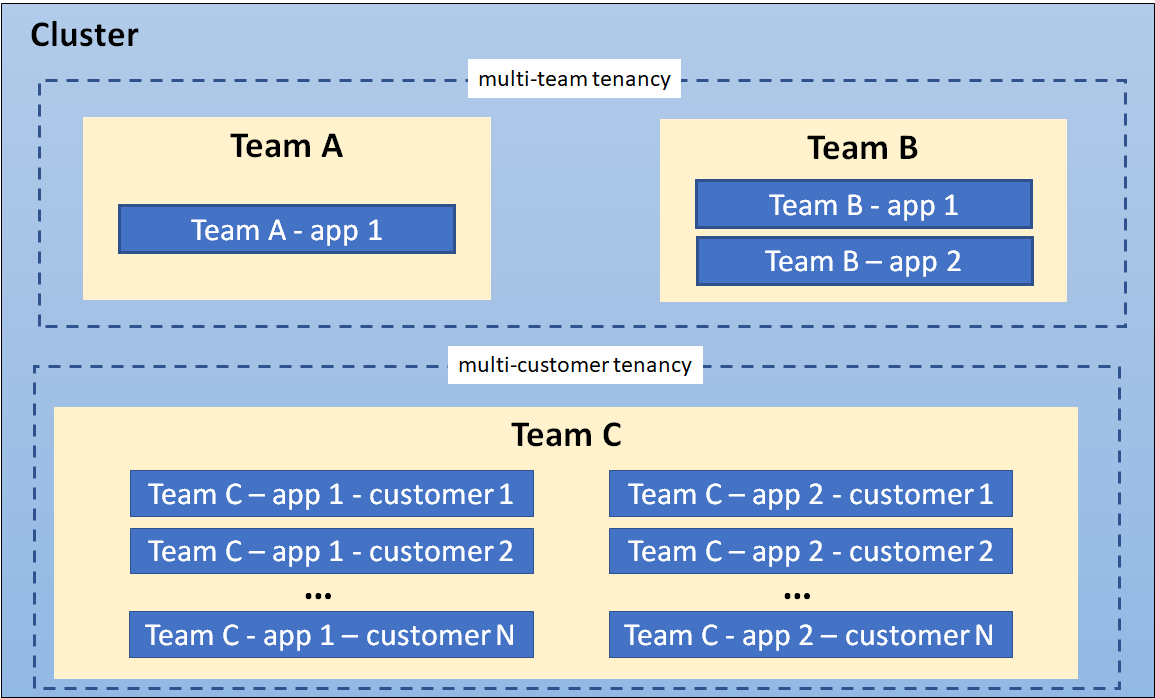
The first step to determining how to share your cluster is understanding your use case, so you can evaluate the patterns and tools available. In general, multi-tenancy in Kubernetes clusters falls into two broad categories, though many variations and hybrids are also possible.
A common form of multi-tenancy is to share a cluster between multiple teams within an organization, each of whom may operate one or more workloads. These workloads frequently need to communicate with each other, and with other workloads located on the same or different clusters.
In this scenario, members of the teams often have direct access to Kubernetes resources via tools
such as kubectl, or indirect access through GitOps controllers or other types of release
automation tools. There is often some level of trust between members of different teams, but
Kubernetes policies such as RBAC, quotas, and network policies are essential to safely and fairly
share clusters.
The other major form of multi-tenancy frequently involves a Software-as-a-Service (SaaS) vendor running multiple instances of a workload for customers. This business model is so strongly associated with this deployment style that many people call it "SaaS tenancy." However, a better term might be "multi-customer tenancy," since SaaS vendors may also use other deployment models, and this deployment model can also be used outside of SaaS.
In this scenario, the customers do not have access to the cluster; Kubernetes is invisible from their perspective and is only used by the vendor to manage the workloads. Cost optimization is frequently a critical concern, and Kubernetes policies are used to ensure that the workloads are strongly isolated from each other.
When discussing multi-tenancy in Kubernetes, there is no single definition for a "tenant". Rather, the definition of a tenant will vary depending on whether multi-team or multi-customer tenancy is being discussed.
In multi-team usage, a tenant is typically a team, where each team typically deploys a small number of workloads that scales with the complexity of the service. However, the definition of "team" may itself be fuzzy, as teams may be organized into higher-level divisions or subdivided into smaller teams.
By contrast, if each team deploys dedicated workloads for each new client, they are using a multi-customer model of tenancy. In this case, a "tenant" is simply a group of users who share a single workload. This may be as large as an entire company, or as small as a single team at that company.
In many cases, the same organization may use both definitions of "tenants" in different contexts. For example, a platform team may offer shared services such as security tools and databases to multiple internal “customers” and a SaaS vendor may also have multiple teams sharing a development cluster. Finally, hybrid architectures are also possible, such as a SaaS provider using a combination of per-customer workloads for sensitive data, combined with multi-tenant shared services.
There are several ways to design and build multi-tenant solutions with Kubernetes. Each of these methods comes with its own set of tradeoffs that impact the isolation level, implementation effort, operational complexity, and cost of service.
A Kubernetes cluster consists of a control plane which runs Kubernetes software, and a data plane consisting of worker nodes where tenant workloads are executed as pods. Tenant isolation can be applied in both the control plane and the data plane based on organizational requirements.
The level of isolation offered is sometimes described using terms like “hard” multi-tenancy, which implies strong isolation, and “soft” multi-tenancy, which implies weaker isolation. In particular, "hard" multi-tenancy is often used to describe cases where the tenants do not trust each other, often from security and resource sharing perspectives (e.g. guarding against attacks such as data exfiltration or DoS). Since data planes typically have much larger attack surfaces, "hard" multi-tenancy often requires extra attention to isolating the data-plane, though control plane isolation also remains critical.
However, the terms "hard" and "soft" can often be confusing, as there is no single definition that will apply to all users. Rather, "hardness" or "softness" is better understood as a broad spectrum, with many different techniques that can be used to maintain different types of isolation in your clusters, based on your requirements.
In more extreme cases, it may be easier or necessary to forgo any cluster-level sharing at all and assign each tenant their dedicated cluster, possibly even running on dedicated hardware if VMs are not considered an adequate security boundary. This may be easier with managed Kubernetes clusters, where the overhead of creating and operating clusters is at least somewhat taken on by a cloud provider. The benefit of stronger tenant isolation must be evaluated against the cost and complexity of managing multiple clusters. The Multi-cluster SIG is responsible for addressing these types of use cases.
The remainder of this page focuses on isolation techniques used for shared Kubernetes clusters. However, even if you are considering dedicated clusters, it may be valuable to review these recommendations, as it will give you the flexibility to shift to shared clusters in the future if your needs or capabilities change.
Control plane isolation ensures that different tenants cannot access or affect each others' Kubernetes API resources.
In Kubernetes, a Namespace provides a mechanism for isolating groups of API resources within a single cluster. This isolation has two key dimensions:
Object names within a namespace can overlap with names in other namespaces, similar to files in folders. This allows tenants to name their resources without having to consider what other tenants are doing.
Many Kubernetes security policies are scoped to namespaces. For example, RBAC Roles and Network Policies are namespace-scoped resources. Using RBAC, Users and Service Accounts can be restricted to a namespace.
In a multi-tenant environment, a Namespace helps segment a tenant's workload into a logical and distinct management unit. In fact, a common practice is to isolate every workload in its own namespace, even if multiple workloads are operated by the same tenant. This ensures that each workload has its own identity and can be configured with an appropriate security policy.
The namespace isolation model requires configuration of several other Kubernetes resources, networking plugins, and adherence to security best practices to properly isolate tenant workloads. These considerations are discussed below.
The most important type of isolation for the control plane is authorization. If teams or their workloads can access or modify each others' API resources, they can change or disable all other types of policies thereby negating any protection those policies may offer. As a result, it is critical to ensure that each tenant has the appropriate access to only the namespaces they need, and no more. This is known as the "Principle of Least Privilege."
Role-based access control (RBAC) is commonly used to enforce authorization in the Kubernetes control plane, for both users and workloads (service accounts). Roles and RoleBindings are Kubernetes objects that are used at a namespace level to enforce access control in your application; similar objects exist for authorizing access to cluster-level objects, though these are less useful for multi-tenant clusters.
In a multi-team environment, RBAC must be used to restrict tenants' access to the appropriate namespaces, and ensure that cluster-wide resources can only be accessed or modified by privileged users such as cluster administrators.
If a policy ends up granting a user more permissions than they need, this is likely a signal that the namespace containing the affected resources should be refactored into finer-grained namespaces. Namespace management tools may simplify the management of these finer-grained namespaces by applying common RBAC policies to different namespaces, while still allowing fine-grained policies where necessary.
Kubernetes workloads consume node resources, like CPU and memory. In a multi-tenant environment, you can use Resource Quotas to manage resource usage of tenant workloads. For the multiple teams use case, where tenants have access to the Kubernetes API, you can use resource quotas to limit the number of API resources (for example: the number of Pods, or the number of ConfigMaps) that a tenant can create. Limits on object count ensure fairness and aim to avoid noisy neighbor issues from affecting other tenants that share a control plane.
Resource quotas are namespaced objects. By mapping tenants to namespaces, cluster admins can use quotas to ensure that a tenant cannot monopolize a cluster's resources or overwhelm its control plane. Namespace management tools simplify the administration of quotas. In addition, while Kubernetes quotas only apply within a single namespace, some namespace management tools allow groups of namespaces to share quotas, giving administrators far more flexibility with less effort than built-in quotas.
Quotas prevent a single tenant from consuming greater than their allocated share of resources hence minimizing the “noisy neighbor” issue, where one tenant negatively impacts the performance of other tenants' workloads.
When you apply a quota to namespace, Kubernetes requires you to also specify resource requests and limits for each container. Limits are the upper bound for the amount of resources that a container can consume. Containers that attempt to consume resources that exceed the configured limits will either be throttled or killed, based on the resource type. When resource requests are set lower than limits, each container is guaranteed the requested amount but there may still be some potential for impact across workloads.
Quotas cannot protect against all kinds of resource sharing, such as network traffic. Node isolation (described below) may be a better solution for this problem.
Data plane isolation ensures that pods and workloads for different tenants are sufficiently isolated.
By default, all pods in a Kubernetes cluster are allowed to communicate with each other, and all network traffic is unencrypted. This can lead to security vulnerabilities where traffic is accidentally or maliciously sent to an unintended destination, or is intercepted by a workload on a compromised node.
Pod-to-pod communication can be controlled using Network Policies, which restrict communication between pods using namespace labels or IP address ranges. In a multi-tenant environment where strict network isolation between tenants is required, starting with a default policy that denies communication between pods is recommended with another rule that allows all pods to query the DNS server for name resolution. With such a default policy in place, you can begin adding more permissive rules that allow for communication within a namespace. It is also recommended not to use empty label selector '{}' for namespaceSelector field in network policy definition, in case traffic need to be allowed between namespaces. This scheme can be further refined as required. Note that this only applies to pods within a single control plane; pods that belong to different virtual control planes cannot talk to each other via Kubernetes networking.
Namespace management tools may simplify the creation of default or common network policies. In addition, some of these tools allow you to enforce a consistent set of namespace labels across your cluster, ensuring that they are a trusted basis for your policies.
More advanced network isolation may be provided by service meshes, which provide OSI Layer 7 policies based on workload identity, in addition to namespaces. These higher-level policies can make it easier to manage namespace-based multi-tenancy, especially when multiple namespaces are dedicated to a single tenant. They frequently also offer encryption using mutual TLS, protecting your data even in the presence of a compromised node, and work across dedicated or virtual clusters. However, they can be significantly more complex to manage and may not be appropriate for all users.
Kubernetes offers several types of volumes that can be used as persistent storage for workloads. For security and data-isolation, dynamic volume provisioning is recommended and volume types that use node resources should be avoided.
StorageClasses allow you to describe custom "classes" of storage offered by your cluster, based on quality-of-service levels, backup policies, or custom policies determined by the cluster administrators.
Pods can request storage using a PersistentVolumeClaim. A PersistentVolumeClaim is a namespaced resource, which enables isolating portions of the storage system and dedicating it to tenants within the shared Kubernetes cluster. However, it is important to note that a PersistentVolume is a cluster-wide resource and has a lifecycle independent of workloads and namespaces.
For example, you can configure a separate StorageClass for each tenant and use this to strengthen isolation.
If a StorageClass is shared, you should set a reclaim policy of Delete
to ensure that a PersistentVolume cannot be reused across different namespaces.
Kubernetes pods are composed of one or more containers that execute on worker nodes. Containers utilize OS-level virtualization and hence offer a weaker isolation boundary than virtual machines that utilize hardware-based virtualization.
In a shared environment, unpatched vulnerabilities in the application and system layers can be exploited by attackers for container breakouts and remote code execution that allow access to host resources. In some applications, like a Content Management System (CMS), customers may be allowed the ability to upload and execute untrusted scripts or code. In either case, mechanisms to further isolate and protect workloads using strong isolation are desirable.
Sandboxing provides a way to isolate workloads running in a shared cluster. It typically involves
running each pod in a separate execution environment such as a virtual machine or a userspace
kernel. Sandboxing is often recommended when you are running untrusted code, where workloads are
assumed to be malicious. Part of the reason this type of isolation is necessary is because
containers are processes running on a shared kernel; they mount file systems like /sys and /proc
from the underlying host, making them less secure than an application that runs on a virtual
machine which has its own kernel. While controls such as seccomp, AppArmor, and SELinux can be
used to strengthen the security of containers, it is hard to apply a universal set of rules to all
workloads running in a shared cluster. Running workloads in a sandbox environment helps to
insulate the host from container escapes, where an attacker exploits a vulnerability to gain
access to the host system and all the processes/files running on that host.
Virtual machines and userspace kernels are two popular approaches to sandboxing.
Node isolation is another technique that you can use to isolate tenant workloads from each other. With node isolation, a set of nodes is dedicated to running pods from a particular tenant and co-mingling of tenant pods is prohibited. This configuration reduces the noisy tenant issue, as all pods running on a node will belong to a single tenant. The risk of information disclosure is slightly lower with node isolation because an attacker that manages to escape from a container will only have access to the containers and volumes mounted to that node.
Although workloads from different tenants are running on different nodes, it is important to be aware that the kubelet and (unless using virtual control planes) the API service are still shared services. A skilled attacker could use the permissions assigned to the kubelet or other pods running on the node to move laterally within the cluster and gain access to tenant workloads running on other nodes. If this is a major concern, consider implementing compensating controls such as seccomp, AppArmor or SELinux or explore using sandboxed containers or creating separate clusters for each tenant.
Node isolation is a little easier to reason about from a billing standpoint than sandboxing containers since you can charge back per node rather than per pod. It also has fewer compatibility and performance issues and may be easier to implement than sandboxing containers. For example, nodes for each tenant can be configured with taints so that only pods with the corresponding toleration can run on them. A mutating webhook could then be used to automatically add tolerations and node affinities to pods deployed into tenant namespaces so that they run on a specific set of nodes designated for that tenant.
Node isolation can be implemented using pod node selectors.
This section discusses other Kubernetes constructs and patterns that are relevant for multi-tenancy.
API priority and fairness is a Kubernetes feature that allows you to assign a priority to certain pods running within the cluster. When an application calls the Kubernetes API, the API server evaluates the priority assigned to pod. Calls from pods with higher priority are fulfilled before those with a lower priority. When contention is high, lower priority calls can be queued until the server is less busy or you can reject the requests.
Using API priority and fairness will not be very common in SaaS environments unless you are allowing customers to run applications that interface with the Kubernetes API, for example, a controller.
When you’re running a SaaS application, you may want the ability to offer different Quality-of-Service (QoS) tiers of service to different tenants. For example, you may have freemium service that comes with fewer performance guarantees and features and a for-fee service tier with specific performance guarantees. Fortunately, there are several Kubernetes constructs that can help you accomplish this within a shared cluster, including network QoS, storage classes, and pod priority and preemption. The idea with each of these is to provide tenants with the quality of service that they paid for. Let’s start by looking at networking QoS.
Typically, all pods on a node share a network interface. Without network QoS, some pods may consume an unfair share of the available bandwidth at the expense of other pods. The Kubernetes bandwidth plugin creates an extended resource for networking that allows you to use Kubernetes resources constructs, i.e. requests/limits, to apply rate limits to pods by using Linux tc queues. Be aware that the plugin is considered experimental as per the Network Plugins documentation and should be thoroughly tested before use in production environments.
For storage QoS, you will likely want to create different storage classes or profiles with different performance characteristics. Each storage profile can be associated with a different tier of service that is optimized for different workloads such IO, redundancy, or throughput. Additional logic might be necessary to allow the tenant to associate the appropriate storage profile with their workload.
Finally, there’s pod priority and preemption where you can assign priority values to pods. When scheduling pods, the scheduler will try evicting pods with lower priority when there are insufficient resources to schedule pods that are assigned a higher priority. If you have a use case where tenants have different service tiers in a shared cluster e.g. free and paid, you may want to give higher priority to certain tiers using this feature.
Kubernetes clusters include a Domain Name System (DNS) service to provide translations from names to IP addresses, for all Services and Pods. By default, the Kubernetes DNS service allows lookups across all namespaces in the cluster.
In multi-tenant environments where tenants can access pods and other Kubernetes resources, or where stronger isolation is required, it may be necessary to prevent pods from looking up services in other Namespaces. You can restrict cross-namespace DNS lookups by configuring security rules for the DNS service. For example, CoreDNS (the default DNS service for Kubernetes) can leverage Kubernetes metadata to restrict queries to Pods and Services within a namespace. For more information, read an example of configuring this within the CoreDNS documentation.
When a Virtual Control Plane per tenant model is used, a DNS service must be configured per tenant or a multi-tenant DNS service must be used. Here is an example of a customized version of CoreDNS that supports multiple tenants.
Operators are Kubernetes controllers that manage applications. Operators can simplify the management of multiple instances of an application, like a database service, which makes them a common building block in the multi-consumer (SaaS) multi-tenancy use case.
Operators used in a multi-tenant environment should follow a stricter set of guidelines. Specifically, the Operator should:
There are two primary ways to share a Kubernetes cluster for multi-tenancy: using Namespaces (that is, a Namespace per tenant) or by virtualizing the control plane (that is, virtual control plane per tenant).
In both cases, data plane isolation, and management of additional considerations such as API Priority and Fairness, is also recommended.
Namespace isolation is well-supported by Kubernetes, has a negligible resource cost, and provides mechanisms to allow tenants to interact appropriately, such as by allowing service-to-service communication. However, it can be difficult to configure, and doesn't apply to Kubernetes resources that can't be namespaced, such as Custom Resource Definitions, Storage Classes, and Webhooks.
Control plane virtualization allows for isolation of non-namespaced resources at the cost of somewhat higher resource usage and more difficult cross-tenant sharing. It is a good option when namespace isolation is insufficient but dedicated clusters are undesirable, due to the high cost of maintaining them (especially on-prem) or due to their higher overhead and lack of resource sharing. However, even within a virtualized control plane, you will likely see benefits by using namespaces as well.
The two options are discussed in more detail in the following sections.
As previously mentioned, you should consider isolating each workload in its own namespace, even if you are using dedicated clusters or virtualized control planes. This ensures that each workload only has access to its own resources, such as ConfigMaps and Secrets, and allows you to tailor dedicated security policies for each workload. In addition, it is a best practice to give each namespace names that are unique across your entire fleet (that is, even if they are in separate clusters), as this gives you the flexibility to switch between dedicated and shared clusters in the future, or to use multi-cluster tooling such as service meshes.
Conversely, there are also advantages to assigning namespaces at the tenant level, not just the workload level, since there are often policies that apply to all workloads owned by a single tenant. However, this raises its own problems. Firstly, this makes it difficult or impossible to customize policies to individual workloads, and secondly, it may be challenging to come up with a single level of "tenancy" that should be given a namespace. For example, an organization may have divisions, teams, and subteams - which should be assigned a namespace?
One possible approach is to organize your namespaces into hierarchies, and share certain policies and resources between them. This could include managing namespace labels, namespace lifecycles, delegated access, and shared resource quotas across related namespaces. These capabilities can be useful in both multi-team and multi-customer scenarios.
Another form of control-plane isolation is to use Kubernetes extensions to provide each tenant a virtual control-plane that enables segmentation of cluster-wide API resources. Data plane isolation techniques can be used with this model to securely manage worker nodes across tenants.
The virtual control plane based multi-tenancy model extends namespace-based multi-tenancy by providing each tenant with dedicated control plane components, and hence complete control over cluster-wide resources and add-on services. Worker nodes are shared across all tenants, and are managed by a Kubernetes cluster that is normally inaccessible to tenants. This cluster is often referred to as a super-cluster (or sometimes as a host-cluster). Since a tenant’s control-plane is not directly associated with underlying compute resources it is referred to as a virtual control plane.
A virtual control plane typically consists of the Kubernetes API server, the controller manager, and the etcd data store. It interacts with the super cluster via a metadata synchronization controller which coordinates changes across tenant control planes and the control plane of the super-cluster.
By using per-tenant dedicated control planes, most of the isolation problems due to sharing one API server among all tenants are solved. Examples include noisy neighbors in the control plane, uncontrollable blast radius of policy misconfigurations, and conflicts between cluster scope objects such as webhooks and CRDs. Hence, the virtual control plane model is particularly suitable for cases where each tenant requires access to a Kubernetes API server and expects the full cluster manageability.
The improved isolation comes at the cost of running and maintaining an individual virtual control plane per tenant. In addition, per-tenant control planes do not solve isolation problems in the data plane, such as node-level noisy neighbors or security threats. These must still be addressed separately.
Selecting the appropriate authentication mechanism(s) is a crucial aspect of securing your cluster. Kubernetes provides several built-in mechanisms, each with its own strengths and weaknesses that should be carefully considered when choosing the best authentication mechanism for your cluster.
In general, it is recommended to enable as few authentication mechanisms as possible to simplify user management and prevent cases where users retain access to a cluster that is no longer required.
It is important to note that Kubernetes does not have an in-built user database within the cluster. Instead, it takes user information from the configured authentication system and uses that to make authorization decisions. Therefore, to audit user access, you need to review credentials from every configured authentication source.
For production clusters with multiple users directly accessing the Kubernetes API, it is recommended to use external authentication sources such as OIDC. The internal authentication mechanisms, such as client certificates and service account tokens, described below, are not suitable for this use case.
Kubernetes leverages X.509 client certificate authentication for system components, such as when the kubelet authenticates to the API Server. While this mechanism can also be used for user authentication, it might not be suitable for production use due to several restrictions:
O value of the client certificate, which means the user's group
memberships cannot be changed for the lifetime of the certificate.Although Kubernetes allows you to load credentials from a static token file located on the control plane node disks, this approach is not recommended for production servers due to several reasons:
Bootstrap tokens are used for joining nodes to clusters and are not recommended for user authentication due to several reasons:
Service account secrets are available as an option to allow workloads running in the cluster to authenticate to the API server. In Kubernetes < 1.23, these were the default option, however, they are being replaced with TokenRequest API tokens. While these secrets could be used for user authentication, they are generally unsuitable for a number of reasons:
The TokenRequest API is a useful tool for generating short-lived credentials for service authentication to the API server or third-party systems. However, it is not generally recommended for user authentication as there is no revocation method available, and distributing credentials to users in a secure manner can be challenging.
When using TokenRequest tokens for service authentication, it is recommended to implement a short lifespan to reduce the impact of compromised tokens.
Kubernetes supports integrating external authentication services with the Kubernetes API using OpenID Connect (OIDC). There is a wide variety of software that can be used to integrate Kubernetes with an identity provider. However, when using OIDC authentication in Kubernetes, it is important to consider the following hardening measures:
Webhook token authentication is another option for integrating external authentication providers into Kubernetes. This mechanism allows for an authentication service, either running inside the cluster or externally, to be contacted for an authentication decision over a webhook. It is important to note that the suitability of this mechanism will likely depend on the software used for the authentication service, and there are some Kubernetes-specific considerations to take into account.
To configure Webhook authentication, access to control plane server filesystems is required. This means that it will not be possible with Managed Kubernetes unless the provider specifically makes it available. Additionally, any software installed in the cluster to support this access should be isolated from general workloads, as it will run with high privileges.
Another option for integrating external authentication systems into Kubernetes is to use an authenticating proxy. With this mechanism, Kubernetes expects to receive requests from the proxy with specific header values set, indicating the username and group memberships to assign for authorization purposes. It is important to note that there are specific considerations to take into account when using this mechanism.
Firstly, securely configured TLS must be used between the proxy and Kubernetes API server to mitigate the risk of traffic interception or sniffing attacks. This ensures that the communication between the proxy and Kubernetes API server is secure.
Secondly, it is important to be aware that an attacker who is able to modify the headers of the request may be able to gain unauthorized access to Kubernetes resources. As such, it is important to ensure that the headers are properly secured and cannot be tampered with.
The Kubernetes scheduler is one of the critical components of the control plane.
This document covers how to improve the security posture of the Scheduler.
A misconfigured scheduler can have security implications. Such a scheduler can target specific nodes and evict the workloads or applications that are sharing the node and its resources. This can aid an attacker with a Yo-Yo attack: an attack on a vulnerable autoscaler.
When setting up authentication configuration, it should be made sure that kube-scheduler's authentication remains consistent with kube-api-server's authentication. If any request has missing authentication headers, the authentication should happen through the kube-api-server allowing all authentication to be consistent in the cluster.
authentication-kubeconfig: Make sure to provide a proper kubeconfig so that
the scheduler can retrieve authentication configuration options from the API Server.
This kubeconfig file should be protected with strict file permissions.authentication-tolerate-lookup-failure: Set this to false to make sure
the scheduler always looks up its authentication configuration from the API server.authentication-skip-lookup: Set this to false to make sure
the scheduler always looks up its authentication configuration from the API server.authorization-always-allow-paths: These paths should respond with data that is appropriate
for anonymous authorization. Defaults to /healthz,/readyz,/livez.profiling: Set to false to disable the profiling endpoints which are provide debugging information
but which should not be enabled on production clusters as they present a risk of denial of service
or information leakage. The --profiling argument is deprecated and can now be provided through the
KubeScheduler DebuggingConfiguration.
Profiling can be disabled through the kube-scheduler config by setting enableProfiling to false.requestheader-client-ca-file: Avoid passing this argument.bind-address: In most cases, the kube-scheduler does not need to be externally accessible.
Setting the bind address to localhost is a secure practice.permit-address-sharing: Set this to false to disable connection sharing through SO_REUSEADDR.
SO_REUSEADDR can lead to reuse of terminated connections that are in TIME_WAIT state.permit-port-sharing: Default false. Use the default unless you are confident you understand the security implications.tls-cipher-suites: Always provide a list of preferred cipher suites.
This ensures encryption never happens with insecure cipher suites.When using custom schedulers based on the Kubernetes scheduling code, cluster administrators need to be careful with
plugins that use the queueSort, prefilter, filter, or permit extension points.
These extension points control various stages of a scheduling process,
and the wrong configuration can impact the kube-scheduler's behavior in your cluster.
queueSort extension point can be enabled at a time.
Any plugins that use queueSort should be scrutinized.prefilter or filter extension point can potentially mark all nodes as unschedulable.
This can bring scheduling of new pods to a halt.permit extension point can prevent or delay the binding of a Pod.
Such plugins should be thoroughly reviewed by the cluster administrator.When using a plugin that is not one of the default plugins,
consider disabling the queueSort, filter and permit extension points as follows:
apiVersion: kubescheduler.config.k8s.io/v1
kind: KubeSchedulerConfiguration
profiles:
  - schedulerName: my-scheduler
    plugins:
      # Disable specific plugins for different extension points
      # You can disable all plugins for an extension point using "*"
      queueSort:
        disabled:
        - name: "*"             # Disable all queueSort plugins
      # - name: "PrioritySort"  # Disable specific queueSort plugin
      filter:
        disabled:
        - name: "*"                 # Disable all filter plugins
      # - name: "NodeResourcesFit"  # Disable specific filter plugin
      permit:
        disabled:
        - name: "*"               # Disables all permit plugins
      # - name: "TaintToleration" # Disable specific permit plugin
This creates a scheduler profile my-scheduler.
Whenever the .spec of a Pod does not have a value for .spec.schedulerName, the kube-scheduler runs for that Pod,
using its main configuration, and default plugins.
If you define a Pod with .spec.schedulerName set to my-scheduler, the kube-scheduler runs
but with a custom configuration; in that custom configuration,
the queueSort, filter and permit extension points are disabled.
If you use this KubeSchedulerConfiguration, and don't run any custom scheduler,
and you then define a Pod with .spec.schedulerName set to nonexistent-scheduler
(or any other scheduler name that doesn't exist in your cluster), no events would be generated for a pod.
A cluster administrator should ensure that cluster users cannot label the nodes.
A malicious actor can use nodeSelector to schedule workloads on nodes where those workloads should not be present.
The Kubernetes API server is the main point of entry to a cluster for external parties (users and services) interacting with it.
As part of this role, the API server has several key built-in security controls, such as audit logging and admission controllers. However, there are ways to modify the configuration or content of the cluster that bypass these controls.
This page describes the ways in which the security controls built into the Kubernetes API server can be bypassed, so that cluster operators and security architects can ensure that these bypasses are appropriately restricted.
The kubelet on each node loads and directly manages any manifests that are stored in a named directory or fetched from a specific URL as static Pods in your cluster. The API server doesn't manage these static Pods. An attacker with write access to this location could modify the configuration of static pods loaded from that source, or could introduce new static Pods.
Static Pods are restricted from accessing other objects in the Kubernetes API. For example,
you can't configure a static Pod to mount a Secret from the cluster. However, these Pods can
take other security sensitive actions, such as using hostPath mounts from the underlying
node.
By default, the kubelet creates a mirror pod so that the static Pods are visible in the Kubernetes API. However, if the attacker uses an invalid namespace name when creating the Pod, it will not be visible in the Kubernetes API and can only be discovered by tooling that has access to the affected host(s).
If a static Pod fails admission control, the kubelet won't register the Pod with the API server. However, the Pod still runs on the node. For more information, refer to kubeadm issue #1541.
The kubelet provides an HTTP API that is typically exposed on TCP port 10250 on cluster worker nodes. The API might also be exposed on control plane nodes depending on the Kubernetes distribution in use. Direct access to the API allows for disclosure of information about the pods running on a node, the logs from those pods, and execution of commands in every container running on the node.
Some of these endpoints support Websocket protocols via HTTP GET requests, which are authorized with the get verb.
This means that get permission on nodes/proxy is not a read-only permission,
and authorizes access to endpoints which can be used to execute commands in any container running on the node.
When Kubernetes cluster users have RBAC access to Node object sub-resources, that access
serves as authorization to interact with the kubelet API. The exact access depends on
which sub-resource access has been granted, as detailed in
kubelet authorization.
Direct access to the kubelet API is not subject to admission control and is not logged by Kubernetes audit logging. An attacker with direct access to this API may be able to bypass controls that detect or prevent certain actions.
The kubelet API can be configured to authenticate requests in a number of ways.
By default, the kubelet configuration allows anonymous access. Most Kubernetes providers
change the default to use webhook and certificate authentication. This lets the control plane
ensure that the caller is authorized to access the nodes API resource or sub-resources.
The default anonymous access doesn't make this assertion with the control plane.
nodes API object using mechanisms such as
RBAC. Only grant this access when required,
such as by monitoring services.nodes/proxy catch-all permission, even with just the get verb.
Instead, grant granular permissions.Kubernetes clusters use etcd as a datastore. The etcd service listens on TCP port 2379.
The only clients that need access are the Kubernetes API server and any backup tooling
that you use. Direct access to this API allows for disclosure or modification of any
data held in the cluster.
Access to the etcd API is typically managed by client certificate authentication. Any certificate issued by a certificate authority that etcd trusts allows full access to the data stored inside etcd.
Direct access to etcd is not subject to Kubernetes admission control and is not logged by Kubernetes audit logging. An attacker who has read access to the API server's etcd client certificate private key (or can create a new trusted client certificate) can gain cluster admin rights by accessing cluster secrets or modifying access rules. Even without elevating their Kubernetes RBAC privileges, an attacker who can modify etcd can retrieve any API object or create new workloads inside the cluster.
Many Kubernetes providers configure etcd to use mutual TLS (both client and server verify each other's certificate for authentication). There is no widely accepted implementation of authorization for the etcd API, although the feature exists. Since there is no authorization model, any certificate with client access to etcd can be used to gain full access to etcd. Typically, etcd client certificates that are only used for health checking can also grant full read and write access.
On each node in a Kubernetes cluster, access to interact with containers is controlled by the container runtime (or runtimes, if you have configured more than one). Typically, the container runtime exposes a Unix socket that the kubelet can access. An attacker with access to this socket can launch new containers or interact with running containers.
At the cluster level, the impact of this access depends on whether the containers that run on the compromised node have access to Secrets or other confidential data that an attacker could use to escalate privileges to other worker nodes or to control plane components.
root user.hostPath mounts
that include the container runtime socket, either directly or by mounting a parent
directory. Also hostPath mounts must be set as read-only to mitigate risks
of attackers bypassing directory restrictions.This page describes some of the security features that are built into the Linux kernel that you can use in your Kubernetes workloads. To learn how to apply these features to your Pods and containers, refer to Configure a SecurityContext for a Pod or Container. You should already be familiar with Linux and with the basics of Kubernetes workloads.
When you deploy a workload in Kubernetes, use the Pod specification to restrict
that workload from running as the root user on the node. You can use the Pod
securityContext to define the specific Linux user and group for the processes in
the Pod, and explicitly restrict containers from running as root users. Setting
these values in the Pod manifest takes precedence over similar values in the
container image, which is especially useful if you're running images that you
don't own.
Configuring the kernel security features on this page provides fine-grained control over the actions that processes in your cluster can take, but managing these configurations can be challenging at scale. Running containers as non-root, or in user namespaces if you need root privileges, helps to reduce the chance that you'll need to enforce your configured kernel security capabilities.
Kubernetes lets you configure and use Linux kernel features to improve isolation and harden your containerized workloads. Common features include the following:
To configure settings for one of these features, the operating system that you choose for your nodes must enable the feature in the kernel. For example, Ubuntu 7.10 and later enable AppArmor by default. To learn whether your OS enables a specific feature, consult the OS documentation.
You use the securityContext field in your Pod specification to define the
constraints that apply to those processes. The securityContext field also
supports other security settings, such as specific Linux capabilities or file
access permissions using UIDs and GIDs. To learn more, refer to
Configure a SecurityContext for a Pod or Container.
Some of your workloads might need privileges to perform specific actions as the root user on your node's host machine. Linux uses capabilities to divide the available privileges into categories, so that processes can get the privileges required to perform specific actions without being granted all privileges. Each capability has a set of system calls (syscalls) that a process can make. seccomp lets you restrict these individual syscalls. It can be used to sandbox the privileges of a process, restricting the calls it is able to make from userspace into the kernel.
In Kubernetes, you use a container runtime on each node to run your containers. Example runtimes include CRI-O, Docker, or containerd. Each runtime allows only a subset of Linux capabilities by default. You can further limit the allowed syscalls individually by using a seccomp profile. Container runtimes usually include a default seccomp profile. Kubernetes lets you automatically apply seccomp profiles loaded onto a node to your Pods and containers.
allowPrivilegeEscalation setting for Pods and
containers. When set to false, this prevents processes from gaining new
capabilities and restricts unprivileged users from changing the applied seccomp
profile to a more permissive profile.To learn how to implement seccomp in Kubernetes, refer to Restrict a Container's Syscalls with seccomp or the Seccomp node reference
To learn more about seccomp, see Seccomp BPF in the Linux kernel documentation.
seccomp is a low-level security configuration that you should only configure yourself if you require fine-grained control over Linux syscalls. Using seccomp, especially at scale, has the following risks:
Recommendation: Use the default seccomp profile that's bundled with your container runtime. If you need a more isolated environment, consider using a sandbox, such as gVisor. Sandboxes solve the preceding risks with custom seccomp profiles, but require more compute resources on your nodes and might have compatibility issues with GPUs and other specialized hardware.
You can use Linux policy-based mandatory access control (MAC) mechanisms, such as AppArmor and SELinux, to harden your Kubernetes workloads.
AppArmor is a Linux kernel security module that supplements the standard Linux user and group based permissions to confine programs to a limited set of resources. AppArmor can be configured for any application to reduce its potential attack surface and provide greater in-depth defense. It is configured through profiles tuned to allow the access needed by a specific program or container, such as Linux capabilities, network access, and file permissions. Each profile can be run in either enforcing mode, which blocks access to disallowed resources, or complain mode, which only reports violations.
AppArmor can help you to run a more secure deployment by restricting what containers are allowed to do, and/or provide better auditing through system logs. The container runtime that you use might ship with a default AppArmor profile, or you can use a custom profile.
To learn how to use AppArmor in Kubernetes, refer to Restrict a Container's Access to Resources with AppArmor.
SELinux is a Linux kernel security module that lets you restrict the access that a specific subject, such as a process, has to the files on your system. You define security policies that apply to subjects that have specific SELinux labels. When a process that has an SELinux label attempts to access a file, the SELinux server checks whether that process' security policy allows the access and makes an authorization decision.
In Kubernetes, you can set an SELinux label in the securityContext field of
your manifest. The specified labels are assigned to those processes. If you
have configured security policies that affect those labels, the host OS kernel
enforces these policies.
To learn how to use SELinux in Kubernetes, refer to Assign SELinux labels to a container.
The operating system on your Linux nodes usually includes one of either AppArmor or SELinux. Both mechanisms provide similar types of protection, but have differences such as the following:
The following table describes the use cases and scope of each security control. You can use all of these controls together to build a more hardened system.
| Security feature | Description | How to use | Example |
|---|---|---|---|
| seccomp | Restrict individual kernel calls in the userspace. Reduces the likelihood that a vulnerability that uses a restricted syscall would compromise the system. | Specify a loaded seccomp profile in the Pod or container specification to apply its constraints to the processes in the Pod. | Reject the unshare syscall, which was used in
CVE-2022-0185. |
| AppArmor | Restrict program access to specific resources. Reduces the attack surface of the program. Improves audit logging. | Specify a loaded AppArmor profile in the container specification. | Restrict a read-only program from writing to any file path in the system. |
| SELinux | Restrict access to resources such as files, applications, ports, and processes using labels and security policies. | Specify access restrictions for specific labels. Tag processes with those labels to enforce the access restrictions related to the label. | Restrict a container from accessing files outside its own filesystem. |
seccomp, AppArmor, and SELinux usually have a default configuration that offers basic protections. You can also create custom profiles and policies that meet the requirements of your workloads. Managing and distributing these custom configurations at scale might be challenging, especially if you use all three features together. To help you to manage these configurations at scale, use a tool like the Kubernetes Security Profiles Operator.
Kubernetes lets you specify that some trusted containers can run in privileged mode. Any container in a Pod can run in privileged mode to use operating system administrative capabilities that would otherwise be inaccessible. This is available for both Windows and Linux.
Privileged containers explicitly override some of the Linux kernel constraints that you might use in your workloads, as follows:
Unconfined seccomp profile,
overriding any seccomp profile that you specified in your manifest.unconfined_t domain.Any container in a Pod can enable Privileged mode if you set the
privileged: true field in the
securityContext
field for the container. Privileged containers override or undo many other hardening settings such as the applied seccomp profile, AppArmor profile, or
SELinux constraints. Privileged containers are given all Linux capabilities,
including capabilities that they don't require. For example, a root user in a
privileged container might be able to use the CAP_SYS_ADMIN and
CAP_NET_ADMIN capabilities on the node, bypassing the runtime seccomp
configuration and other restrictions.
In most cases, you should avoid using privileged containers, and instead grant
the specific capabilities required by your container using the capabilities
field in the securityContext field. Only use privileged mode if you have a
capability that you can't grant with the securityContext. This is useful for
containers that want to use operating system administrative capabilities such
as manipulating the network stack or accessing hardware devices.
In Kubernetes version 1.26 and later, you can also run Windows containers in a
similarly privileged mode by setting the windowsOptions.hostProcess flag on
the security context of the Pod spec. For details and instructions, see
Create a Windows HostProcess Pod.
runAsNonRoot: true.Additionally, you can run workloads in user namespaces by setting
hostUsers: false in your Pod manifest. This lets you run containers as root
users in the user namespace, but as non-root users in the host namespace on the
node. This is still in early stages of development and might not have the level
of support that you need. For instructions, refer to
Use a User Namespace With a Pod.
This checklist aims at providing a basic list of guidance with links to more comprehensive documentation on each topic. It does not claim to be exhaustive and is meant to evolve.
On how to read and use this document:
system:masters group is not used for user or component authentication after bootstrapping.--use-service-account-credentials
enabled.After bootstrapping, neither users nor components should authenticate to the
Kubernetes API as system:masters. Similarly, running all of
kube-controller-manager as system:masters should be avoided. In fact,
system:masters should only be used as a break-glass mechanism, as opposed to
an admin user.
A number of Container Network Interface (CNI) plugins plugins provide the functionality to restrict network resources that pods may communicate with. This is most commonly done through Network Policies which provide a namespaced resource to define rules. Default network policies that block all egress and ingress, in each namespace, selecting all pods, can be useful to adopt an allow list approach to ensure that no workloads are missed.
Not all CNI plugins provide encryption in transit. If the chosen plugin lacks this feature, an alternative solution could be to use a service mesh to provide that functionality.
The etcd datastore of the control plane should have controls to limit access and not be publicly exposed on the Internet. Furthermore, mutual TLS (mTLS) should be used to communicate securely with it. The certificate authority for this should be unique to etcd.
External Internet access to the Kubernetes API server should be restricted to not expose the API publicly. Be careful, as many managed Kubernetes distributions are publicly exposing the API server by default. You can then use a bastion host to access the server.
The kubelet API access
should be restricted and not exposed publicly, the default authentication and
authorization settings, when no configuration file specified with the --config
flag, are overly permissive.
If a cloud provider is used for hosting Kubernetes, the access from pods to the cloud
metadata API 169.254.169.254 should also be restricted or blocked if not needed
because it may leak information.
For restricted LoadBalancer and ExternalIPs use, see CVE-2020-8554: Man in the middle using LoadBalancer or ExternalIPs and the DenyServiceExternalIPs admission controller for further information.
create, update, patch, delete workloads is only granted if necessary.RBAC authorization is crucial but
cannot be granular enough to have authorization on the Pods' resources
(or on any resource that manages Pods). The only granularity is the API verbs
on the resource itself, for example, create on Pods. Without
additional admission, the authorization to create these resources allows direct
unrestricted access to the schedulable nodes of a cluster.
The Pod Security Standards
define three different policies, privileged, baseline and restricted that limit
how fields can be set in the PodSpec regarding security.
These standards can be enforced at the namespace level with the new
Pod Security admission,
enabled by default, or by third-party admission webhook. Please note that,
contrary to the removed PodSecurityPolicy admission it replaces,
Pod Security
admission can be easily combined with admission webhooks and external services.
Pod Security admission restricted policy, the most restrictive policy of the
Pod Security Standards set,
can operate in several modes,
warn, audit or enforce to gradually apply the most appropriate
security context
according to security best practices. Nevertheless, pods'
security context
should be separately investigated to limit the privileges and access pods may
have on top of the predefined security standards, for specific use cases.
For a hands-on tutorial on Pod Security, see the blog post Kubernetes 1.23: Pod Security Graduates to Beta.
Memory and CPU limits should be set in order to restrict the memory and CPU resources a pod can consume on a node, and therefore prevent potential DoS attacks from malicious or breached workloads. Such policy can be enforced by an admission controller. Please note that CPU limits will throttle usage and thus can have unintended effects on auto-scaling features or efficiency i.e. running the process in best effort with the CPU resource available.
Seccomp stands for secure computing mode and has been a feature of the Linux kernel since version 2.6.12. It can be used to sandbox the privileges of a process, restricting the calls it is able to make from userspace into the kernel. Kubernetes lets you automatically apply seccomp profiles loaded onto a node to your Pods and containers.
Seccomp can improve the security of your workloads by reducing the Linux kernel syscall attack surface available inside containers. The seccomp filter mode leverages BPF to create an allow or deny list of specific syscalls, named profiles.
Since Kubernetes 1.27, you can enable the use of RuntimeDefault as the default seccomp profile
for all workloads. A security tutorial is available on this
topic. In addition, the
Kubernetes Security Profiles Operator
is a project that facilitates the management and use of seccomp in clusters.
AppArmor is a Linux kernel security module that can provide an easy way to implement Mandatory Access Control (MAC) and better auditing through system logs. A default AppArmor profile is enforced on nodes that support it, or a custom profile can be configured. Like seccomp, AppArmor is also configured through profiles, where each profile is either running in enforcing mode, which blocks access to disallowed resources or complain mode, which only reports violations. AppArmor profiles are enforced on a per-container basis, with an annotation, allowing for processes to gain just the right privileges.
SELinux is also a
Linux kernel security module that can provide a mechanism for supporting access
control security policies, including Mandatory Access Controls (MAC). SELinux
labels can be assigned to containers or pods
via their securityContext section.
Pods that are on different tiers of sensitivity, for example, an application pod and the Kubernetes API server, should be deployed onto separate nodes. The purpose of node isolation is to prevent an application container breakout to directly providing access to applications with higher level of sensitivity to easily pivot within the cluster. This separation should be enforced to prevent pods accidentally being deployed onto the same node. This could be enforced with the following features:
Secrets required for pods should be stored within Kubernetes Secrets as opposed to alternatives such as ConfigMap. Secret resources stored within etcd should be encrypted at rest.
Pods needing secrets should have these automatically mounted through volumes,
preferably stored in memory like with the emptyDir.medium option.
Mechanism can be used to also inject secrets from third-party storages as
volume, like the Secrets Store CSI Driver.
This should be done preferentially as compared to providing the pods service
account RBAC access to secrets. This would allow adding secrets into the pod as
environment variables or files. Please note that the environment variable method
might be more prone to leakage due to crash dumps in logs and the
non-confidential nature of environment variable in Linux, as opposed to the
permission mechanism on files.
Service account tokens should not be mounted into pods that do not require them. This can be configured by setting
automountServiceAccountToken
to false either within the service account to apply throughout the namespace
or specifically for a pod. For Kubernetes v1.22 and above, use
Bound Service Accounts
for time-bound service account credentials.
Container image should contain the bare minimum to run the program they package. Preferably, only the program and its dependencies, building the image from the minimal possible base. In particular, image used in production should not contain shells or debugging utilities, as an ephemeral debug container can be used for troubleshooting.
Build images to directly start with an unprivileged user by using the
USER instruction in Dockerfile.
The Security Context
allows a container image to be started with a specific user and group with
runAsUser and runAsGroup, even if not specified in the image manifest.
However, the file permissions in the image layers might make it impossible to just
start the process with a new unprivileged user without image modification.
Avoid using image tags to reference an image, especially the latest tag, the
image behind a tag can be easily modified in a registry. Prefer using the
complete sha256 digest which is unique to the image manifest. This policy can be
enforced via an ImagePolicyWebhook.
Image signatures can also be automatically verified with an admission controller
at deploy time to validate their authenticity and integrity.
Scanning a container image can prevent critical vulnerabilities from being deployed to the cluster alongside the container image. Image scanning should be completed before deploying a container image to a cluster and is usually done as part of the deployment process in a CI/CD pipeline. The purpose of an image scan is to obtain information about possible vulnerabilities and their prevention in the container image, such as a Common Vulnerability Scoring System (CVSS) score. If the result of the image scans is combined with the pipeline compliance rules, only properly patched container images will end up in Production.
Admission controllers can help improve the security of the cluster. However, they can present risks themselves as they extend the API server and should be properly secured.
The following lists present a number of admission controllers that could be considered to enhance the security posture of your cluster and application. It includes controllers that may be referenced in other parts of this document.
This first group of admission controllers includes plugins enabled by default, consider to leave them enabled unless you know what you are doing:
CertificateApprovalCertificateSigningCertificateSubjectRestrictionsystem:masters.LimitRangerMutatingAdmissionWebhookPodSecurityResourceQuotaValidatingAdmissionWebhookThe second group includes plugins that are not enabled by default but are in general availability state and are recommended to improve your security posture:
DenyServiceExternalIPsService.spec.externalIPs field. This is a mitigation for
CVE-2020-8554: Man in the middle using LoadBalancer or ExternalIPs.NodeRestrictionnode-restriction.kubernetes.io/ annotation, which can be used
by an attacker with access to the kubelet's credentials to influence pod
placement to the controlled node.The third group includes plugins that are not enabled by default but could be considered for certain use cases:
AlwaysPullImagesImagePolicyWebhookThis checklist aims to provide basic guidelines on securing applications running in Kubernetes from a developer's perspective. This list is not meant to be exhaustive and is intended to evolve over time.
On how to read and use this document:
developer is a Kubernetes cluster user who
interacts with namespaced scope objects.The following checklist provides base security hardening recommendations that would apply to most applications deploying to Kubernetes.
default ServiceAccount. Instead, create ServiceAccounts for
each workload or microservice.automountServiceAccountToken should be set to false unless the pod
specifically requires access to the Kubernetes API to operate.securityContext recommendationsrunAsNonRoot: true.runAsUser and runAsGroup), and configure appropriate
permissions on files or directories inside the container image.fsGroup to access persistent volumes.securityContext recommendationsallowPrivilegeEscalation: false.readOnlyRootFilesystem: true.privileged: false).system:unauthenticated group and remove them where
possible, as this gives access to anyone who can contact the API server at a network level.The create, update and delete verbs should be permitted judiciously. The patch verb if allowed on a Namespace can allow users to update labels on the namespace or deployments which can increase the attack surface.
For sensitive workloads, consider providing a recommended ValidatingAdmissionPolicy that further restricts the permitted write actions.
Make sure that your cluster provides and enforces NetworkPolicy. If you are writing an application that users will deploy to different clusters, consider whether you can assume that NetworkPolicy is available and enforced.
This section of this guide covers some advanced security hardening points which might be valuable based on different Kubernetes environment setup.
Configure Security Context for the pod-container.
Some containers may require a different isolation level from what is provided by
the default runtime of the cluster. runtimeClassName can be used in a podspec
to define a different runtime class.
For sensitive workloads consider using kernel emulation tools like gVisor, or virtualized isolation using a mechanism such as kata-containers.
In high trust environments, consider using confidential virtual machines to improve cluster security even further.