Kubernetes is a portable, extensible, open source platform for managing containerized workloads and services that facilitate both declarative configuration and automation. It has a large, rapidly growing ecosystem. Kubernetes services, support, and tools are widely available.
This page is an overview of Kubernetes.
The name Kubernetes originates from Greek, meaning helmsman or pilot. K8s as an abbreviation results from counting the eight letters between the "K" and the "s". Google open sourced the Kubernetes project in 2014. Kubernetes combines over 15 years of Google's experience running production workloads at scale with best-of-breed ideas and practices from the community.
Containers are a good way to bundle and run your applications. In a production environment, you need to manage the containers that run the applications and ensure that there is no downtime. For example, if a container goes down, another container needs to start. Wouldn't it be easier if this behavior was handled by a system?
That's how Kubernetes comes to the rescue! Kubernetes provides you with a framework to run distributed systems resiliently. It takes care of scaling and failover for your application, provides deployment patterns, and more. For example: Kubernetes can easily manage a canary deployment for your system.
Kubernetes provides you with:
Kubernetes is not a traditional, all-inclusive PaaS (Platform as a Service) system. Since Kubernetes operates at the container level rather than at the hardware level, it provides some generally applicable features common to PaaS offerings, such as deployment, scaling, load balancing, and lets users integrate their logging, monitoring, and alerting solutions. However, Kubernetes is not monolithic, and these default solutions are optional and pluggable. Kubernetes provides the building blocks for building developer platforms, but preserves user choice and flexibility where it is important.
Kubernetes:
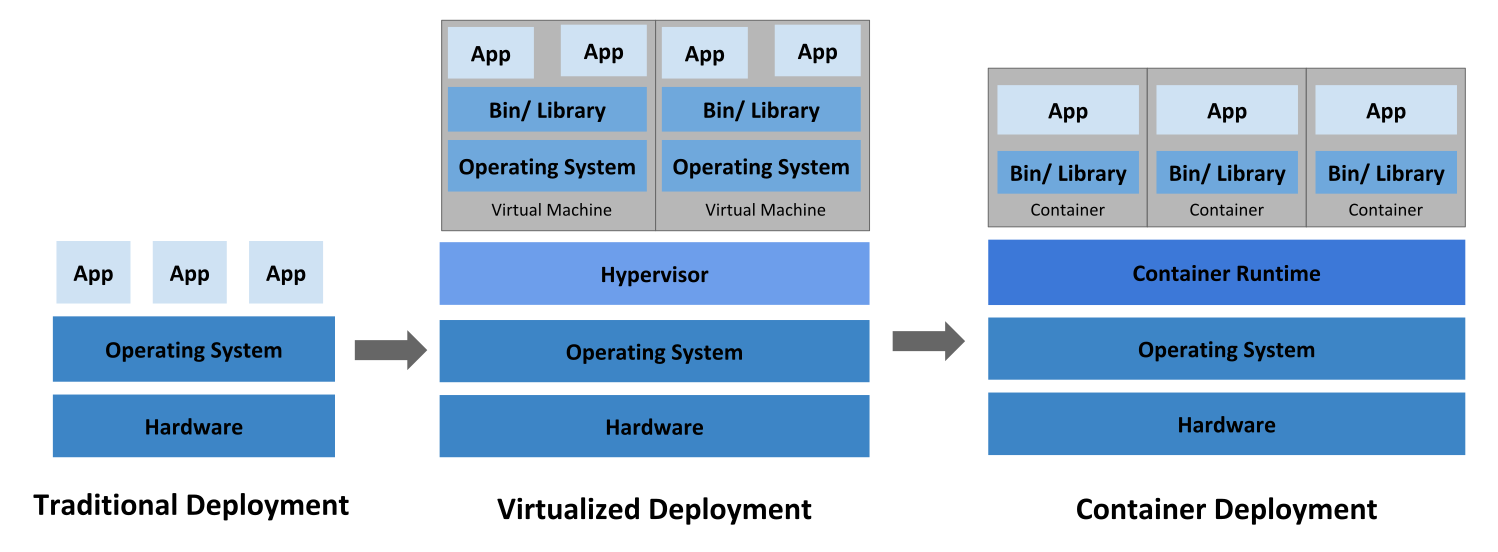
Let's take a look at why Kubernetes is so useful by going back in time.
Traditional deployment era:
Early on, organizations ran applications on physical servers. There was no way to define resource boundaries for applications in a physical server, and this caused resource allocation issues. For example, if multiple applications run on a physical server, there can be instances where one application would take up most of the resources, and as a result, the other applications would underperform. A solution for this would be to run each application on a different physical server. But this did not scale as resources were underutilized, and it was expensive for organizations to maintain many physical servers.
Virtualized deployment era:
As a solution, virtualization was introduced. It allows you to run multiple Virtual Machines (VMs) on a single physical server's CPU. Virtualization allows applications to be isolated between VMs and provides a level of security as the information of one application cannot be freely accessed by another application.
Virtualization allows better utilization of resources in a physical server and allows better scalability because an application can be added or updated easily, reduces hardware costs, and much more. With virtualization you can present a set of physical resources as a cluster of disposable virtual machines.
Each VM is a full machine running all the components, including its own operating system, on top of the virtualized hardware.
Container deployment era:
Containers are similar to VMs, but they have relaxed isolation properties to share the Operating System (OS) among the applications. Therefore, containers are considered lightweight. Similar to a VM, a container has its own filesystem, share of CPU, memory, process space, and more. As they are decoupled from the underlying infrastructure, they are portable across clouds and OS distributions.
Containers have become popular because they provide extra benefits, such as:
This page provides a high-level overview of the essential components that make up a Kubernetes cluster.

The components of a Kubernetes cluster
A Kubernetes cluster consists of a control plane and one or more worker nodes. Here's a brief overview of the main components:
Manage the overall state of the cluster:
Run on every node, maintaining running pods and providing the Kubernetes runtime environment:
Your cluster may require additional software on each node; for example, you might also run systemd on a Linux node to supervise local components.
Addons extend the functionality of Kubernetes. A few important examples include:
Kubernetes allows for flexibility in how these components are deployed and managed. The architecture can be adapted to various needs, from small development environments to large-scale production deployments.
For more detailed information about each component and various ways to configure your cluster architecture, see the Cluster Architecture page.
This page explains how Kubernetes objects are represented in the Kubernetes API, and how you can
express them in .yaml format.
Kubernetes objects are persistent entities in the Kubernetes system. Kubernetes uses these entities to represent the state of your cluster. Specifically, they can describe:
A Kubernetes object is a "record of intent"--once you create the object, the Kubernetes system will constantly work to ensure that the object exists. By creating an object, you're effectively telling the Kubernetes system what you want your cluster's workload to look like; this is your cluster's desired state.
To work with Kubernetes objects—whether to create, modify, or delete them—you'll need to use the
Kubernetes API. When you use the kubectl command-line
interface, for example, the CLI makes the necessary Kubernetes API calls for you. You can also use
the Kubernetes API directly in your own programs using one of the
Client Libraries.
Almost every Kubernetes object includes two nested object fields that govern
the object's configuration: the object spec and the object status.
For objects that have a spec, you have to set this when you create the object,
providing a description of the characteristics you want the resource to have:
its desired state.
The status describes the current state of the object, supplied and updated
by the Kubernetes system and its components. The Kubernetes
control plane continually
and actively manages every object's actual state to match the desired state you
supplied.
For example: in Kubernetes, a Deployment is an object that can represent an
application running on your cluster. When you create the Deployment, you
might set the Deployment spec to specify that you want three replicas of
the application to be running. The Kubernetes system reads the Deployment
spec and starts three instances of your desired application--updating
the status to match your spec. If any of those instances should fail
(a status change), the Kubernetes system responds to the difference
between spec and status by making a correction--in this case, starting
a replacement instance.
For more information on the object spec, status, and metadata, see the Kubernetes API Conventions.
When you create an object in Kubernetes, you must provide the object spec that describes its
desired state, as well as some basic information about the object (such as a name). When you use
the Kubernetes API to create the object (either directly or via kubectl), that API request must
include that information as JSON in the request body.
Most often, you provide the information to kubectl in a file known as a manifest.
By convention, manifests are YAML (you could also use JSON format).
Tools such as kubectl convert the information from a manifest into JSON or another supported
serialization format when making the API request over HTTP.
Here's an example manifest that shows the required fields and object spec for a Kubernetes Deployment:
apiVersion: apps/v1
kind: Deployment
metadata:
  name: nginx-deployment
spec:
  selector:
    matchLabels:
      app: nginx
  replicas: 2 # tells deployment to run 2 pods matching the template
  template:
    metadata:
      labels:
        app: nginx
    spec:
      containers:
      - name: nginx
        image: nginx:1.14.2
        ports:
        - containerPort: 80
One way to create a Deployment using a manifest file like the one above is to use the
kubectl apply command
in the kubectl command-line interface, passing the .yaml file as an argument. Here's an example:
kubectl apply -f https://k8s.io/examples/application/deployment.yaml
The output is similar to this:
deployment.apps/nginx-deployment created
In the manifest (YAML or JSON file) for the Kubernetes object you want to create, you'll need to set values for the following fields:
apiVersion - Which version of the Kubernetes API you're using to create this objectkind - What kind of object you want to createmetadata - Data that helps uniquely identify the object, including a name string, UID, and optional namespacespec - What state you desire for the objectThe precise format of the object spec is different for every Kubernetes object, and contains
nested fields specific to that object. The Kubernetes API Reference
can help you find the spec format for all of the objects you can create using Kubernetes.
For example, see the spec field
for the Pod API reference.
For each Pod, the .spec field specifies the pod and its desired state (such as the container image name for
each container within that pod).
Another example of an object specification is the
spec field
for the StatefulSet API. For StatefulSet, the .spec field specifies the StatefulSet and
its desired state.
Within the .spec of a StatefulSet is a template
for Pod objects. That template describes Pods that the StatefulSet controller will create in order to
satisfy the StatefulSet specification.
Different kinds of objects can also have different .status; again, the API reference pages
detail the structure of that .status field, and its content for each different type of object.
See Kubernetes Configuration Best Practices for additional information on writing YAML configuration files.
Starting with Kubernetes v1.25, the API server offers server side
field validation
that detects unrecognized or duplicate fields in an object. It provides all the functionality
of kubectl --validate on the server side.
The kubectl tool uses the --validate flag to set the level of field validation. It accepts the
values ignore, warn, and strict while also accepting the values true (equivalent to strict)
and false (equivalent to ignore). The default validation setting for kubectl is --validate=true.
StrictWarnIgnoreWhen kubectl cannot connect to an API server that supports field validation it will fall back
to using client-side validation. Kubernetes 1.27 and later versions always offer field validation;
older Kubernetes releases might not. If your cluster is older than v1.27, check the documentation
for your version of Kubernetes.
If you're new to Kubernetes, read more about the following:
Kubernetes Object Management
explains how to use kubectl to manage objects.
You might need to install kubectl if you don't already have it available.
To learn about the Kubernetes API in general, visit:
To learn about objects in Kubernetes in more depth, read other pages in this section:
The kubectl command-line tool supports several different ways to create and manage
Kubernetes objects. This document provides an overview of the different
approaches. Read the Kubectl book for
details of managing objects by Kubectl.
| Management technique | Operates on | Recommended environment | Supported writers | Learning curve |
|---|---|---|---|---|
| Imperative commands | Live objects | Development projects | 1+ | Lowest |
| Imperative object configuration | Individual files | Production projects | 1 | Moderate |
| Declarative object configuration | Directories of files | Production projects | 1+ | Highest |
When using imperative commands, a user operates directly on live objects
in a cluster. The user provides operations to
the kubectl command as arguments or flags.
This is the recommended way to get started or to run a one-off task in a cluster. Because this technique operates directly on live objects, it provides no history of previous configurations.
Run an instance of the nginx container by creating a Deployment object:
kubectl create deployment nginx --image nginx
Advantages compared to object configuration:
Disadvantages compared to object configuration:
In imperative object configuration, the kubectl command specifies the operation (create, replace, etc.), optional flags and at least one file name. The file specified must contain a full definition of the object in YAML or JSON format.
See the API reference for more details on object definitions.
replace command replaces the existing
spec with the newly provided one, dropping all changes to the object missing from
the configuration file. This approach should not be used with resource
types whose specs are updated independently of the configuration file.
Services of type LoadBalancer, for example, have their externalIPs field updated
independently from the configuration by the cluster.Create the objects defined in a configuration file:
kubectl create -f nginx.yaml
Delete the objects defined in two configuration files:
kubectl delete -f nginx.yaml -f redis.yaml
Update the objects defined in a configuration file by overwriting the live configuration:
kubectl replace -f nginx.yaml
Advantages compared to imperative commands:
Disadvantages compared to imperative commands:
Advantages compared to declarative object configuration:
Disadvantages compared to declarative object configuration:
When using declarative object configuration, a user operates on object
configuration files stored locally, however the user does not define the
operations to be taken on the files. Create, update, and delete operations
are automatically detected per-object by kubectl. This enables working on
directories, where different operations might be needed for different objects.
patch API operation to write only
observed differences, instead of using the replace
API operation to replace the entire object configuration.Process all object configuration files in the configs directory, and create or
patch the live objects. You can first diff to see what changes are going to be
made, and then apply:
kubectl diff -f configs/
kubectl apply -f configs/
Recursively process directories:
kubectl diff -R -f configs/
kubectl apply -R -f configs/
Advantages compared to imperative object configuration:
Disadvantages compared to imperative object configuration:
Each object in your cluster has a Name that is unique for that type of resource. Every Kubernetes object also has a UID that is unique across your whole cluster.
For example, you can only have one Pod named myapp-1234 within the same namespace, but you can have one Pod and one Deployment that are each named myapp-1234.
For non-unique user-provided attributes, Kubernetes provides labels and annotations.
A client-provided string that refers to an object in a resource
URL, such as /api/v1/pods/some-name.
Only one object of a given kind can have a given name at a time. However, if you delete the object, you can make a new object with the same name.
Names must be unique across all API versions of the same resource. API resources are distinguished by their API group, resource type, namespace (for namespaced resources), and name. In other words, API version is irrelevant in this context.
The server may generate a name when generateName is provided instead of name in a resource create request.
When generateName is used, the provided value is used as a name prefix, which server appends a generated suffix
to. Even though the name is generated, it may conflict with existing names resulting in an HTTP 409 response. This
became far less likely to happen in Kubernetes v1.31 and later, since the server will make up to 8 attempts to generate a
unique name before returning an HTTP 409 response.
Below are four types of commonly used name constraints for resources.
Most resource types require a name that can be used as a DNS subdomain name as defined in RFC 1123. This means the name must:
Some resource types require their names to follow the DNS label standard as defined in RFC 1123. This means the name must:
RelaxedServiceNameValidation feature gate is enabled,
Service object names are allowed to start with a digit.Some resource types require their names to follow the DNS label standard as defined in RFC 1035. This means the name must:
RelaxedServiceNameValidation
feature gate is enabled for Service objects, which allows Service names to start with digits.Some resource types require their names to be able to be safely encoded as a path segment. In other words, the name may not be "." or ".." and the name may not contain "/" or "%".
Here's an example manifest for a Pod named nginx-demo.
apiVersion: v1
kind: Pod
metadata:
  name: nginx-demo
spec:
  containers:
  - name: nginx
    image: nginx:1.14.2
    ports:
    - containerPort: 80
A Kubernetes systems-generated string to uniquely identify objects.
Every object created over the whole lifetime of a Kubernetes cluster has a distinct UID. It is intended to distinguish between historical occurrences of similar entities.
Kubernetes UIDs are universally unique identifiers (also known as UUIDs). UUIDs are standardized as ISO/IEC 9834-8 and as ITU-T X.667.
Labels are key/value pairs that are attached to objects such as Pods. Labels are intended to be used to specify identifying attributes of objects that are meaningful and relevant to users, but do not directly imply semantics to the core system. Labels can be used to organize and to select subsets of objects. Labels can be attached to objects at creation time and subsequently added and modified at any time. Each object can have a set of key/value labels defined. Each Key must be unique for a given object.
"metadata": {
  "labels": {
    "key1" : "value1",
    "key2" : "value2"
  }
}
Labels allow for efficient queries and watches and are ideal for use in UIs and CLIs. Non-identifying information should be recorded using annotations.
Labels enable users to map their own organizational structures onto system objects in a loosely coupled fashion, without requiring clients to store these mappings.
Service deployments and batch processing pipelines are often multi-dimensional entities (e.g., multiple partitions or deployments, multiple release tracks, multiple tiers, multiple micro-services per tier). Management often requires cross-cutting operations, which breaks encapsulation of strictly hierarchical representations, especially rigid hierarchies determined by the infrastructure rather than by users.
Example labels:
"release" : "stable", "release" : "canary""environment" : "dev", "environment" : "qa", "environment" : "production""tier" : "frontend", "tier" : "backend", "tier" : "cache""partition" : "customerA", "partition" : "customerB""track" : "daily", "track" : "weekly"These are examples of commonly used labels; you are free to develop your own conventions. Keep in mind that label Key must be unique for a given object.
Labels are key/value pairs. Valid label keys have two segments: an optional
prefix and name, separated by a slash (/). The name segment is required and
must be 63 characters or less, beginning and ending with an alphanumeric
character ([a-z0-9A-Z]) with dashes (-), underscores (_), dots (.),
and alphanumerics between. The prefix is optional. If specified, the prefix
must be a DNS subdomain: a series of DNS labels separated by dots (.),
not longer than 253 characters in total, followed by a slash (/).
If the prefix is omitted, the label Key is presumed to be private to the user.
Automated system components (e.g. kube-scheduler, kube-controller-manager,
kube-apiserver, kubectl, or other third-party automation) which add labels
to end-user objects must specify a prefix.
The kubernetes.io/ and k8s.io/ prefixes are
reserved for Kubernetes core components.
Valid label value:
[a-z0-9A-Z]),-), underscores (_), dots (.), and alphanumerics between.For example, here's a manifest for a Pod that has two labels
environment: production and app: nginx:
apiVersion: v1
kind: Pod
metadata:
  name: label-demo
  labels:
    environment: production
    app: nginx
spec:
  containers:
  - name: nginx
    image: nginx:1.14.2
    ports:
    - containerPort: 80
Unlike names and UIDs, labels do not provide uniqueness. In general, we expect many objects to carry the same label(s).
Via a label selector, the client/user can identify a set of objects. The label selector is the core grouping primitive in Kubernetes.
The API currently supports two types of selectors: equality-based and set-based.
A label selector can be made of multiple requirements which are comma-separated.
In the case of multiple requirements, all must be satisfied so the comma separator
acts as a logical AND (&&) operator.
The semantics of empty or non-specified selectors are dependent on the context, and API types that use selectors should document the validity and meaning of them.
||) operator.
Ensure your filter statements are structured accordingly.Equality- or inequality-based requirements allow filtering by label keys and values.
Matching objects must satisfy all of the specified label constraints, though they may
have additional labels as well. Three kinds of operators are admitted =,==,!=.
The first two represent equality (and are synonyms), while the latter represents inequality.
For example:
environment = production
tier != frontend
The former selects all resources with key equal to environment and value equal to production.
The latter selects all resources with key equal to tier and value distinct from frontend,
and all resources with no labels with the tier key. One could filter for resources in production
excluding frontend using the comma operator: environment=production,tier!=frontend
One usage scenario for equality-based label requirement is for Pods to specify
node selection criteria. For example, the sample Pod below selects nodes where
the accelerator label exists and is set to nvidia-tesla-p100.
apiVersion: v1
kind: Pod
metadata:
  name: cuda-test
spec:
  containers:
    - name: cuda-test
      image: "registry.k8s.io/cuda-vector-add:v0.1"
      resources:
        limits:
          nvidia.com/gpu: 1
  nodeSelector:
    accelerator: nvidia-tesla-p100
Set-based label requirements allow filtering keys according to a set of values.
Three kinds of operators are supported: in,notin and exists (only the key identifier).
For example:
environment in (production, qa)
tier notin (frontend, backend)
partition
!partition
environment and value
equal to production or qa.tier and values other
than frontend and backend, and all resources with no labels with the tier key.partition;
no values are checked.partition;
no values are checked.Similarly the comma separator acts as an AND operator. So filtering resources
with a partition key (no matter the value) and with environment different
than qa can be achieved using partition,environment notin (qa).
The set-based label selector is a general form of equality since
environment=production is equivalent to environment in (production);
similarly for != and notin.
Set-based requirements can be mixed with equality-based requirements.
For example: partition in (customerA, customerB),environment!=qa.
For list and watch operations, you can specify label selectors to filter the sets of objects returned; you specify the filter using a query parameter. (To learn in detail about watches in Kubernetes, read efficient detection of changes). Both requirements are permitted (presented here as they would appear in a URL query string):
?labelSelector=environment%3Dproduction,tier%3Dfrontend?labelSelector=environment+in+%28production%2Cqa%29%2Ctier+in+%28frontend%29Both label selector styles can be used to list or watch resources via a REST client.
For example, targeting apiserver with kubectl and using equality-based one may write:
kubectl get pods -l environment=production,tier=frontend
or using set-based requirements:
kubectl get pods -l 'environment in (production),tier in (frontend)'
As already mentioned set-based requirements are more expressive. For instance, they can implement the OR operator on values:
kubectl get pods -l 'environment in (production, qa)'
or restricting negative matching via notin operator:
kubectl get pods -l 'environment,environment notin (frontend)'
Some Kubernetes objects, such as services
and replicationcontrollers,
also use label selectors to specify sets of other resources, such as
pods.
The set of pods that a service targets is defined with a label selector.
Similarly, the population of pods that a replicationcontroller should
manage is also defined with a label selector.
Label selectors for both objects are defined in json or yaml files using maps,
and only equality-based requirement selectors are supported:
"selector": {
    "component" : "redis",
}
or
selector:
  component: redis
This selector (respectively in json or yaml format) is equivalent to
component=redis or component in (redis).
Newer resources, such as Job,
Deployment,
ReplicaSet, and
DaemonSet,
support set-based requirements as well.
selector:
  matchLabels:
    component: redis
  matchExpressions:
    - { key: tier, operator: In, values: [cache] }
    - { key: environment, operator: NotIn, values: [dev] }
matchLabels is a map of {key,value} pairs. A single {key,value} in the
matchLabels map is equivalent to an element of matchExpressions, whose key
field is "key", the operator is "In", and the values array contains only "value".
matchExpressions is a list of pod selector requirements. Valid operators include
In, NotIn, Exists, and DoesNotExist. The values set must be non-empty in the case of
In and NotIn. All of the requirements, from both matchLabels and matchExpressions
are ANDed together -- they must all be satisfied in order to match.
One use case for selecting over labels is to constrain the set of nodes onto which a pod can schedule. See the documentation on node selection for more information.
You can apply a single label to any resources, but this is not always the best practice. There are many scenarios where multiple labels should be used to distinguish resource sets from one another.
For instance, different applications would use different values for the app label, but a
multi-tier application, such as the guestbook example,
would additionally need to distinguish each tier.
In the following examples, the app label is included for convenience in manual queries
and simple CLI usage. The app.kubernetes.io/name label follows the recommended Kubernetes
labeling conventions and is better suited for tooling and automation.
The frontend could carry the following labels:
labels:
  app: guestbook
  app.kubernetes.io/name: guestbook
  tier: frontend
while the Redis master and replica would have different tier labels, and perhaps even an
additional role label:
labels:
  app: guestbook
  app.kubernetes.io/name: guestbook
  tier: backend
  role: master
and
labels:
  app: guestbook
  app.kubernetes.io/name: guestbook
  tier: backend
  role: replica
The labels allow for slicing and dicing the resources along any dimension specified by a label:
kubectl apply -f examples/guestbook/all-in-one/guestbook-all-in-one.yaml
kubectl get pods -Lapp -Ltier -Lrole
NAME                           READY  STATUS    RESTARTS   AGE   APP         TIER       ROLE
guestbook-fe-4nlpb             1/1    Running   0          1m    guestbook   frontend   <none>
guestbook-fe-ght6d             1/1    Running   0          1m    guestbook   frontend   <none>
guestbook-fe-jpy62             1/1    Running   0          1m    guestbook   frontend   <none>
guestbook-redis-master-5pg3b   1/1    Running   0          1m    guestbook   backend    master
guestbook-redis-replica-2q2yf  1/1    Running   0          1m    guestbook   backend    replica
guestbook-redis-replica-qgazl  1/1    Running   0          1m    guestbook   backend    replica
my-nginx-divi2                 1/1    Running   0          29m   nginx       <none>     <none>
my-nginx-o0ef1                 1/1    Running   0          29m   nginx       <none>     <none>
kubectl get pods -lapp=guestbook,role=replica
NAME                           READY  STATUS   RESTARTS  AGE
guestbook-redis-replica-2q2yf  1/1    Running  0         3m
guestbook-redis-replica-qgazl  1/1    Running  0         3m
Sometimes you may want to relabel existing pods and other resources before creating
new resources. This can be done with kubectl label.
For example, if you want to label all your NGINX Pods as frontend tier, run:
kubectl label pods -l app=nginx tier=fe
pod/my-nginx-2035384211-j5fhi labeled
pod/my-nginx-2035384211-u2c7e labeled
pod/my-nginx-2035384211-u3t6x labeled
This first filters all pods with the label "app=nginx", and then labels them with the "tier=fe". To see the pods you labeled, run:
kubectl get pods -l app=nginx -L tier
NAME                        READY     STATUS    RESTARTS   AGE       TIER
my-nginx-2035384211-j5fhi   1/1       Running   0          23m       fe
my-nginx-2035384211-u2c7e   1/1       Running   0          23m       fe
my-nginx-2035384211-u3t6x   1/1       Running   0          23m       fe
This outputs all "app=nginx" pods, with an additional label column of pods' tier
(specified with -L or --label-columns).
For more information, please see kubectl label.
In Kubernetes, namespaces provide a mechanism for isolating groups of resources within a single cluster. Names of resources need to be unique within a namespace, but not across namespaces. Namespace-based scoping is applicable only for namespaced objects (e.g. Deployments, Services, etc.) and not for cluster-wide objects (e.g. StorageClass, Nodes, PersistentVolumes, etc.).
Namespaces are intended for use in environments with many users spread across multiple teams, or projects. For clusters with a few to tens of users, you should not need to create or think about namespaces at all. Start using namespaces when you need the features they provide.
Namespaces provide a scope for names. Names of resources need to be unique within a namespace, but not across namespaces. Namespaces cannot be nested inside one another and each Kubernetes resource can only be in one namespace.
Namespaces are a way to divide cluster resources between multiple users (via resource quota).
It is not necessary to use multiple namespaces to separate slightly different resources, such as different versions of the same software: use labels to distinguish resources within the same namespace.
default namespace. Instead, make other namespaces and use those.Kubernetes starts with four initial namespaces:
defaultkube-node-leasekube-publickube-systemCreation and deletion of namespaces are described in the Admin Guide documentation for namespaces.
kube-, since it is reserved for Kubernetes system namespaces.You can list the current namespaces in a cluster using:
kubectl get namespace
NAME              STATUS   AGE
default           Active   1d
kube-node-lease   Active   1d
kube-public       Active   1d
kube-system       Active   1d
To set the namespace for a current request, use the --namespace flag.
For example:
kubectl run nginx --image=nginx --namespace=<insert-namespace-name-here>
kubectl get pods --namespace=<insert-namespace-name-here>
You can permanently save the namespace for all subsequent kubectl commands in that context.
kubectl config set-context --current --namespace=<insert-namespace-name-here>
# Validate it
kubectl config view --minify | grep namespace:
When you create a Service,
it creates a corresponding DNS entry.
This entry is of the form <service-name>.<namespace-name>.svc.cluster.local, which means
that if a container only uses <service-name>, it will resolve to the service which
is local to a namespace. This is useful for using the same configuration across
multiple namespaces such as Development, Staging and Production. If you want to reach
across namespaces, you need to use the fully qualified domain name (FQDN).
As a result, all namespace names must be valid RFC 1123 DNS labels.
By creating namespaces with the same name as public top-level domains, Services in these namespaces can have short DNS names that overlap with public DNS records. Workloads from any namespace performing a DNS lookup without a trailing dot will be redirected to those services, taking precedence over public DNS.
To mitigate this, limit privileges for creating namespaces to trusted users. If required, you could additionally configure third-party security controls, such as admission webhooks, to block creating any namespace with the name of public TLDs.
Most Kubernetes resources (e.g. pods, services, replication controllers, and others) are in some namespaces. However namespace resources are not themselves in a namespace. And low-level resources, such as nodes and persistentVolumes, are not in any namespace.
To see which Kubernetes resources are and aren't in a namespace:
# In a namespace
kubectl api-resources --namespaced=true

# Not in a namespace
kubectl api-resources --namespaced=false
Kubernetes 1.22 [stable]
The Kubernetes control plane sets an immutable label
kubernetes.io/metadata.name on all namespaces.
The value of the label is the namespace name.
You can use Kubernetes annotations to attach arbitrary non-identifying metadata to objects. Clients such as tools and libraries can retrieve this metadata.
You can use either labels or annotations to attach metadata to Kubernetes objects. Labels can be used to select objects and to find collections of objects that satisfy certain conditions. In contrast, annotations are not used to identify and select objects. The metadata in an annotation can be small or large, structured or unstructured, and can include characters not permitted by labels. It is possible to use labels as well as annotations in the metadata of the same object.
Annotations, like labels, are key/value maps:
"metadata": {
  "annotations": {
    "key1" : "value1",
    "key2" : "value2"
  }
}
Here are some examples of information that could be recorded in annotations:
Fields managed by a declarative configuration layer. Attaching these fields as annotations distinguishes them from default values set by clients or servers, and from auto-generated fields and fields set by auto-sizing or auto-scaling systems.
Build, release, or image information like timestamps, release IDs, git branch, PR numbers, image hashes, and registry address.
Pointers to logging, monitoring, analytics, or audit repositories.
Client library or tool information that can be used for debugging purposes: for example, name, version, and build information.
User or tool/system provenance information, such as URLs of related objects from other ecosystem components.
Lightweight rollout tool metadata: for example, config or checkpoints.
Phone or pager numbers of persons responsible, or directory entries that specify where that information can be found, such as a team web site.
Directives from the end-user to the implementations to modify behavior or engage non-standard features.
Instead of using annotations, you could store this type of information in an external database or directory, but that would make it much harder to produce shared client libraries and tools for deployment, management, introspection, and the like.
Annotations are key/value pairs. Valid annotation keys have two segments: an optional prefix and name, separated by a slash (/). The name segment is required and must be 63 characters or less, beginning and ending with an alphanumeric character ([a-z0-9A-Z]) with dashes (-), underscores (_), dots (.), and alphanumerics between. The prefix is optional. If specified, the prefix must be a DNS subdomain: a series of DNS labels separated by dots (.), not longer than 253 characters in total, followed by a slash (/).
If the prefix is omitted, the annotation Key is presumed to be private to the user. Automated system components (e.g. kube-scheduler, kube-controller-manager, kube-apiserver, kubectl, or other third-party automation) which add annotations to end-user objects must specify a prefix.
The kubernetes.io/ and k8s.io/ prefixes are reserved for Kubernetes core components.
For example, here's a manifest for a Pod that has the annotation imageregistry: https://hub.docker.com/ :
apiVersion: v1
kind: Pod
metadata:
  name: annotations-demo
  annotations:
    imageregistry: "https://hub.docker.com/"
spec:
  containers:
  - name: nginx
    image: nginx:1.14.2
    ports:
    - containerPort: 80
Field selectors let you select Kubernetes objects based on the value of one or more resource fields. Here are some examples of field selector queries:
metadata.name=my-servicemetadata.namespace!=defaultstatus.phase=PendingThis kubectl command selects all Pods for which the value of the status.phase field is Running:
kubectl get pods --field-selector status.phase=Running
kubectl queries kubectl get pods and kubectl get pods --field-selector "" equivalent.Supported field selectors vary by Kubernetes resource type. All resource types support the metadata.name and metadata.namespace fields. Using unsupported field selectors produces an error. For example:
kubectl get ingress --field-selector foo.bar=baz
Error from server (BadRequest): Unable to find "ingresses" that match label selector "", field selector "foo.bar=baz": "foo.bar" is not a known field selector: only "metadata.name", "metadata.namespace"
| Kind | Fields |
|---|---|
| Pod | spec.nodeNamespec.restartPolicyspec.schedulerNamespec.serviceAccountNamespec.hostNetworkstatus.phasestatus.podIPstatus.podIPsstatus.nominatedNodeName |
| Event | involvedObject.kindinvolvedObject.namespaceinvolvedObject.nameinvolvedObject.uidinvolvedObject.apiVersioninvolvedObject.resourceVersioninvolvedObject.fieldPathreasonreportingComponentsourcetype |
| Secret | type |
| Namespace | status.phase |
| ReplicaSet | status.replicas |
| ReplicationController | status.replicas |
| Job | status.successful |
| Node | spec.unschedulable |
| CertificateSigningRequest | spec.signerName |
All custom resource types support the metadata.name and metadata.namespace fields.
Additionally, the spec.versions[*].selectableFields field of a CustomResourceDefinition
declares which other fields in a custom resource may be used in field selectors. See selectable fields for custom resources
for more information about how to use field selectors with CustomResourceDefinitions.
You can use the =, ==, and != operators with field selectors (= and == mean the same thing). This kubectl command, for example, selects all Kubernetes Services that aren't in the default namespace:
kubectl get services --all-namespaces --field-selector metadata.namespace!=default
As with label and other selectors, field selectors can be chained together as a comma-separated list. This kubectl command selects all Pods for which the status.phase does not equal Running and the spec.restartPolicy field equals Always:
kubectl get pods --field-selector=status.phase!=Running,spec.restartPolicy=Always
You can use field selectors across multiple resource types. This kubectl command selects all Statefulsets and Services that are not in the default namespace:
kubectl get statefulsets,services --all-namespaces --field-selector metadata.namespace!=default
Finalizers are namespaced keys that tell Kubernetes to wait until specific conditions are met before it fully deletes resources that are marked for deletion. Finalizers alert controllers to clean up resources the deleted object owned.
When you tell Kubernetes to delete an object that has finalizers specified for
it, the Kubernetes API marks the object for deletion by populating .metadata.deletionTimestamp,
and returns a 202 status code (HTTP "Accepted"). The target object remains in a terminating state while the
control plane, or other components, take the actions defined by the finalizers.
After these actions are complete, the controller removes the relevant finalizers
from the target object. When the metadata.finalizers field is empty,
Kubernetes considers the deletion complete and deletes the object.
You can use finalizers to control garbage collection of resources. For example, you can define a finalizer to clean up related API resources or infrastructure before the controller deletes the object being finalized.
You can use finalizers to control garbage collection of objects by alerting controllers to perform specific cleanup tasks before deleting the target resource.
Finalizers don't usually specify the code to execute. Instead, they are typically lists of keys on a specific resource similar to annotations. Kubernetes specifies some finalizers automatically, but you can also specify your own.
When you create a resource using a manifest file, you can specify finalizers in
the metadata.finalizers field. When you attempt to delete the resource, the
API server handling the delete request notices the values in the finalizers field
and does the following:
metadata.deletionTimestamp field with the
time you started the deletion.metadata.finalizers field202 status code (HTTP "Accepted")The controller managing that finalizer notices the update to the object setting the
metadata.deletionTimestamp, indicating deletion of the object has been requested.
The controller then attempts to satisfy the requirements of the finalizers
specified for that resource. Each time a finalizer condition is satisfied, the
controller removes that key from the resource's finalizers field. When the
finalizers field is emptied, an object with a deletionTimestamp field set
is automatically deleted. You can also use finalizers to prevent deletion of unmanaged resources.
A common example of a finalizer is kubernetes.io/pv-protection, which prevents
accidental deletion of PersistentVolume objects. When a PersistentVolume
object is in use by a Pod, Kubernetes adds the pv-protection finalizer. If you
try to delete the PersistentVolume, it enters a Terminating status, but the
controller can't delete it because the finalizer exists. When the Pod stops
using the PersistentVolume, Kubernetes clears the pv-protection finalizer,
and the controller deletes the volume.
When you DELETE an object, Kubernetes adds the deletion timestamp for that object and then
immediately starts to restrict changes to the .metadata.finalizers field for the object that is
now pending deletion. You can remove existing finalizers (deleting an entry from the finalizers
list) but you cannot add a new finalizer. You also cannot modify the deletionTimestamp for an
object once it is set.
After the deletion is requested, you can not resurrect this object. The only way is to delete it and make a new similar object.
example.com/finalizer-name.
Kubernetes enforces this format; the API server rejects writes to objects where the change does not use qualified finalizer names for any custom finalizer.Like labels, owner references describe the relationships between objects in Kubernetes, but are used for a different purpose. When a controller manages objects like Pods, it uses labels to track changes to groups of related objects. For example, when a Job creates one or more Pods, the Job controller applies labels to those pods and tracks changes to any Pods in the cluster with the same label.
The Job controller also adds owner references to those Pods, pointing at the Job that created the Pods. If you delete the Job while these Pods are running, Kubernetes uses the owner references (not labels) to determine which Pods in the cluster need cleanup.
Kubernetes also processes finalizers when it identifies owner references on a resource targeted for deletion.
In some situations, finalizers can block the deletion of dependent objects, which can cause the targeted owner object to remain for longer than expected without being fully deleted. In these situations, you should check finalizers and owner references on the target owner and dependent objects to troubleshoot the cause.
In Kubernetes, some objects are owners of other objects. For example, a ReplicaSet is the owner of a set of Pods. These owned objects are dependents of their owner.
Ownership is different from the labels and selectors
mechanism that some resources also use. For example, consider a Service that
creates EndpointSlice objects. The Service uses labels to allow the control plane to
determine which EndpointSlice objects are used for that Service. In addition
to the labels, each EndpointSlice that is managed on behalf of a Service has
an owner reference. Owner references help different parts of Kubernetes avoid
interfering with objects they don’t control.
Dependent objects have a metadata.ownerReferences field that references their
owner object. A valid owner reference consists of the object name and a UID
within the same namespace as the dependent object. Kubernetes sets the value of
this field automatically for objects that are dependents of other objects like
ReplicaSets, DaemonSets, Deployments, Jobs and CronJobs, and ReplicationControllers.
You can also configure these relationships manually by changing the value of
this field. However, you usually don't need to and can allow Kubernetes to
automatically manage the relationships.
Dependent objects also have an ownerReferences.blockOwnerDeletion field that
takes a boolean value and controls whether specific dependents can block garbage
collection from deleting their owner object. Kubernetes automatically sets this
field to true if a controller
(for example, the Deployment controller) sets the value of the
metadata.ownerReferences field. You can also set the value of the
blockOwnerDeletion field manually to control which dependents block garbage
collection.
A Kubernetes admission controller controls user access to change this field for dependent resources, based on the delete permissions of the owner. This control prevents unauthorized users from delaying owner object deletion.
Cross-namespace owner references are disallowed by design. Namespaced dependents can specify cluster-scoped or namespaced owners. A namespaced owner must exist in the same namespace as the dependent. If it does not, the owner reference is treated as absent, and the dependent is subject to deletion once all owners are verified absent.
Cluster-scoped dependents can only specify cluster-scoped owners. In v1.20+, if a cluster-scoped dependent specifies a namespaced kind as an owner, it is treated as having an unresolvable owner reference, and is not able to be garbage collected.
In v1.20+, if the garbage collector detects an invalid cross-namespace ownerReference,
or a cluster-scoped dependent with an ownerReference referencing a namespaced kind, a warning Event
with a reason of OwnerRefInvalidNamespace and an involvedObject of the invalid dependent is reported.
You can check for that kind of Event by running
kubectl get events -A --field-selector=reason=OwnerRefInvalidNamespace.
When you tell Kubernetes to delete a resource, the API server allows the
managing controller to process any finalizer rules
for the resource. Finalizers
prevent accidental deletion of resources your cluster may still need to function
correctly. For example, if you try to delete a PersistentVolume that is still
in use by a Pod, the deletion does not happen immediately because the
PersistentVolume has the kubernetes.io/pv-protection finalizer on it.
Instead, the volume remains in the Terminating status until Kubernetes clears
the finalizer, which only happens after the PersistentVolume is no longer
bound to a Pod.
Kubernetes also adds finalizers to an owner resource when you use either
foreground or orphan cascading deletion.
In foreground deletion, it adds the foreground finalizer so that the
controller must delete dependent resources that also have
ownerReferences.blockOwnerDeletion=true before it deletes the owner. If you
specify an orphan deletion policy, Kubernetes adds the orphan finalizer so
that the controller ignores dependent resources after it deletes the owner
object.
You can visualize and manage Kubernetes objects with more tools than kubectl and the dashboard. A common set of labels allows tools to work interoperably, describing objects in a common manner that all tools can understand.
In addition to supporting tooling, the recommended labels describe applications in a way that can be queried.
The metadata is organized around the concept of an application. Kubernetes is not a platform as a service (PaaS) and doesn't have or enforce a formal notion of an application. Instead, applications are informal and described with metadata. The definition of what an application contains is loose.
Shared labels and annotations share a common prefix: app.kubernetes.io. Labels
without a prefix are private to users. The shared prefix ensures that shared labels
do not interfere with custom user labels.
In order to take full advantage of using these labels, they should be applied on every resource object.
| Key | Description | Example | Type |
|---|---|---|---|
app.kubernetes.io/name |
The name of the application | mysql |
string |
app.kubernetes.io/instance |
A unique name identifying the instance of an application | mysql-abcxyz |
string |
app.kubernetes.io/version |
The current version of the application (e.g., a SemVer 1.0, revision hash, etc.) | 5.7.21 |
string |
app.kubernetes.io/component |
The component within the architecture | database |
string |
app.kubernetes.io/part-of |
The name of a higher level application this one is part of | wordpress |
string |
app.kubernetes.io/managed-by |
The tool being used to manage the operation of an application | Helm |
string |
To illustrate these labels in action, consider the following StatefulSet object:
# This is an excerpt
apiVersion: apps/v1
kind: StatefulSet
metadata:
  labels:
    app.kubernetes.io/name: mysql
    app.kubernetes.io/instance: mysql-abcxyz
    app.kubernetes.io/version: "5.7.21"
    app.kubernetes.io/component: database
    app.kubernetes.io/part-of: wordpress
    app.kubernetes.io/managed-by: Helm
An application can be installed one or more times into a Kubernetes cluster and, in some cases, the same namespace. For example, WordPress can be installed more than once where different websites are different installations of WordPress.
The name of an application and the instance name are recorded separately. For
example, WordPress has a app.kubernetes.io/name of wordpress while it has
an instance name, represented as app.kubernetes.io/instance with a value of
wordpress-abcxyz. This enables the application and instance of the application
to be identifiable. Every instance of an application must have a unique name.
To illustrate different ways to use these labels the following examples have varying complexity.
Consider the case for a simple stateless service deployed using Deployment and Service objects. The following two snippets represent how the labels could be used in their simplest form.
The Deployment is used to oversee the pods running the application itself.
apiVersion: apps/v1
kind: Deployment
metadata:
  labels:
    app.kubernetes.io/name: myservice
    app.kubernetes.io/instance: myservice-abcxyz
...
The Service is used to expose the application.
apiVersion: v1
kind: Service
metadata:
  labels:
    app.kubernetes.io/name: myservice
    app.kubernetes.io/instance: myservice-abcxyz
...
Consider a slightly more complicated application: a web application (WordPress) using a database (MySQL), installed using Helm. The following snippets illustrate the start of objects used to deploy this application.
The start to the following Deployment is used for WordPress:
apiVersion: apps/v1
kind: Deployment
metadata:
  labels:
    app.kubernetes.io/name: wordpress
    app.kubernetes.io/instance: wordpress-abcxyz
    app.kubernetes.io/version: "4.9.4"
    app.kubernetes.io/managed-by: Helm
    app.kubernetes.io/component: server
    app.kubernetes.io/part-of: wordpress
...
The Service is used to expose WordPress:
apiVersion: v1
kind: Service
metadata:
  labels:
    app.kubernetes.io/name: wordpress
    app.kubernetes.io/instance: wordpress-abcxyz
    app.kubernetes.io/version: "4.9.4"
    app.kubernetes.io/managed-by: Helm
    app.kubernetes.io/component: server
    app.kubernetes.io/part-of: wordpress
...
MySQL is exposed as a StatefulSet with metadata for both it and the larger application it belongs to:
apiVersion: apps/v1
kind: StatefulSet
metadata:
  labels:
    app.kubernetes.io/name: mysql
    app.kubernetes.io/instance: mysql-abcxyz
    app.kubernetes.io/version: "5.7.21"
    app.kubernetes.io/managed-by: Helm
    app.kubernetes.io/component: database
    app.kubernetes.io/part-of: wordpress
...
The Service is used to expose MySQL as part of WordPress:
apiVersion: v1
kind: Service
metadata:
  labels:
    app.kubernetes.io/name: mysql
    app.kubernetes.io/instance: mysql-abcxyz
    app.kubernetes.io/version: "5.7.21"
    app.kubernetes.io/managed-by: Helm
    app.kubernetes.io/component: database
    app.kubernetes.io/part-of: wordpress
...
With the MySQL StatefulSet and Service you'll notice information about both MySQL and WordPress, the broader application, are included.
The Kubernetes API server stores objects, relying on an etcd-compatible backing store (often, the backing storage is etcd itself). Each object is serialized using a particular version of that API type; for example, the v1 representation of a ConfigMap. Kubernetes uses the term storage version to describe how an object is stored in your cluster.
The Kubernetes API also relies on automatic conversion; for example, if you have a HorizontalPodAutoscaler, then you can interact with that HorizontalPodAutoscaler using any mix of the v1 and v2 versions of the HorizontalPodAutoscaler API. Kubernetes is responsible for converting each API call so that clients do not see what version is actually serialized.
For cluster administrators, object storage version is an important concept to understand since it is what links the API representation of the object to the actual encoding in the storage backend. This can be important for when the underlying binary encodings of the object matter, such as for encryption at rest, or API deprecation.
The same API may have multiple storage versions that the API Server can then convert to an object schema. A single object that is part of that resource must only have one storage version at any time. This means that the API Server is aware of the binary encodings of the objects and is able to convert between all the stored versions to the API Representation of the object dynamically.
The version of an object is separate from the storage version entirely. For
example, a v1alpha1 and v1beta1 API Object for the same Resource will be
encoded the same in storage as long as the storage version has not been updated
between the two objects.
Every resource will have 1 active storage version at any point in time, meaning that any write to an object will store the object at that storage version. The storage version can be updated however, making it so that objects can be stored at differing versions. One object will only be stored at one storage version at any time.
Reads from the API Server will convert the stored data to the API representation of the object. This makes it so that old storage versions can sit indefinitely as long as no updates occur to the object. Writes, on the other hand, will convert the stored object to the new representation upon update.
Custom resources are defined dynamically, and as such differ from built in Kubernetes types with their storage version. Builtin objects generally have their storage encoding defined separately from their API types, where the stored object acts as a hub and the specific version of the resource does not matter apart from being a field in the object schema.
However, for custom resources, a certain version of the resource must be set as the storage version. The schema defined by that specific version of the custom resource will be used as the encoding of the resource in the storage layer. See the advanced CRD featureset for more detailed information on the API setup and versioning.
For example see this CustomResourceDefinition for crontabs:
apiVersion: apiextensions.k8s.io/v1
kind: CustomResourceDefinition
metadata:
  name: crontabs.example.com
spec:
  group: example.com
  # list of versions supported by this CustomResourceDefinition
  versions:
  - name: v1beta1
    # Each version can be enabled/disabled by Served flag.
    served: true
    # One and only one version must be marked as the storage version.
    storage: true
    schema:
      openAPIV3Schema:
        type: object
        properties:
          host:
            type: string
          port:
            type: string
  - name: v1
    served: true
    storage: false
    schema:
      openAPIV3Schema:
        type: object
        properties:
          host:
            type: string
          port:
            type: string
          time:
            type: string
  conversion:
    strategy: None
  scope: Namespaced
  names:
    plural: crontabs
    singular: crontab
    kind: CronTab
    shortNames:
    - ct
The v1beta1 API definition is used as the storage version, meaning that any
updates or creation of crontabs will be stored with the object schema of the
v1beta1 api. In this case it actually would mean that the v1 API object
would never be able to store the time field since it is not part of the
storage definition. This schema is used in the storage layer as the binary
encoding of the object itself. Trying to set two versions as the stored version
at the same time is considered invalid, since that would mean that two data
schemes would be considered valid ways to store the objects at the same time.
Upon modification of the version that is used for storage, that version of the API will be used to store any new or update CRs. Watching or getting the object will have the object be in use but will just convert the object from the old storage version and not affect the object. Only updating or creating will have an effect and use the newly defined storage version.
There are tools to encrypt the at rest storage of a cluster, especially for cluster secrets. This adds an additional layer of protection for data exfiltration since the actual stored data in the cluster is encrypted. This means that the API Server is actually decrypting the data as it retrieves them from storage. The APIServer must have the key for that storage version in order to decode the object properly.
The storage version in this case is more than just the binary encoding of the object. As long as what is stored can be somehow converted into the API object, it can be used as a storage version.
Multiple storage versions for a single resource can pose problems for cluster administrators. A cluster administrator may not remove old versions of an API for CRDs which may be unsupported until they are sure that all objects are no longer using the storege version associated with it. With a large number of objects and an opaque view into which ones are new and which ones still are backed by old storage versions, it makes it difficult to tell when a version can be safely removed. If a version is removed prematurely, it can mean being unable to read the object entirely.
Another important issue is the use of encryption keys as defined in the section above. Since a resource must be actively in use to update the storage version, when a key rotation is done, both the old encryption key and the new encryption key must remain in use until the administrator is sure all objects have been written to at least once. This poses both security risks and usability issues, since a key cannot be fully removed from use until then.
See storage version migration on examples of how to run a migration to ensure that all objects are using a newer storage version without manual intervention.
The core of Kubernetes' control plane is the API server. The API server exposes an HTTP API that lets end users, different parts of your cluster, and external components communicate with one another.
The Kubernetes API lets you query and manipulate the state of API objects in Kubernetes (for example: Pods, Namespaces, ConfigMaps, and Events).
Most operations can be performed through the kubectl command-line interface or other command-line tools, such as kubeadm, which in turn use the API. However, you can also access the API directly using REST calls. Kubernetes provides a set of client libraries for those looking to write applications using the Kubernetes API.
Each Kubernetes cluster publishes the specification of the APIs that the cluster serves.
There are two mechanisms that Kubernetes uses to publish these API specifications; both are useful
to enable automatic interoperability. For example, the kubectl tool fetches and caches the API
specification for enabling command-line completion and other features.
The two supported mechanisms are as follows:
The Discovery API provides information about the Kubernetes APIs: API names, resources, versions, and supported operations. This is a Kubernetes specific term as it is a separate API from the Kubernetes OpenAPI. It is intended to be a brief summary of the available resources and it does not detail specific schema for the resources. For reference about resource schemas, please refer to the OpenAPI document.
The Kubernetes OpenAPI Document provides (full) OpenAPI v2.0 and 3.0 schemas for all Kubernetes API endpoints. The OpenAPI v3 is the preferred method for accessing OpenAPI as it provides a more comprehensive and accurate view of the API. It includes all the available API paths, as well as all resources consumed and produced for every operations on every endpoints. It also includes any extensibility components that a cluster supports. The data is a complete specification and is significantly larger than that from the Discovery API.
Kubernetes publishes a list of all group versions and resources supported via the Discovery API. This includes the following for each resource:
The API is available in both aggregated and unaggregated form. The aggregated discovery serves two endpoints, while the unaggregated discovery serves a separate endpoint for each group version.
Kubernetes v1.30 [stable](enabled by default)Kubernetes offers stable support for aggregated discovery, publishing
all resources supported by a cluster through two endpoints (/api and
/apis). Requesting this
endpoint drastically reduces the number of requests sent to fetch the
discovery data from the cluster. You can access the data by
requesting the respective endpoints with an Accept header indicating
the aggregated discovery resource:
Accept: application/json;v=v2;g=apidiscovery.k8s.io;as=APIGroupDiscoveryList.
Without indicating the resource type using the Accept header, the default
response for the /api and /apis endpoint is an unaggregated discovery
document.
The discovery document for the built-in resources can be found in the Kubernetes GitHub repository. This Github document can be used as a reference of the base set of the available resources if a Kubernetes cluster is not available to query.
The endpoint also supports ETag and protobuf encoding.
Without discovery aggregation, discovery is published in levels, with the root endpoints publishing discovery information for downstream documents.
A list of all group versions supported by a cluster is published at
the /api and /apis endpoints. Example:
{
  "kind": "APIGroupList",
  "apiVersion": "v1",
  "groups": [
    {
      "name": "apiregistration.k8s.io",
      "versions": [
        {
          "groupVersion": "apiregistration.k8s.io/v1",
          "version": "v1"
        }
      ],
      "preferredVersion": {
        "groupVersion": "apiregistration.k8s.io/v1",
        "version": "v1"
      }
    },
    {
      "name": "apps",
      "versions": [
        {
          "groupVersion": "apps/v1",
          "version": "v1"
        }
      ],
      "preferredVersion": {
        "groupVersion": "apps/v1",
        "version": "v1"
      }
    },
    ...
}
Additional requests are needed to obtain the discovery document for each group version at
/apis/<group>/<version> (for example:
/apis/rbac.authorization.k8s.io/v1alpha1), which advertises the list of
resources served under a particular group version. These endpoints are used by
kubectl to fetch the list of resources supported by a cluster.
For details about the OpenAPI specifications, see the OpenAPI documentation.
Kubernetes serves both OpenAPI v2.0 and OpenAPI v3.0. OpenAPI v3 is the
preferred method of accessing the OpenAPI because it offers a more comprehensive
(lossless) representation of Kubernetes resources. Due to limitations of OpenAPI
version 2, certain fields are dropped from the published OpenAPI including but not
limited to default, nullable, oneOf.
The Kubernetes API server serves an aggregated OpenAPI v2 spec via the
/openapi/v2 endpoint. You can request the response format using
request headers as follows:
| Header | Possible values | Notes |
|---|---|---|
Accept-Encoding |
gzip |
not supplying this header is also acceptable |
Accept |
application/com.github.proto-openapi.spec.v2@v1.0+protobuf |
mainly for intra-cluster use |
application/json |
default | |
* |
serves application/json |
kubectl apply --dry-run=server runs all the applicable validation (and also activates admission-time
checks).Kubernetes v1.27 [stable](enabled by default)Kubernetes supports publishing a description of its APIs as OpenAPI v3.
A discovery endpoint /openapi/v3 is provided to see a list of all
group/versions available. This endpoint only returns JSON. These
group/versions are provided in the following format:
{
    "paths": {
        ...,
        "api/v1": {
            "serverRelativeURL": "/openapi/v3/api/v1?hash=CC0E9BFD992D8C59AEC98A1E2336F899E8318D3CF4C68944C3DEC640AF5AB52D864AC50DAA8D145B3494F75FA3CFF939FCBDDA431DAD3CA79738B297795818CF"
        },
        "apis/admissionregistration.k8s.io/v1": {
            "serverRelativeURL": "/openapi/v3/apis/admissionregistration.k8s.io/v1?hash=E19CC93A116982CE5422FC42B590A8AFAD92CDE9AE4D59B5CAAD568F083AD07946E6CB5817531680BCE6E215C16973CD39003B0425F3477CFD854E89A9DB6597"
        },
        ....
    }
}
The relative URLs are pointing to immutable OpenAPI descriptions, in
order to improve client-side caching. The proper HTTP caching headers
are also set by the API server for that purpose (Expires to 1 year in
the future, and Cache-Control to immutable). When an obsolete URL is
used, the API server returns a redirect to the newest URL.
The Kubernetes API server publishes an OpenAPI v3 spec per Kubernetes
group version at the /openapi/v3/apis/<group>/<version>?hash=<hash>
endpoint.
Refer to the table below for accepted request headers.
| Header | Possible values | Notes |
|---|---|---|
Accept-Encoding |
gzip |
not supplying this header is also acceptable |
Accept |
application/com.github.proto-openapi.spec.v3@v1.0+protobuf |
mainly for intra-cluster use |
application/json |
default | |
* |
serves application/json |
A Golang implementation to fetch the OpenAPI V3 is provided in the package
k8s.io/client-go/openapi3.
Kubernetes 1.35 publishes OpenAPI v2.0 and v3.0; there are no plans to support 3.1 in the near future.
Kubernetes implements an alternative Protobuf based serialization format that is primarily intended for intra-cluster communication. For more information about this format, see the Kubernetes Protobuf serialization design proposal and the Interface Definition Language (IDL) files for each schema located in the Go packages that define the API objects.
Kubernetes stores the serialized state of objects by writing them into etcd.
To make it easier to eliminate fields or restructure resource representations,
Kubernetes supports multiple API versions, each at a different API path, such
as /api/v1 or /apis/rbac.authorization.k8s.io/v1alpha1.
Versioning is done at the API level rather than at the resource or field level to ensure that the API presents a clear, consistent view of system resources and behavior, and to enable controlling access to end-of-life and/or experimental APIs.
To make it easier to evolve and to extend its API, Kubernetes implements API groups that can be enabled or disabled.
API resources are distinguished by their API group, resource type, namespace (for namespaced resources), and name. The API server handles the conversion between API versions transparently: all the different versions are actually representations of the same persisted data. The API server may serve the same underlying data through multiple API versions.
For example, suppose there are two API versions, v1 and v1beta1, for the same
resource. If you originally created an object using the v1beta1 version of its
API, you can later read, update, or delete that object using either the v1beta1
or the v1 API version, until the v1beta1 version is deprecated and removed.
At that point you can continue accessing and modifying the object using the v1 API.
Any system that is successful needs to grow and change as new use cases emerge or existing ones change. Therefore, Kubernetes has designed the Kubernetes API to continuously change and grow. The Kubernetes project aims to not break compatibility with existing clients, and to maintain that compatibility for a length of time so that other projects have an opportunity to adapt.
In general, new API resources and new resource fields can be added often and frequently. Elimination of resources or fields requires following the API deprecation policy.
Kubernetes makes a strong commitment to maintain compatibility for official Kubernetes APIs
once they reach general availability (GA), typically at API version v1. Additionally,
Kubernetes maintains compatibility with data persisted via beta API versions of official Kubernetes APIs,
and ensures that data can be converted and accessed via GA API versions when the feature goes stable.
If you adopt a beta API version, you will need to transition to a subsequent beta or stable API version once the API graduates. The best time to do this is while the beta API is in its deprecation period, since objects are simultaneously accessible via both API versions. Once the beta API completes its deprecation period and is no longer served, the replacement API version must be used.
Refer to API versions reference for more details on the API version level definitions.
The Kubernetes API can be extended in one of two ways:
Kubernetes provides a command line tool for communicating with a Kubernetes cluster's control plane, using the Kubernetes API.
The kubectl tool communicates with your cluster through the Kubernetes API.
For configuration, kubectl looks for a file named config in the $HOME/.kube directory.
You can specify other kubeconfig
files by setting the KUBECONFIG environment variable or by setting the
--kubeconfig flag.
The kubectl tool is the primary interface for creating, inspecting, updating, and deleting Kubernetes objects.
It complements the Kubernetes Components that run inside your cluster
and the Kubernetes API that those components implement.
Whether you run kubectl from your laptop or from a Pod inside the cluster, it sends requests to the API server.
Other clients, such as client libraries and web dashboards
like Headlamp, also communicate through the same API.
The kubectl tool connects to the API server and authenticates using the cluster, user, and context defined in your
kubeconfig file.
When you run kubectl from outside a cluster, it uses the kubeconfig file to find the API server address and credentials.
When kubectl runs inside a Pod (for example, in a CI/CD pipeline), it can use in-cluster authentication
based on the ServiceAccount token mounted in the Pod.
When you run a command, kubectl translates your intent into one or more HTTP requests to the
Kubernetes API. The API server validates each request,
applies it to the cluster state stored in etcd, and
returns the result. This means every kubectl action, whether creating a Deployment or reading logs,
follows the same API-driven path.
Because your kubeconfig can define multiple clusters, users, and contexts, you can use kubectl to
switch between clusters without reconfiguring your environment. Run kubectl config use-context to
change the active context.
The kubectl tool supports many operations, which fall into these broad categories:
kubectl apply for declarative management from configuration files.For syntax, command reference, and examples, see the kubectl reference documentation.
For production workloads, prefer declarative object management
using kubectl apply with version-controlled configuration files.
Declarative management helps you track changes, collaborate, and integrate with GitOps workflows.
Imperative commands (such as kubectl create or kubectl run) are useful for development and experimentation,
but are harder to reproduce and audit.
You can extend kubectl with plugins that add new
sub-commands. Plugins are standalone binaries that follow the kubectl-<plugin-name> naming convention.
The Kubernetes community maintains many plugins, and you can manage them with the
Krew plugin manager.
The kubectl tool supports a version skew of plus-or-minus one minor version relative to the cluster's
control plane. For example, kubectl v1.32 works with control planes at v1.31, v1.32, and v1.33.
Using a compatible version avoids unexpected behavior. See the
version skew policy for details.
kubectl uses.