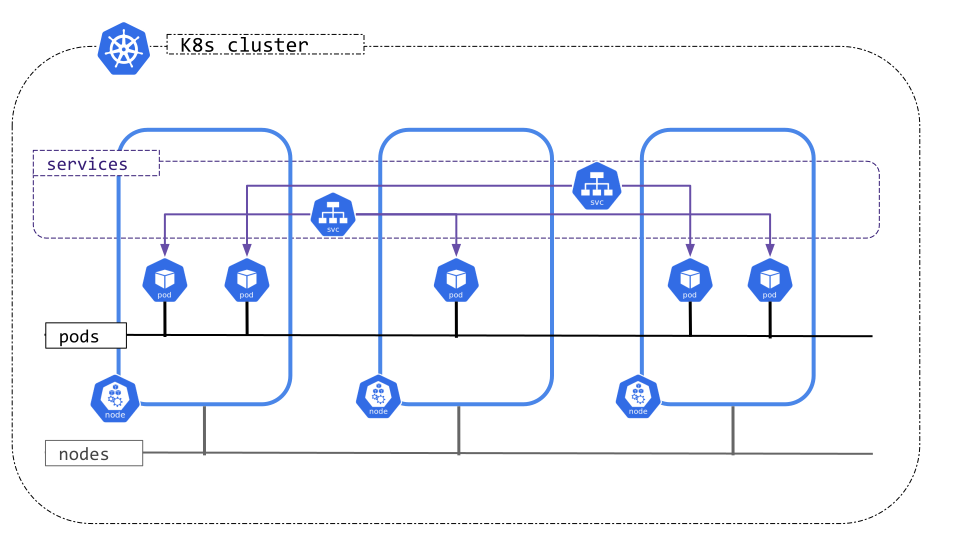
Lower-level detail relevant to creating or administering a Kubernetes cluster.
The cluster administration overview is for anyone creating or administering a Kubernetes cluster. It assumes some familiarity with core Kubernetes concepts.
See the guides in Setup for examples of how to plan, set up, and configure Kubernetes clusters. The solutions listed in this article are called distros.
Before choosing a guide, here are some considerations:
Learn how to manage nodes.
Learn how to set up and manage the resource quota for shared clusters.
Generate Certificates describes the steps to generate certificates using different tool chains.
Kubernetes Container Environment describes the environment for Kubelet managed containers on a Kubernetes node.
Controlling Access to the Kubernetes API describes how Kubernetes implements access control for its own API.
Authenticating explains authentication in Kubernetes, including the various authentication options.
Authorization is separate from authentication, and controls how HTTP calls are handled.
Using Admission Controllers explains plug-ins which intercepts requests to the Kubernetes API server after authentication and authorization.
Admission Webhook Good Practices provides good practices and considerations when designing mutating admission webhooks and validating admission webhooks.
Using Sysctls in a Kubernetes Cluster
describes to an administrator how to use the sysctl command-line tool to set kernel parameters
.
Auditing describes how to interact with Kubernetes' audit logs.
DNS Integration describes how to resolve a DNS name directly to a Kubernetes service.
Logging and Monitoring Cluster Activity explains how logging in Kubernetes works and how to implement it.
In a Kubernetes cluster, a node can be shut down in a planned graceful way or unexpectedly because of reasons such as a power outage or something else external. A node shutdown could lead to workload failure if the node is not drained before the shutdown. A node shutdown can be either graceful or non-graceful.
The kubelet attempts to detect node system shutdown and terminates pods running on the node.
Kubelet ensures that pods follow the normal pod termination process during the node shutdown. During node shutdown, the kubelet does not accept new Pods (even if those Pods are already bound to the node).
Kubernetes v1.21 [beta](enabled by default)On Linux, the graceful node shutdown feature is controlled with the GracefulNodeShutdown
feature gate which is
enabled by default in 1.21.
Kubernetes v1.34 [beta](enabled by default)On Windows, the graceful node shutdown feature is controlled with the WindowsGracefulNodeShutdown
feature gate
which is introduced in 1.32 as an alpha feature. In Kubernetes 1.34 the feature is Beta
and is enabled by default.
Windows graceful node shutdown can not be cancelled.
If kubelet is not running as a Windows service, it will not be able to set and monitor the Preshutdown event, the node will have to go through the Non-Graceful Node Shutdown procedure mentioned above.
In the case where the Windows graceful node shutdown feature is enabled, but the kubelet is not running as a Windows service, the kubelet will continue running instead of failing. However, it will log an error indicating that it needs to be run as a Windows service.
Note that by default, both configuration options described below,
shutdownGracePeriod and shutdownGracePeriodCriticalPods, are set to zero,
thus not activating the graceful node shutdown functionality.
To activate the feature, both options should be configured appropriately and
set to non-zero values.
Once the kubelet is notified of a node shutdown, it sets a NotReady condition on
the Node, with the reason set to "node is shutting down". The kube-scheduler honors this condition
and does not schedule any Pods onto the affected node; other third-party schedulers are
expected to follow the same logic. This means that new Pods won't be scheduled onto that node
and therefore none will start.
The kubelet also rejects Pods during the PodAdmission phase if an ongoing
node shutdown has been detected, so that even Pods with a
toleration for
node.kubernetes.io/not-ready:NoSchedule do not start there.
When kubelet is setting that condition on its Node via the API, the kubelet also begins terminating any Pods that are running locally.
During a graceful shutdown, kubelet terminates pods in two phases:
The graceful node shutdown feature is configured with two
KubeletConfiguration options:
shutdownGracePeriod:
Specifies the total duration that the node should delay the shutdown by. This is the total grace period for pod termination for both regular and critical pods.
shutdownGracePeriodCriticalPods:
Specifies the duration used to terminate
critical pods
during a node shutdown. This value should be less than shutdownGracePeriod.
Ready state.
However, Pods which already started the process of termination will not be restored by kubelet
and will need to be re-scheduled.For example, if shutdownGracePeriod=30s, and
shutdownGracePeriodCriticalPods=10s, kubelet will delay the node shutdown by
30 seconds. During the shutdown, the first 20 (30-10) seconds would be reserved
for gracefully terminating normal pods, and the last 10 seconds would be
reserved for terminating critical pods.
When pods were evicted during the graceful node shutdown, they are marked as shutdown.
Running kubectl get pods shows the status of the evicted pods as Terminated.
And kubectl describe pod indicates that the pod was evicted because of node shutdown:
Reason:         Terminated
Message:        Pod was terminated in response to imminent node shutdown.
Kubernetes v1.24 [beta](enabled by default)To provide more flexibility during graceful node shutdown around the ordering of pods during shutdown, graceful node shutdown honors the PriorityClass for Pods, provided that you enabled this feature in your cluster. The feature allows cluster administrators to explicitly define the ordering of pods during graceful node shutdown based on priority classes.
The Graceful Node Shutdown feature, as described above, shuts down pods in two phases, non-critical pods, followed by critical pods. If additional flexibility is needed to explicitly define the ordering of pods during shutdown in a more granular way, pod priority based graceful shutdown can be used.
When graceful node shutdown honors pod priorities, this makes it possible to do graceful node shutdown in multiple phases, each phase shutting down a particular priority class of pods. The kubelet can be configured with the exact phases and shutdown time per phase.
Assuming the following custom pod priority classes in a cluster,
| Pod priority class name | Pod priority class value |
|---|---|
custom-class-a |
100000 |
custom-class-b |
10000 |
custom-class-c |
1000 |
regular/unset |
0 |
Within the kubelet configuration
the settings for shutdownGracePeriodByPodPriority could look like:
| Pod priority class value | Shutdown period |
|---|---|
| 100000 | 10 seconds |
| 10000 | 180 seconds |
| 1000 | 120 seconds |
| 0 | 60 seconds |
The corresponding kubelet config YAML configuration would be:
shutdownGracePeriodByPodPriority:
  - priority: 100000
    shutdownGracePeriodSeconds: 10
  - priority: 10000
    shutdownGracePeriodSeconds: 180
  - priority: 1000
    shutdownGracePeriodSeconds: 120
  - priority: 0
    shutdownGracePeriodSeconds: 60
The above table implies that any pod with priority value >= 100000 will get
just 10 seconds to shut down, any pod with value >= 10000 and < 100000 will get 180
seconds to shut down, any pod with value >= 1000 and < 10000 will get 120 seconds to shut down.
Finally, all other pods will get 60 seconds to shut down.
One doesn't have to specify values corresponding to all of the classes. For example, you could instead use these settings:
| Pod priority class value | Shutdown period |
|---|---|
| 100000 | 300 seconds |
| 1000 | 120 seconds |
| 0 | 60 seconds |
In the above case, the pods with custom-class-b will go into the same bucket
as custom-class-c for shutdown.
If there are no pods in a particular range, then the kubelet does not wait for pods in that priority range. Instead, the kubelet immediately skips to the next priority class value range.
If this feature is enabled and no configuration is provided, then no ordering action will be taken.
Using this feature requires enabling the GracefulNodeShutdownBasedOnPodPriority
feature gate,
and setting ShutdownGracePeriodByPodPriority in the
kubelet config
to the desired configuration containing the pod priority class values and
their respective shutdown periods.
Metrics graceful_shutdown_start_time_seconds and graceful_shutdown_end_time_seconds
are emitted under the kubelet subsystem to monitor node shutdowns.
Kubernetes v1.28 [stable](enabled by default)A node shutdown action may not be detected by kubelet's Node Shutdown Manager, either because the command does not trigger the inhibitor locks mechanism used by kubelet or because of a user error, i.e., the ShutdownGracePeriod and ShutdownGracePeriodCriticalPods are not configured properly. Please refer to above section Graceful Node Shutdown for more details.
When a node is shutdown but not detected by kubelet's Node Shutdown Manager, the pods that are part of a StatefulSet will be stuck in terminating status on the shutdown node and cannot move to a new running node. This is because kubelet on the shutdown node is not available to delete the pods so the StatefulSet cannot create a new pod with the same name. If there are volumes used by the pods, the VolumeAttachments will not be deleted from the original shutdown node so the volumes used by these pods cannot be attached to a new running node. As a result, the application running on the StatefulSet cannot function properly. If the original shutdown node comes up, the pods will be deleted by kubelet and new pods will be created on a different running node. If the original shutdown node does not come up, these pods will be stuck in terminating status on the shutdown node forever.
To mitigate the above situation, a user can manually add the taint node.kubernetes.io/out-of-service
with either NoExecute or NoSchedule effect to a Node marking it out-of-service.
If a Node is marked out-of-service with this taint, the pods on the node will be forcefully deleted
if there are no matching tolerations on it and volume detach operations for the pods terminating on
the node will happen immediately. This allows the Pods on the out-of-service node to recover quickly
on a different node.
During a non-graceful shutdown, Pods are terminated in the two phases:
out-of-service tolerations.node.kubernetes.io/out-of-service, it should be verified
that the node is already in shutdown or power off state (not in the middle of restarting).In any situation where a pod deletion has not succeeded for 6 minutes, kubernetes will
force detach volumes being unmounted if the node is unhealthy at that instant. Any
workload still running on the node that uses a force-detached volume will cause a
violation of the
CSI specification,
which states that ControllerUnpublishVolume "must be called after all
NodeUnstageVolume and NodeUnpublishVolume on the volume are called and succeed".
In such circumstances, volumes on the node in question might encounter data corruption.
The forced storage detach behaviour is optional; users might opt to use the "Non-graceful node shutdown" feature instead.
Force storage detach on timeout can be disabled by setting the disable-force-detach-on-timeout
config field in kube-controller-manager. Disabling the force detach on timeout feature means
that a volume that is hosted on a node that is unhealthy for more than 6 minutes will not have
its associated
VolumeAttachment
deleted.
After this setting has been applied, unhealthy pods still attached to volumes must be recovered via the Non-Graceful Node Shutdown procedure mentioned above.
Learn more about the following:
Kubernetes can be configured to use swap memory on a node, allowing the kernel to free up physical memory by swapping out pages to backing storage. This is useful for multiple use-cases. For example, nodes running workloads that can benefit from using swap, such as those that have large memory footprints but only access a portion of that memory at any given time. It also helps prevent Pods from being terminated during memory pressure spikes, shields nodes from system-level memory spikes that might compromise its stability, allows for more flexible memory management on the node, and much more.
To learn about configuring swap in your cluster, read Configuring swap memory on Kubernetes nodes.
There are a number of possible ways that one could envision swap use on a node. If kubelet is already running on a node, it would need to be restarted after swap is provisioned in order to identify it.
When kubelet starts on a node in which swap is provisioned and available
(with the failSwapOn: false configuration), kubelet will:
Swap configuration on a node is exposed to a cluster admin via the
memorySwap in the KubeletConfiguration.
As a cluster administrator, you can specify the node's behaviour in the
presence of swap memory by setting memorySwap.swapBehavior.
You need to pick a swap behavior to use. Different nodes in your cluster can use different swap behaviors.
The swap behaviors you can choose for Linux nodes are:
NoSwap (default)LimitedSwapIf you choose the NoSwap behavior, and you configure the kubelet to tolerate
swap space (failSwapOn: false), then your workloads don't use any swap.
However, processes outside of Kubernetes-managed containers, such as systemi services (and even the kubelet itself!) can utilize swap.
You can read configuring swap memory on Kubernetes nodes to learn about enabling swap for your cluster.
The kubelet uses the container runtime API, and directs the container runtime to
apply specific configuration (for example, in the cgroup v2 case, memory.swap.max) in a manner that will
enable the desired swap configuration for a container. For runtimes that use control groups, or cgroups,
the container runtime is then responsible for writing these settings to the container-level cgroup.
Kubelet now collects node and container level metric statistics,
which can be accessed at the /metrics/resource (which is used mainly by monitoring
tools like Prometheus) and /stats/summary (which is used mainly by Autoscalers) kubelet HTTP endpoints.
This allows clients who can directly request the kubelet to
monitor swap usage and remaining swap memory when using LimitedSwap.
Additionally, a machine_swap_bytes metric has been added to cadvisor to show
the total physical swap capacity of the machine.
See this page for more info.
For example, these /metrics/resource are supported:
node_swap_usage_bytes: Current swap usage of the node in bytes.container_swap_usage_bytes: Current amount of the container swap usage in bytes.container_swap_limit_bytes: Current amount of the container swap limit in bytes.kubectl top --show-swapQuerying metrics is valuable, but somewhat cumbersome, as these metrics
are designed to be used by software rather than humans.
In order to consume this data in a more user-friendly way,
the kubectl top command has been extended to support swap metrics, using the --show-swap flag.
In order to receive information about swap usage on nodes, kubectl top nodes --show-swap can be used:
kubectl top nodes --show-swap
This will result in an output similar to:
NAME    CPU(cores)   CPU(%)   MEMORY(bytes)   MEMORY(%)   SWAP(bytes)    SWAP(%)
node1   1m           10%      2Mi             10%         1Mi            0%
node2   5m           10%      6Mi             10%         2Mi            0%
node3   3m           10%      4Mi             10%         <unknown>      <unknown>
In order to receive information about swap usage by pods, kubectl top pods --show-swap can be used:
kubectl top pod -n kube-system --show-swap
This will result in an output similar to:
NAME                                      CPU(cores)   MEMORY(bytes)   SWAP(bytes)
coredns-58d5bc5cdb-5nbk4                  2m           19Mi            0Mi
coredns-58d5bc5cdb-jsh26                  3m           37Mi            0Mi
etcd-node01                               51m          143Mi           5Mi
kube-apiserver-node01                     98m          824Mi           16Mi
kube-controller-manager-node01            20m          135Mi           9Mi
kube-proxy-ffgs2                          1m           24Mi            0Mi
kube-proxy-fhvwx                          1m           39Mi            0Mi
kube-scheduler-node01                     13m          69Mi            0Mi
metrics-server-8598789fdb-d2kcj           5m           26Mi            0Mi
A new node status field is now added, node.status.nodeInfo.swap.capacity, to report the swap capacity of a node.
As an example, the following command can be used to retrieve the swap capacity of the nodes in a cluster:
kubectl get nodes -o go-template='{{range .items}}{{.metadata.name}}: {{if .status.nodeInfo.swap.capacity}}{{.status.nodeInfo.swap.capacity}}{{else}}<unknown>{{end}}{{"\n"}}{{end}}'
This will result in an output similar to:
node1: 21474836480
node2: 42949664768
node3: <unknown>
<unknown> value indicates that the .status.nodeInfo.swap.capacity field is not set for that Node.
This probably means that the node does not have swap provisioned, or less likely,
that the kubelet is not able to determine the swap capacity of the node.Node Feature Discovery is a Kubernetes addon for detecting hardware features and configuration. It can be utilized to discover which nodes are provisioned with swap.
As an example, to figure out which nodes are provisioned with swap, use the following command:
kubectl get nodes -o jsonpath='{range .items[?(@.metadata.labels.feature\.node\.kubernetes\.io/memory-swap)]}{.metadata.name}{"\t"}{.metadata.labels.feature\.node\.kubernetes\.io/memory-swap}{"\n"}{end}'
This will result in an output similar to:
k8s-worker1: true
k8s-worker2: true
k8s-worker3: false
In this example, swap is provisioned on nodes k8s-worker1 and k8s-worker2, but not on k8s-worker3.
Having swap available on a system reduces predictability. While swap can enhance performance by making more RAM available, swapping data back to memory is a heavy operation, sometimes slower by many orders of magnitude, which can cause unexpected performance regressions. Furthermore, swap changes a system's behaviour under memory pressure. Enabling swap increases the risk of noisy neighbors, where Pods that frequently use their RAM may cause other Pods to swap. In addition, since swap allows for greater memory usage for workloads in Kubernetes that cannot be predictably accounted for, and due to unexpected packing configurations, the scheduler currently does not account for swap memory usage. This heightens the risk of noisy neighbors.
The performance of a node with swap memory enabled depends on the underlying physical storage. When swap memory is in use, performance will be significantly worse in an I/O operations per second (IOPS) constrained environment, such as a cloud VM with I/O throttling, when compared to faster storage mediums like solid-state drives or NVMe. As swap might cause IO pressure, it is recommended to give a higher IO latency priority to system critical daemons. See the relevant section in the recommended practices section below.
On Linux nodes, memory-backed volumes (such as secret
volume mounts, or emptyDir with medium: Memory)
are implemented with a tmpfs filesystem.
The contents of such volumes should remain in memory at all times, hence should
not be swapped to disk.
To ensure the contents of such volumes remain in memory, the noswap tmpfs option
is being used.
The Linux kernel officially supports the noswap option from version 6.3 (more info
can be found in Linux Kernel Version Requirements).
However, the different distributions often choose to backport this mount option to older
Linux versions as well.
In order to verify whether the node supports the noswap option, the kubelet will do the following:
noswap option will be assumed to be supported.noswap option at startup.
If kubelet fails with an error indicating of an unknown option, noswap will be assumed
to not be supported, hence will not be used.
A kubelet log entry will be emitted to warn the user about memory-backed volumes might swap to disk.
If kubelet succeeds, the dummy tmpfs will be deleted and the noswap option will be used.
noswap option is not supported, kubelet will emit a warning log entry,
then continue its execution.See the section above with an example for setting unencrypted swap. However, handling encrypted swap is not within the scope of kubelet; rather, it is a general OS configuration concern and should be addressed at that level. It is the administrator's responsibility to provision encrypted swap to mitigate this risk.
Configuring memory eviction thresholds for swap-enabled nodes can be tricky.
With swap being disabled, it is reasonable to configure kubelet's eviction thresholds to be a bit lower than the node's memory capacity. The rationale is that we want Kubernetes to start evicting Pods before the node runs out of memory and invokes the Out Of Memory (OOM) killer, since the OOM killer is not Kubernetes-aware, therefore does not consider things like QoS, pod priority, or other Kubernetes-specific factors.
With swap enabled, the situation is more complex.
In Linux, the vm.min_free_kbytes parameter defines the memory threshold for the kernel
to start aggressively reclaiming memory, which includes swapping out pages.
If the kubelet's eviction thresholds are set in a way that eviction would take place
before the kernel starts reclaiming memory, it could lead to workloads never
being able to swap out during node memory pressure.
However, setting the eviction thresholds too high could result in the node running out of memory
and invoking the OOM killer, which is not ideal either.
To address this, it is recommended to set the kubelet's eviction thresholds
to be slightly lower than the vm.min_free_kbytes value.
This way, the node can start swapping before kubelet would start evicting Pods,
allowing workloads to swap out unused data and preventing evictions from happening.
On the other hand, since it is just slightly lower, kubelet is likely to start evicting Pods
before the node runs out of memory, thus avoiding the OOM killer.
The value of vm.min_free_kbytes can be determined by running the following command on the node:
cat /proc/sys/vm/min_free_kbytes
Under the LimitedSwap behavior, the amount of swap available to a Pod is determined automatically,
based on the proportion of the memory requested relative to the node's total memory
(For more details, see the section below).
This design means that usually there would be some portion of swap that will remain restricted for Kubernetes workloads. For example, since Kubernetes 1.35 does not permit swap use for Pods in the Guaranteed QoS class, the amount of swap that's proportional to the memory request for Guaranteed pods would remain unused by Kubernetes workloads.
This behavior carries some risk in a situation where many pods are not eligible for swapping. On the other hand, it effectively keeps some system-reserved amount of swap memory that can be used by processes outside of Kubernetes' scope, such as system daemons and even kubelet itself.
During the testing phase and based on user feedback, it was observed that the performance
of system-critical daemons and services might degrade.
This implies that system daemons, including the kubelet, could operate slower than usual.
If this issue is encountered, it is advisable to configure the cgroup of the system slice
to prevent swapping (i.e., set memory.swap.max=0).
Swap can increase the I/O load on a node. When memory pressure causes the kernel to rapidly swap pages in and out, system-critical daemons and services that rely on I/O operations may experience performance degradation.
To mitigate this, it is recommended for systemd users to prioritize the system slice in terms of I/O latency.
For non-systemd users,
setting up a dedicated cgroup for system daemons and processes and prioritizing I/O latency in the same way is advised.
This can be achieved by setting io.latency for the system slice,
thereby granting it higher I/O priority.
See cgroup's documentation for more info.
The Kubernetes project recommends running control plane nodes without any swap space configured. The control plane primarily hosts Guaranteed QoS Pods, so swap can generally be disabled. The main concern is that swapping critical services on the control plane could negatively impact performance.
The Kubernetes project recommends using encrypted swap, whenever you run nodes with swap enabled. If swap resides on a partition or the root filesystem, workloads may interfere with system processes that need to write to disk. When they share the same disk, processes can overwhelm swap, disrupting the I/O of kubelet, container runtime, and systemd, which would impact other workloads. Since swap space is located on a disk, it is crucial to ensure the disk is fast enough for the intended use cases. Alternatively, one can configure I/O priorities between different mapped areas of a single backing device.
Kubernetes 1.35 does not support allocating Pods to nodes in a way that accounts
for swap memory usage. The scheduler typically uses requests for infrastructure resources
to guide Pod placement, and Pods do not request swap space; they just request memory.
This means that the scheduler does not consider swap memory when making scheduling decisions.
While this is something we are actively working on, it is not yet implemented.
In order for administrators to ensure that Pods are not scheduled on nodes with swap memory unless they are specifically intended to use it, Administrators can taint nodes with swap available to protect against this problem. Taints will ensure that workloads which tolerate swap will not spill onto nodes without swap under load.
The storage device designated for swap space is critical to maintaining system responsiveness during high memory usage. Rotational hard disk drives (HDDs) are ill-suited for this task as their mechanical nature introduces significant latency, leading to severe performance degradation and system thrashing. For modern performance needs, a device such as a Solid State Drive (SSD) is probably the appropriate choice for swap, as its low-latency electronic access minimizes the slowdown.
The configuration of swap memory, including its limitations, presents a significant challenge. Not only is it prone to misconfiguration, but as a system-level property, any misconfiguration could potentially compromise the entire node rather than just a specific workload. To mitigate this risk and ensure the health of the node, we have implemented Swap with automatic configuration of limitations.
With LimitedSwap, Pods that do not fall under the Burstable QoS classification (i.e.
BestEffort/Guaranteed QoS Pods) are prohibited from utilizing swap memory.
BestEffort QoS Pods exhibit unpredictable memory consumption patterns and lack
information regarding their memory usage, making it difficult to determine a safe
allocation of swap memory.
Conversely, Guaranteed QoS Pods are typically employed for applications that rely on the
precise allocation of resources specified by the workload, with memory being immediately available.
To maintain the aforementioned security and node health guarantees,
these Pods are not permitted to use swap memory when LimitedSwap is in effect.
In addition, high-priority pods are not permitted to use swap in order to ensure the memory
they consume always residents on disk, hence ready to use.
Prior to detailing the calculation of the swap limit, it is necessary to define the following terms:
nodeTotalMemory: The total amount of physical memory available on the node.totalPodsSwapAvailable: The total amount of swap memory on the node that is available for use by Pods (some swap memory may be reserved for system use).containerMemoryRequest: The container's memory request.Swap limitation is configured as:
( containerMemoryRequest / nodeTotalMemory ) × totalPodsSwapAvailable
In other words, the amount of swap that a container is able to use is proportionate to its memory request, the node's total physical memory and the total amount of swap memory on the node that is available for use by Pods.
It is important to note that, for containers within Burstable QoS Pods, it is possible to opt-out of swap usage by specifying memory requests that are equal to memory limits. Containers configured in this manner will not have access to swap memory.
In order to run workloads in your cluster, you need Nodes. Nodes in your cluster can be autoscaled - dynamically provisioned, or consolidated to provide needed capacity while optimizing cost. Autoscaling is performed by Node autoscalers.
If there are Pods in a cluster that can't be scheduled on existing Nodes, new Nodes can be automatically added to the cluster—provisioned—to accommodate the Pods. This is especially useful if the number of Pods changes over time, for example as a result of combining horizontal workload with Node autoscaling.
Autoscalers provision the Nodes by creating and deleting cloud provider resources backing them. Most commonly, the resources backing the Nodes are Virtual Machines.
The main goal of provisioning is to make all Pods schedulable. This goal is not always attainable because of various limitations, including reaching configured provisioning limits, provisioning configuration not being compatible with a particular set of pods, or the lack of cloud provider capacity. While provisioning, Node autoscalers often try to achieve additional goals (for example minimizing the cost of the provisioned Nodes or balancing the number of Nodes between failure domains).
There are two main inputs to a Node autoscaler when determining Nodes to provision—Pod scheduling constraints, and Node constraints imposed by autoscaler configuration.
Autoscaler configuration may also include other Node provisioning triggers (for example the number of Nodes falling below a configured minimum limit).
Pods can express scheduling constraints to impose limitations on the kind of Nodes they can be scheduled on. Node autoscalers take these constraints into account to ensure that the pending Pods can be scheduled on the provisioned Nodes.
The most common kind of scheduling constraints are the resource requests specified by Pod containers. Autoscalers will make sure that the provisioned Nodes have enough resources to satisfy the requests. However, they don't directly take into account the real resource usage of the Pods after they start running. In order to autoscale Nodes based on actual workload resource usage, you can combine horizontal workload autoscaling with Node autoscaling.
Other common Pod scheduling constraints include Node affinity, inter-Pod affinity, or a requirement for a particular storage volume.
The specifics of the provisioned Nodes (for example the amount of resources, the presence of a given label) depend on autoscaler configuration. Autoscalers can either choose them from a pre-defined set of Node configurations, or use auto-provisioning.
Node auto-provisioning is a mode of provisioning in which a user doesn't have to fully configure the specifics of the Nodes that can be provisioned. Instead, the autoscaler dynamically chooses the Node configuration based on the pending Pods it's reacting to, as well as pre-configured constraints (for example, the minimum amount of resources or the need for a given label).
The main consideration when running a cluster is ensuring that all schedulable pods are running, whilst keeping the cost of the cluster as low as possible. To achieve this, the Pods' resource requests should utilize as much of the Nodes' resources as possible. From this perspective, the overall Node utilization in a cluster can be used as a proxy for how cost-effective the cluster is.
Nodes in your cluster can be automatically consolidated in order to improve the overall Node utilization, and in turn the cost-effectiveness of the cluster. Consolidation happens through removing a set of underutilized Nodes from the cluster. Optionally, a different set of Nodes can be provisioned to replace them.
Consolidation, like provisioning, only considers Pod resource requests and not real resource usage when making decisions.
For the purpose of consolidation, a Node is considered empty if it only has DaemonSet and static Pods running on it. Removing empty Nodes during consolidation is more straightforward than non-empty ones, and autoscalers often have optimizations designed specifically for consolidating empty Nodes.
Removing non-empty Nodes during consolidation is disruptive—the Pods running on them are terminated, and possibly have to be recreated (for example by a Deployment). However, all such recreated Pods should be able to schedule on existing Nodes in the cluster, or the replacement Nodes provisioned as part of consolidation. No Pods should normally become pending as a result of consolidation.
Autoscaler configuration may also enable triggering consolidation by other conditions (for example, the time elapsed since a Node was created), in order to optimize different properties (for example, the maximum lifespan of Nodes in a cluster).
The details of how consolidation is performed depend on the configuration of a given autoscaler.
The functionalities described in previous sections are provided by Node autoscalers. In addition to the Kubernetes API, autoscalers also need to interact with cloud provider APIs to provision and consolidate Nodes. This means that they need to be explicitly integrated with each supported cloud provider. The performance and feature set of a given autoscaler can differ between cloud provider integrations.
Cluster Autoscaler and Karpenter are the two Node autoscalers currently sponsored by SIG Autoscaling.
From the perspective of a cluster user, both autoscalers should provide a similar Node autoscaling experience. Both will provision new Nodes for unschedulable Pods, and both will consolidate the Nodes that are no longer optimally utilized.
Different autoscalers may also provide features outside the Node autoscaling scope described on this page, and those additional features may differ between them.
Consult the sections below, and the linked documentation for the individual autoscalers to decide which autoscaler fits your use case better.
Cluster Autoscaler adds or removes Nodes to pre-configured Node groups. Node groups generally map to some sort of cloud provider resource group (most commonly a Virtual Machine group). A single instance of Cluster Autoscaler can simultaneously manage multiple Node groups. When provisioning, Cluster Autoscaler will add Nodes to the group that best fits the requests of pending Pods. When consolidating, Cluster Autoscaler always selects specific Nodes to remove, as opposed to just resizing the underlying cloud provider resource group.
Additional context:
Karpenter auto-provisions Nodes based on NodePool configurations provided by the cluster operator. Karpenter handles all aspects of node lifecycle, not just autoscaling. This includes automatically refreshing Nodes once they reach a certain lifetime, and auto-upgrading Nodes when new worker Node images are released. It works directly with individual cloud provider resources (most commonly individual Virtual Machines), and doesn't rely on cloud provider resource groups.
Additional context:
Main differences between Cluster Autoscaler and Karpenter:
Node autoscaling usually works in response to Pods—it provisions new Nodes to accommodate unschedulable Pods, and then consolidates the Nodes once they're no longer needed.
Horizontal workload autoscaling automatically scales the number of workload replicas to maintain a desired average resource utilization across the replicas. In other words, it automatically creates new Pods in response to application load, and then removes the Pods once the load decreases.
You can use Node autoscaling together with horizontal workload autoscaling to autoscale the Nodes in your cluster based on the average real resource utilization of your Pods.
If the application load increases, the average utilization of its Pods should also increase, prompting workload autoscaling to create new Pods. Node autoscaling should then provision new Nodes to accommodate the new Pods.
Once the application load decreases, workload autoscaling should remove unnecessary Pods. Node autoscaling should, in turn, consolidate the Nodes that are no longer needed.
If configured correctly, this pattern ensures that your application always has the Node capacity to handle load spikes if needed, but you don't have to pay for the capacity when it's not needed.
When using Node autoscaling, it's important to set Pod resource requests correctly. If the requests of a given Pod are too low, provisioning a new Node for it might not help the Pod actually run. If the requests of a given Pod are too high, it might incorrectly prevent consolidating its Node.
Vertical workload autoscaling automatically adjusts the resource requests of your Pods based on their historical resource usage.
You can use Node autoscaling together with vertical workload autoscaling in order to adjust the resource requests of your Pods while preserving Node autoscaling capabilities in your cluster.
This section describes components providing functionality related to Node autoscaling.
The descheduler is a component providing Node consolidation functionality based on custom policies, as well as other features related to optimizing Nodes and Pods (for example deleting frequently restarting Pods).
Cluster Proportional Autoscaler and Cluster Proportional Vertical Autoscaler provide horizontal, and vertical workload autoscaling based on the number of Nodes in the cluster. You can read more in autoscaling based on cluster size.
To learn how to generate certificates for your cluster, see Certificates.
Networking is a central part of Kubernetes, but it can be challenging to understand exactly how it is expected to work. There are 4 distinct networking problems to address:
localhost communications.Kubernetes is all about sharing machines among applications. Typically, sharing machines requires ensuring that two applications do not try to use the same ports. Coordinating ports across multiple developers is very difficult to do at scale and exposes users to cluster-level issues outside of their control.
Dynamic port allocation brings a lot of complications to the system - every application has to take ports as flags, the API servers have to know how to insert dynamic port numbers into configuration blocks, services have to know how to find each other, etc. Rather than deal with this, Kubernetes takes a different approach.
To learn about the Kubernetes networking model, see here.
Kubernetes clusters require to allocate non-overlapping IP addresses for Pods, Services and Nodes, from a range of available addresses configured in the following components:
Kubernetes clusters, attending to the IP families configured, can be categorized into:
Kubernetes clusters only consider the IP families present on the Pods, Services and Nodes objects,
independently of the existing IPs of the represented objects. For example, a server or a pod can have multiple
IP addresses assigned to its interfaces, but only the IP addresses in node.status.addresses or pod.status.ips are
considered when implementing the Kubernetes network model and defining the cluster type.
The network model is implemented by the container runtime on each node. The most common container runtimes use Container Network Interface (CNI) plugins to manage their network and security capabilities. Many different CNI plugins exist from many different vendors. Some of these provide only basic features of adding and removing network interfaces, while others provide more sophisticated solutions, such as integration with other container orchestration systems, running multiple CNI plugins, advanced IPAM features etc.
See this page for a non-exhaustive list of networking addons supported by Kubernetes.
The early design of the networking model and its rationale are described in more detail in the networking design document. For future plans and some on-going efforts that aim to improve Kubernetes networking, please refer to the SIG-Network KEPs.
In Kubernetes, observability is the process of collecting and analyzing metrics, logs, and traces—often referred to as the three pillars of observability—in order to obtain a better understanding of the internal state, performance, and health of the cluster.
Kubernetes control plane components, as well as many add-ons, generate and emit these signals. By aggregating and correlating them, you can gain a unified picture of the control plane, add-ons, and applications across the cluster.
Figure 1 outlines how cluster components emit the three primary signal types.
Figure 1. High-level signals emitted by cluster components and their consumers.
Kubernetes components emit metrics in Prometheus format from their /metrics endpoints, including:
The kubelet also exposes metrics at /metrics/cadvisor, /metrics/resource, and /metrics/probes, and add-ons such as kube-state-metrics enrich those control plane signals with Kubernetes object status.
A typical Kubernetes metrics pipeline periodically scrapes these endpoints and stores the samples in a time series database (for example with Prometheus).
See the system metrics guide for details and configuration options.
Figure 2 outlines a common Kubernetes metrics pipeline.
Figure 2. Components of a typical Kubernetes metrics pipeline.
For multi-cluster or multi-cloud visibility, distributed time series databases (for example Thanos or Cortex) can complement Prometheus.
See Common observability tools - metrics tools for metrics scrapers and time series databases.
Logs provide a chronological record of events inside applications, Kubernetes system components, and security-related activities such as audit logging.
Container runtimes capture a containerized application’s output from standard output (stdout) and standard error (stderr) streams. While runtimes implement this differently, the integration with the kubelet is standardized through the CRI logging format, and the kubelet makes these logs available through kubectl logs.
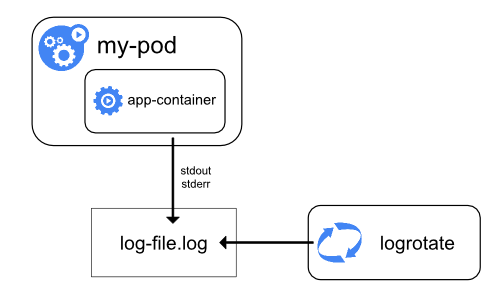
Figure 3a. Node-level logging architecture.
System component logs capture events from the cluster and are often useful for debugging and troubleshooting. These components are classified in two different ways: those that run in a container and those that do not. For example, the kube-scheduler and kube-proxy usually run in containers, whereas the kubelet and the container runtime run directly on the host.
systemd, the kubelet and container runtime write to journald. Otherwise, they write to .log files in the /var/log directory..log files in /var/log, bypassing the default container logging mechanism.System component and container logs stored under /var/log require log rotation to prevent uncontrolled growth. Some cluster provisioning scripts install log rotation by default; verify your environment and adjust as needed. See the system logs reference for details on locations, formats, and configuration options.
Most clusters run a node-level logging agent (for example, Fluent Bit or Fluentd) that tails these files and forwards entries to a central log store. The logging architecture guidance explains how to design such pipelines, apply retention, and log flows to backends.
Figure 3 outlines a common log aggregation pipeline.
Figure 3. Components of a typical Kubernetes logs pipeline.
See Common observability tools - logging tools for logging agents and central log stores.
Traces capture how requests moves across Kubernetes components and applications, linking latency, timing and relationships between operations.By collecting traces, you can visualize end-to-end request flow, diagnose performance issues, and identify bottlenecks or unexpected interactions in the control plane, add-ons, or applications.
Kubernetes 1.35 can export spans over the OpenTelemetry Protocol (OTLP), either directly via built-in gRPC exporters or by forwarding them through an OpenTelemetry Collector.
The OpenTelemetry Collector receives spans from components and applications, processes them (for example by applying sampling or redaction), and forwards them to a tracing backend for storage and analysis.
Figure 4 outlines a typical distributed tracing pipeline.
Figure 4. Components of a typical Kubernetes traces pipeline.
See Common observability tools - tracing tools for tracing collectors and backends.
Note: This section links to third-party projects that provide observability capabilities required by Kubernetes. The Kubernetes project authors aren't responsible for these projects, which are listed alphabetically. To add a project to this list, read the content guide before submitting a change.
This page provides good practices and considerations when designing admission webhooks in Kubernetes. This information is intended for cluster operators who run admission webhook servers or third-party applications that modify or validate your API requests.
Before reading this page, ensure that you're familiar with the following concepts:
Admission control occurs when any create, update, or delete request is sent to the Kubernetes API. Admission controllers intercept requests that match specific criteria that you define. These requests are then sent to mutating admission webhooks or validating admission webhooks. These webhooks are often written to ensure that specific fields in object specifications exist or have specific allowed values.
Webhooks are a powerful mechanism to extend the Kubernetes API. Badly-designed webhooks often result in workload disruptions because of how much control the webhooks have over objects in the cluster. Like other API extension mechanisms, webhooks are challenging to test at scale for compatibility with all of your workloads, other webhooks, add-ons, and plugins.
Additionally, with every release, Kubernetes adds or modifies the API with new
features, feature promotions to beta or stable status, and deprecations. Even
stable Kubernetes APIs are likely to change. For example, the Pod API changed
in v1.29 to add the
Sidecar containers feature.
While it's rare for a Kubernetes object to enter a broken state because of a new
Kubernetes API, webhooks that worked as expected with earlier versions of an API
might not be able to reconcile more recent changes to that API. This can result
in unexpected behavior after you upgrade your clusters to newer versions.
This page describes common webhook failure scenarios and how to avoid them by cautiously and thoughtfully designing and implementing your webhooks.
Even if you don't run your own admission webhooks, some third-party applications that you run in your clusters might use mutating or validating admission webhooks.
To check whether your cluster has any mutating admission webhooks, run the following command:
kubectl get mutatingwebhookconfigurations
The output lists any mutating admission controllers in the cluster.
To check whether your cluster has any validating admission webhooks, run the following command:
kubectl get validatingwebhookconfigurations
The output lists any validating admission controllers in the cluster.
Kubernetes includes multiple admission control and policy enforcement options. Knowing when to use a specific option can help you to improve latency and performance, reduce management overhead, and avoid issues during version upgrades. The following table describes the mechanisms that let you mutate or validate resources during admission:
| Mechanism | Description | Use cases |
|---|---|---|
| Mutating admission webhook | Intercept API requests before admission and modify as needed using custom logic. |
|
| Mutating admission policy | Intercept API requests before admission and modify as needed using Common Expression Language (CEL) expressions. |
|
| Validating admission webhook | Intercept API requests before admission and validate against complex policy declarations. |
|
| Validating admission policy | Intercept API requests before admission and validate against CEL expressions. |
|
In general, use webhook admission control when you want an extensible way to declare or configure the logic. Use built-in CEL-based admission control when you want to declare simpler logic without the overhead of running a webhook server. The Kubernetes project recommends that you use CEL-based admission control when possible.
If you use CustomResourceDefinitions, don't use admission webhooks to validate values in CustomResource specifications or to set default values for fields. Kubernetes lets you define validation rules and default field values when you create CustomResourceDefinitions.
To learn more, see the following resources:
This section describes recommendations for improving performance and reducing latency. In summary, these are as follows:
Mutating admission webhooks are called in sequence. Depending on the mutating webhook setup, some webhooks might be called multiple times. Every mutating webhook call adds latency to the admission process. This is unlike validating webhooks, which get called in parallel.
When designing your mutating webhooks, consider your latency requirements and tolerance. The more mutating webhooks there are in your cluster, the greater the chance of latency increases.
Consider the following to reduce latency:
Consider any other components that run in your cluster that might conflict with the mutations that your webhook makes. For example, if your webhook adds a label that a different controller removes, your webhook gets called again. This leads to a loop.
To detect these loops, try the following:
Update your cluster audit policy to log audit events. Use the following parameters:
level: RequestResponseverbs: ["patch"]omitStages: RequestReceivedSet the audit rule to create events for the specific resources that your webhook mutates.
Check your audit events for webhooks being reinvoked multiple times with the same patch being applied to the same object, or for an object having a field updated and reverted multiple times.
Admission webhooks should evaluate as quickly as possible (typically in milliseconds), since they add to API request latency. Use a small timeout for webhooks.
For details, see Timeouts.
Admission webhooks should leverage some form of load-balancing to provide high
availability and performance benefits. If a webhook is running within the
cluster, you can run multiple webhook backends behind a Service of type
ClusterIP.
Consider your cluster's availability requirements when designing your webhook.
For example, during node downtime or zonal outages, Kubernetes marks Pods as
NotReady to allow load balancers to reroute traffic to available zones and
nodes. These updates to Pods might trigger your mutating webhooks. Depending on
the number of affected Pods, the mutating webhook server has a risk of timing
out or causing delays in Pod processing. As a result, traffic won't get
rerouted as quickly as you need.
Consider situations like the preceding example when writing your webhooks. Exclude operations that are a result of Kubernetes responding to unavoidable incidents.
This section provides recommendations for filtering which requests trigger specific webhooks. In summary, these are as follows:
Admission webhooks are only called when an API request matches the corresponding webhook configuration. Limit the scope of each webhook to reduce unnecessary calls to the webhook server. Consider the following scope limitations:
kube-system namespace. If you run your own
Pods in the kube-system namespace, use an
objectSelector
to avoid mutating a critical workload.kube-node-lease system namespace. Mutating node leases might result in
failed node upgrades. Only apply validation controls to Lease objects in this
namespace if you're confident that the controls won't put your cluster at
risk.namespaceSelector.Admission controllers support multiple fields that you can use to match requests
that meet specific criteria. For example, you can use a namespaceSelector to
filter for requests that target a specific namespace.
For more fine-grained request filtering, use the matchConditions field in your
webhook configuration. This field lets you write multiple CEL expressions that
must evaluate to true for a request to trigger your admission webhook. Using
matchConditions might significantly reduce the number of calls to your webhook
server.
For details, see
Matching requests: matchConditions.
By default, admission webhooks run on any API versions that affect a specified
resource. The matchPolicy field in the webhook configuration controls this
behavior. Specify a value of Equivalent in the matchPolicy field or omit
the field to allow the webhook to run on any API version.
For details, see
Matching requests: matchPolicy.
This section provides recommendations for the scope of mutations and any special considerations for object fields. In summary, these are as follows:
Admission webhook servers send HTTP responses to indicate what to do with a
specific Kubernetes API request. This response is an AdmissionReview object.
A mutating webhook can add specific fields to mutate before allowing admission
by using the patchType field and the patch field in the response. Ensure
that you only modify the fields that require a change.
For example, consider a mutating webhook that's configured to ensure that
web-server Deployments have at least three replicas. When a request to
create a Deployment object matches your webhook configuration, the webhook
should only update the value in the spec.replicas field.
Fields in Kubernetes object specifications might include arrays. Some arrays
contain key:value pairs (like the envVar field in a container specification),
while other arrays are unkeyed (like the readinessGates field in a Pod
specification). The order of values in an array field might matter in some
situations. For example, the order of arguments in the args field of a
container specification might affect the container.
Consider the following when modifying arrays:
add JSONPatch operation instead of replace to
avoid accidentally replacing a required value.Ensure that your webhooks operate only on the content of the AdmissionReview
that's sent to them, and do not make out-of-band changes. These additional
changes, called side effects, might cause conflicts during admission if they
aren't reconciled properly. The .webhooks[].sideEffects field should
be set to None if a webhook doesn't have any side effect.
If side effects are required during the admission evaluation, they must be
suppressed when processing an AdmissionReview object with dryRun set to
true, and the .webhooks[].sideEffects field should be set to NoneOnDryRun.
For details, see Side effects.
A webhook running inside the cluster might cause deadlocks for its own deployment if it is configured to intercept resources required to start its own Pods.
For example, a mutating admission webhook is configured to admit create Pod
requests only if a certain label is set in the Pod (such as env: prod).
The webhook server runs in a Deployment that doesn't set the env label.
When a node that runs the webhook server Pods becomes unhealthy, the webhook
Deployment tries to reschedule the Pods to another node. However, the existing
webhook server rejects the requests since the env label is unset. As a
result, the migration cannot happen.
Exclude the namespace where your webhook is running with a
namespaceSelector.
Dependency loops can occur in scenarios like the following:
To avoid these dependency loops, try the following:
objectSelector.Mutating admission webhooks support the failurePolicy configuration field.
This field indicates whether the API server should admit or reject the request
if the webhook fails. Webhook failures might occur because of timeouts or errors
in the server logic.
By default, admission webhooks set the failurePolicy field to Fail. The API
server rejects a request if the webhook fails. However, rejecting requests by
default might result in compliant requests being rejected during webhook
downtime.
Let your mutating webhooks "fail open" by setting the failurePolicy field to
Ignore. Use a validating controller to check the state of requests to ensure
that they comply with your policies.
This approach has the following benefits:
In general, design your webhooks under the assumption that Kubernetes APIs might
change in a later version. Don't write a server that takes the stability of an
API for granted. For example, the release of sidecar containers in Kubernetes
added a restartPolicy field to the Pod API.
Mutating webhooks that respond to a broad range of API requests might unintentionally trigger themselves. For example, consider a webhook that responds to all requests in the cluster. If you configure the webhook to create Event objects for every mutation, it'll respond to its own Event object creation requests.
To avoid this, consider setting a unique label in any resources that your webhook creates. Exclude this label from your webhook match conditions.
Some Kubernetes objects in the API server can't change. For example, when you deploy a static Pod, the kubelet on the node creates a mirror Pod in the API server to track the static Pod. However, changes to the mirror Pod don't propagate to the static Pod.
Don't attempt to mutate these objects during admission. All mirror Pods have the
kubernetes.io/config.mirror annotation. To exclude mirror Pods while reducing
the security risk of ignoring an annotation, allow static Pods to only run in
specific namespaces.
This section provides recommendations for webhook order and designing idempotent webhooks. In summary, these are as follows:
Mutating admission webhooks don't run in a consistent order. Various factors might change when a specific webhook is called. Don't rely on your webhook running at a specific point in the admission process. Other webhooks could still mutate your modified object.
The following recommendations might help to minimize the risk of unintended changes:
Every mutating admission webhook should be idempotent. The webhook should be able to run on an object that it already modified without making additional changes beyond the original change.
Additionally, all of the mutating webhooks in your cluster should, as a collection, be idempotent. After the mutation phase of admission control ends, every individual mutating webhook should be able to run on an object without making additional changes to the object.
Depending on your environment, ensuring idempotence at scale might be challenging. The following recommendations might help:
The following examples show idempotent mutation logic:
For a create Pod request, set the field
.spec.securityContext.runAsNonRoot of the Pod to true.
For a create Pod request, if the field
.spec.containers[].resources.limits of a container is not set, set default
resource limits.
For a create Pod request, inject a sidecar container with name
foo-sidecar if no container with the name foo-sidecar already exists.
In these cases, the webhook can be safely reinvoked, or admit an object that already has the fields set.
The following examples show non-idempotent mutation logic:
For a create Pod request, inject a sidecar container with name
foo-sidecar suffixed with the current timestamp (such as
foo-sidecar-19700101-000000).
Reinvoking the webhook can result in the same sidecar being injected multiple times to a Pod, each time with a different container name. Similarly, the webhook can inject duplicated containers if the sidecar already exists in a user-provided pod.
For a create/update Pod request, reject if the Pod has label env
set, otherwise add an env: prod label to the Pod.
Reinvoking the webhook will result in the webhook failing on its own output.
For a create Pod request, append a sidecar container named foo-sidecar
without checking whether a foo-sidecar container exists.
Reinvoking the webhook will result in duplicated containers in the Pod, which makes the request invalid and rejected by the API server.
This section provides recommendations for testing your mutating webhooks and validating mutated objects. In summary, these are as follows:
Robust testing should be a core part of your release cycle for new or updated webhooks. If possible, test any changes to your cluster webhooks in a staging environment that closely resembles your production clusters. At the very least, consider using a tool like minikube or kind to create a small test cluster for webhook changes.
Your mutating webhooks shouldn't break any of the validations that apply to an object before admission. For example, consider a mutating webhook that sets the default CPU request of a Pod to a specific value. If the CPU limit of that Pod is set to a lower value than the mutated request, the Pod fails admission.
Test every mutating webhook against the validations that run in your cluster.
Before upgrading your production clusters to a new minor version, test your webhooks and workloads in a staging environment. Compare the results to ensure that your webhooks continue to function as expected after the upgrade.
Additionally, use the following resources to stay informed about API changes:
Mutating webhooks run to completion before any validating webhooks run. There is no stable order in which mutations are applied to objects. As a result, your mutations could get overwritten by a mutating webhook that runs at a later time.
Add a validating admission controller like a ValidatingAdmissionWebhook or a
ValidatingAdmissionPolicy to your cluster to ensure that your mutations
are still present. For example, consider a mutating webhook that inserts the
restartPolicy: Always field to specific init containers to make them run as
sidecar containers. You could run a validating webhook to ensure that those
init containers retained the restartPolicy: Always configuration after all
mutations were completed.
For details, see the following resources:
This section provides recommendations for deploying your mutating admission webhooks. In summary, these are as follows:
When you're ready to deploy your mutating webhook to a cluster, use the following order of operations:
failurePolicy field in the MutatingWebhookConfiguration manifest
to Ignore. This lets you avoid disruptions caused by misconfigured webhooks.namespaceSelector field in the MutatingWebhookConfiguration
manifest to a test namespace.Monitor the webhook in the test namespace to check for any issues, then roll the webhook out to other namespaces. If the webhook intercepts an API request that it wasn't meant to intercept, pause the rollout and adjust the scope of the webhook configuration.
Mutating webhooks are powerful Kubernetes controllers. Use RBAC or another authorization mechanism to limit access to your webhook configurations and servers. For RBAC, ensure that the following access is only available to trusted entities:
admissionregistration.k8s.io/v1If your mutating webhook server runs in the cluster, limit access to create or modify any resources in that namespace.
The following projects are examples of "good" custom webhook server implementations. You can use them as a starting point when designing your own webhooks. Don't use these examples as-is; use them as a starting point and design your webhooks to run well in your specific environment.
This page describes good practices when configuring a Kubernetes cluster utilizing Dynamic Resource Allocation (DRA). These instructions are for cluster administrators.
DRA is orchestrated through a number of different APIs. Use authorization tools (like RBAC, or another solution) to control access to the right APIs depending on the persona of your user.
In general, DeviceClasses and ResourceSlices should be restricted to admins and the DRA drivers. Cluster operators that will be deploying Pods with claims will need access to ResourceClaim and ResourceClaimTemplate APIs; both of these APIs are namespace scoped.
DRA drivers are third-party applications that run on each node of your cluster to interface with the hardware of that node and Kubernetes' native DRA components. The installation procedure depends on the driver you choose, but is likely deployed as a DaemonSet to all or a selection of the nodes (using node selectors or similar mechanisms) in your cluster.
DRA drivers implement the kubeletplugin package
interface.
Your driver may support seamless upgrades by implementing a property of this
interface that allows two versions of the same DRA driver to coexist for a short
time. This is only available for kubelet versions 1.33 and above and may not be
supported by your driver for heterogeneous clusters with attached nodes running
older versions of Kubernetes - check your driver's documentation to be sure.
If seamless upgrades are available for your situation, consider using it to minimize scheduling delays when your driver updates.
If you cannot use seamless upgrades, during driver downtime for upgrades you may observe that:
Your DRA driver likely implements a gRPC socket for healthchecks as part of DRA driver good practices. The easiest way to utilize this grpc socket is to configure it as a liveness probe for the DaemonSet deploying your DRA driver. Your driver's documentation or deployment tooling may already include this, but if you are building your configuration separately or not running your DRA driver as a Kubernetes pod, be sure that your orchestration tooling restarts the DRA driver on failed healthchecks to this grpc socket. Doing so will minimize any accidental downtime of the DRA driver and give it more opportunities to self heal, reducing scheduling delays or troubleshooting time.
The DRA driver is responsible for unpreparing any devices that were allocated to Pods, and if the DRA driver is drained before Pods with claims have been deleted, it will not be able to finalize its cleanup. If you implement custom drain logic for nodes, consider checking that there are no allocated/reserved ResourceClaim or ResourceClaimTemplates before terminating the DRA driver itself.
Control plane component kube-scheduler and the internal ResourceClaim controller orchestrated by the component kube-controller-manager do the heavy lifting during scheduling of Pods with claims based on metadata stored in the DRA APIs. Compared to non-DRA scheduled Pods, the number of API server calls, memory, and CPU utilization needed by these components is increased for Pods using DRA claims. In addition, node local components like the DRA driver and kubelet utilize DRA APIs to allocated the hardware request at Pod sandbox creation time. Especially in high scale environments where clusters have many nodes, and/or deploy many workloads that heavily utilize DRA defined resource claims, the cluster administrator should configure the relevant components to anticipate the increased load.
The effects of mistuned components can have direct or snowballing affects
causing different symptoms during the Pod lifecycle. If the kube-scheduler
component's QPS and burst configurations are too low, the scheduler might
quickly identify a suitable node for a Pod but take longer to bind the Pod to
that node. With DRA, during Pod scheduling, the QPS and Burst parameters in the
client-go configuration within kube-controller-manager are critical.
The specific values to tune your cluster to depend on a variety of factors like
number of nodes/pods, rate of pod creation, churn, even in non-DRA environments;
see the SIG Scalability README on Kubernetes scalability
thresholds
for more information. In scale tests performed against a DRA enabled cluster
with 100 nodes, involving 720 long-lived pods (90% saturation) and 80 churn pods
(10% churn, 10 times), with a job creation QPS of 10, kube-controller-manager
QPS could be set to as low as 75 and Burst to 150 to meet equivalent metric
targets for non-DRA deployments. At this lower bound, it was observed that the
client side rate limiter was triggered enough to protect the API server from
explosive burst but was high enough that pod startup SLOs were not impacted.
While this is a good starting point, you can get a better idea of how to tune
the different components that have the biggest effect on DRA performance for
your deployment by monitoring the following metrics. For more information on all
the stable metrics in Kubernetes, see the Kubernetes Metrics
Reference.
kube-controller-manager metricsThe following metrics look closely at the internal ResourceClaim controller
managed by the kube-controller-manager component.
sum(rate(workqueue_adds_total{name="resource_claim"}[5m])) to gauge how quickly items are added to the ResourceClaim controller.sum(workqueue_depth{endpoint="kube-controller-manager",
name="resource_claim"}) to identify any backlogs in the ResourceClaim
controller.histogram_quantile(0.99,
sum(rate(workqueue_work_duration_seconds_bucket{name="resource_claim"}[5m]))
by (le)) to understand the speed at which the ResourceClaim controller
processes work.If you are experiencing low Workqueue Add Rate, high Workqueue Depth, and/or high Workqueue Work Duration, this suggests the controller isn't performing optimally. Consider tuning parameters like QPS, burst, and CPU/memory configurations.
If you are experiencing high Workequeue Add Rate, high Workqueue Depth, but reasonable Workqueue Work Duration, this indicates the controller is processing work, but concurrency might be insufficient. Concurrency is hardcoded in the controller, so as a cluster administrator, you can tune for this by reducing the pod creation QPS, so the add rate to the resource claim workqueue is more manageable.
kube-scheduler metricsThe following scheduler metrics are high level metrics aggregating performance
across all Pods scheduled, not just those using DRA. It is important to note
that the end-to-end metrics are ultimately influenced by the
kube-controller-manager's performance in creating ResourceClaims from
ResourceClainTemplates in deployments that heavily use ResourceClainTemplates.
histogram_quantile(0.99,
  sum(increase(scheduler_pod_scheduling_sli_duration_seconds_bucket[5m])) by
(le)).histogram_quantile(0.99,
sum(increase(scheduler_scheduling_algorithm_duration_seconds_bucket[5m])) by
(le)).kubelet metricsWhen a Pod bound to a node must have a ResourceClaim satisfied, kubelet calls
the NodePrepareResources and NodeUnprepareResources methods of the DRA
driver. You can observe this behavior from the kubelet's point of view with the
following metrics.
histogram_quantile(0.99,
  sum(rate(dra_operations_duration_seconds_bucket{operation_name="PrepareResources"}[5m]))
by (le)).histogram_quantile(0.99,
sum(rate(dra_operations_duration_seconds_bucket{operation_name="UnprepareResources"}[5m]))
by (le)).DRA drivers implement the kubeletplugin package
interface
which surfaces its own metric for the underlying gRPC operation
NodePrepareResources and NodeUnprepareResources. You can observe this
behavior from the point of view of the internal kubeletplugin with the following
metrics.
histogram_quantile(0.99,
  sum(rate(dra_grpc_operations_duration_seconds_bucket{method_name=~".*NodePrepareResources"}[5m]))
  by (le))
. histogram_quantile(0.99,
sum(rate(dra_grpc_operations_duration_seconds_bucket{method_name=~".*NodeUnprepareResources"}[5m]))
by (le)).Application logs can help you understand what is happening inside your application. The logs are particularly useful for debugging problems and monitoring cluster activity. Most modern applications have some kind of logging mechanism. Likewise, container engines are designed to support logging. The easiest and most adopted logging method for containerized applications is writing to standard output and standard error streams.
However, the native functionality provided by a container engine or runtime is usually not enough for a complete logging solution.
For example, you may want to access your application's logs if a container crashes, a pod gets evicted, or a node dies.
In a cluster, logs should have a separate storage and lifecycle independent of nodes, pods, or containers. This concept is called cluster-level logging.
Cluster-level logging architectures require a separate backend to store, analyze, and query logs. Kubernetes does not provide a native storage solution for log data. Instead, there are many logging solutions that integrate with Kubernetes. The following sections describe how to handle and store logs on nodes.
Kubernetes captures logs from each container in a running Pod.
This example uses a manifest for a Pod with a container
that writes text to the standard output stream, once per second.
apiVersion: v1
kind: Pod
metadata:
  name: counter
spec:
  containers:
  - name: count
    image: busybox:1.28
    args: [/bin/sh, -c,
            'i=0; while true; do echo "$i: $(date)"; i=$((i+1)); sleep 1; done']
To run this pod, use the following command:
kubectl apply -f https://k8s.io/examples/debug/counter-pod.yaml
The output is:
pod/counter created
To fetch the logs, use the kubectl logs command, as follows:
kubectl logs counter
The output is similar to:
0: Fri Apr  1 11:42:23 UTC 2022
1: Fri Apr  1 11:42:24 UTC 2022
2: Fri Apr  1 11:42:25 UTC 2022
You can use kubectl logs --previous to retrieve logs from a previous instantiation of a container.
If your pod has multiple containers, specify which container's logs you want to access by
appending a container name to the command, with a -c flag, like so:
kubectl logs counter -c count
Kubernetes v1.32 [alpha](disabled by default)As an alpha feature, the kubelet can split out the logs from the two standard streams produced
by a container: standard output
and standard error.
To use this behavior, you must enable the PodLogsQuerySplitStreams
feature gate.
With that feature gate enabled, Kubernetes 1.35 allows access to these
log streams directly via the Pod API. You can fetch a specific stream by specifying the stream name (either Stdout or Stderr),
using the stream query string. You must have access to read the log subresource of that Pod.
To demonstrate this feature, you can create a Pod that periodically writes text to both the standard output and error stream.
apiVersion: v1
kind: Pod
metadata:
  name: counter-err
spec:
  containers:
  - name: count
    image: busybox:1.28
    args: [/bin/sh, -c,
            'i=0; while true; do echo "$i: $(date)"; echo "$i: err" >&2 ; i=$((i+1)); sleep 1; done']
To run this pod, use the following command:
kubectl apply -f https://k8s.io/examples/debug/counter-pod-err.yaml
To fetch only the stderr log stream, you can run:
kubectl get --raw "/api/v1/namespaces/default/pods/counter-err/log?stream=Stderr"
See the kubectl logs documentation
for more details.
A container runtime handles and redirects any output generated to a containerized
application's stdout and stderr streams.
Different container runtimes implement this in different ways; however, the integration
with the kubelet is standardized as the CRI logging format.
By default, if a container restarts, the kubelet keeps one terminated container with its logs. If a pod is evicted from the node, all corresponding containers are also evicted, along with their logs.
The kubelet makes logs available to clients via a special feature of the Kubernetes API.
The usual way to access this is by running kubectl logs.
Kubernetes v1.21 [stable]
The kubelet is responsible for rotating container logs and managing the logging directory structure. The kubelet sends this information to the container runtime (using CRI), and the runtime writes the container logs to the given location.
You can configure two kubelet configuration settings,
containerLogMaxSize (default 10Mi) and containerLogMaxFiles (default 5),
using the kubelet configuration file.
These settings let you configure the maximum size for each log file and the maximum number of
files allowed for each container respectively.
In order to perform an efficient log rotation in clusters where the volume of the logs generated by
the workload is large, kubelet also provides a mechanism to tune how the logs are rotated in
terms of how many concurrent log rotations can be performed and the interval at which the logs are
monitored and rotated as required.
You can configure two kubelet configuration settings,
containerLogMaxWorkers and containerLogMonitorInterval using the
kubelet configuration file.
When you run kubectl logs as in
the basic logging example, the kubelet on the node handles the request and
reads directly from the log file. The kubelet returns the content of the log file.
Only the contents of the latest log file are available through kubectl logs.
For example, if a Pod writes 40 MiB of logs and the kubelet rotates logs
after 10 MiB, running kubectl logs returns at most 10MiB of data.
There are two types of system components: those that typically run in a container, and those components directly involved in running containers. For example:
DaemonSet.The way that the kubelet and container runtime write logs depends on the operating system that the node uses:
On Linux nodes that use systemd, the kubelet and container runtime write to journald
by default. You use journalctl to read the systemd journal; for example:
journalctl -u kubelet.
If systemd is not present, the kubelet and container runtime write to .log files in the
/var/log directory. If you want to have logs written elsewhere, you can indirectly
run the kubelet via a helper tool, kube-log-runner, and use that tool to redirect
kubelet logs to a directory that you choose.
By default, kubelet directs your container runtime to write logs into directories within
/var/log/pods.
For more information on kube-log-runner, read System Logs.
By default, the kubelet writes logs to files within the directory C:\var\logs
(notice that this is not C:\var\log).
Although C:\var\log is the Kubernetes default location for these logs, several
cluster deployment tools set up Windows nodes to log to C:\var\log\kubelet instead.
If you want to have logs written elsewhere, you can indirectly
run the kubelet via a helper tool, kube-log-runner, and use that tool to redirect
kubelet logs to a directory that you choose.
However, by default, kubelet directs your container runtime to write logs within the
directory C:\var\log\pods.
For more information on kube-log-runner, read System Logs.
For Kubernetes cluster components that run in pods, these write to files inside
the /var/log directory, bypassing the default logging mechanism (the components
do not write to the systemd journal). You can use Kubernetes' storage mechanisms
to map persistent storage into the container that runs the component.
Kubelet allows changing the pod logs directory from default /var/log/pods
to a custom path. This adjustment can be made by configuring the podLogsDir
parameter in the kubelet's configuration file.
It's important to note that the default location /var/log/pods has been in use for
an extended period and certain processes might implicitly assume this path.
Therefore, altering this parameter must be approached with caution and at your own risk.
Another caveat to keep in mind is that the kubelet supports the location being on the same
disk as /var. Otherwise, if the logs are on a separate filesystem from /var,
then the kubelet will not track that filesystem's usage, potentially leading to issues if
it fills up.
For details about etcd and its logs, view the etcd documentation. Again, you can use Kubernetes' storage mechanisms to map persistent storage into the container that runs the component.
If you deploy Kubernetes cluster components (such as the scheduler) to log to a volume shared from the parent node, you need to consider and ensure that those logs are rotated. Kubernetes does not manage that log rotation.
Your operating system may automatically implement some log rotation - for example,
if you share the directory /var/log into a static Pod for a component, node-level
log rotation treats a file in that directory the same as a file written by any component
outside Kubernetes.
Some deploy tools account for that log rotation and automate it; others leave this as your responsibility.
While Kubernetes does not provide a native solution for cluster-level logging, there are several common approaches you can consider. Here are some options:
You can implement cluster-level logging by including a node-level logging agent on each node. The logging agent is a dedicated tool that exposes logs or pushes logs to a backend. Commonly, the logging agent is a container that has access to a directory with log files from all of the application containers on that node.
Because the logging agent must run on every node, it is recommended to run the agent
as a DaemonSet.
Node-level logging creates only one agent per node and doesn't require any changes to the applications running on the node.
Containers write to stdout and stderr, but with no agreed format. A node-level agent collects these logs and forwards them for aggregation.
You can use a sidecar container in one of the following ways:
stdout.
By having your sidecar containers write to their own stdout and stderr
streams, you can take advantage of the kubelet and the logging agent that
already run on each node. The sidecar containers read logs from a file, a socket,
or journald. Each sidecar container prints a log to its own stdout or stderr stream.
This approach allows you to separate several log streams from different
parts of your application, some of which can lack support
for writing to stdout or stderr. The logic behind redirecting logs
is minimal, so it's not a significant overhead. Additionally, because
stdout and stderr are handled by the kubelet, you can use built-in tools
like kubectl logs.
For example, a pod runs a single container, and the container writes to two different log files using two different formats. Here's a manifest for the Pod:
apiVersion: v1
kind: Pod
metadata:
  name: counter
spec:
  containers:
  - name: count
    image: busybox:1.28
    args:
    - /bin/sh
    - -c
    - >
      i=0;
      while true;
      do
        echo "$i: $(date)" >> /var/log/1.log;
        echo "$(date) INFO $i" >> /var/log/2.log;
        i=$((i+1));
        sleep 1;
      done
    volumeMounts:
    - name: varlog
      mountPath: /var/log
  volumes:
  - name: varlog
    emptyDir: {}
It is not recommended to write log entries with different formats to the same log
stream, even if you managed to redirect both components to the stdout stream of
the container. Instead, you can create two sidecar containers. Each sidecar
container could tail a particular log file from a shared volume and then redirect
the logs to its own stdout stream.
Here's a manifest for a pod that has two sidecar containers:
apiVersion: v1
kind: Pod
metadata:
  name: counter
spec:
  containers:
  - name: count
    image: busybox:1.28
    args:
    - /bin/sh
    - -c
    - >
      i=0;
      while true;
      do
        echo "$i: $(date)" >> /var/log/1.log;
        echo "$(date) INFO $i" >> /var/log/2.log;
        i=$((i+1));
        sleep 1;
      done
    volumeMounts:
    - name: varlog
      mountPath: /var/log
  - name: count-log-1
    image: busybox:1.28
    args: [/bin/sh, -c, 'tail -n+1 -F /var/log/1.log']
    volumeMounts:
    - name: varlog
      mountPath: /var/log
  - name: count-log-2
    image: busybox:1.28
    args: [/bin/sh, -c, 'tail -n+1 -F /var/log/2.log']
    volumeMounts:
    - name: varlog
      mountPath: /var/log
  volumes:
  - name: varlog
    emptyDir: {}
Now when you run this pod, you can access each log stream separately by running the following commands:
kubectl logs counter count-log-1
The output is similar to:
0: Fri Apr  1 11:42:26 UTC 2022
1: Fri Apr  1 11:42:27 UTC 2022
2: Fri Apr  1 11:42:28 UTC 2022
...
kubectl logs counter count-log-2
The output is similar to:
Fri Apr  1 11:42:29 UTC 2022 INFO 0
Fri Apr  1 11:42:30 UTC 2022 INFO 0
Fri Apr  1 11:42:31 UTC 2022 INFO 0
...
If you installed a node-level agent in your cluster, that agent picks up those log streams automatically without any further configuration. If you like, you can configure the agent to parse log lines depending on the source container.
Even for Pods that only have low CPU and memory usage (order of a couple of millicores
for cpu and order of several megabytes for memory), writing logs to a file and
then streaming them to stdout can double how much storage you need on the node.
If you have an application that writes to a single file, it's recommended to set
/dev/stdout as the destination rather than implement the streaming sidecar
container approach.
Sidecar containers can also be used to rotate log files that cannot be rotated by
the application itself. An example of this approach is a small container running
logrotate periodically.
However, it's more straightforward to use stdout and stderr directly, and
leave rotation and retention policies to the kubelet.
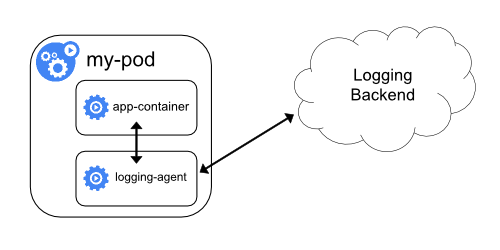
If the node-level logging agent is not flexible enough for your situation, you can create a sidecar container with a separate logging agent that you have configured specifically to run with your application.
kubectl logs because they are not controlled
by the kubelet.Here are two example manifests that you can use to implement a sidecar container with a logging agent.
The first manifest contains a ConfigMap
to configure fluentd.
apiVersion: v1
kind: ConfigMap
metadata:
  name: fluentd-config
data:
  fluentd.conf: |
    <source>
      type tail
      format none
      path /var/log/1.log
      pos_file /var/log/1.log.pos
      tag count.format1
    </source>

    <source>
      type tail
      format none
      path /var/log/2.log
      pos_file /var/log/2.log.pos
      tag count.format2
    </source>

    <match **>
      type google_cloud
    </match>
The second manifest describes a pod that has a sidecar container running fluentd. The pod mounts a volume where fluentd can pick up its configuration data.
apiVersion: v1
kind: Pod
metadata:
  name: counter
spec:
  containers:
  - name: count
    image: busybox:1.28
    args:
    - /bin/sh
    - -c
    - >
      i=0;
      while true;
      do
        echo "$i: $(date)" >> /var/log/1.log;
        echo "$(date) INFO $i" >> /var/log/2.log;
        i=$((i+1));
        sleep 1;
      done
    volumeMounts:
    - name: varlog
      mountPath: /var/log
  - name: count-agent
    image: registry.k8s.io/fluentd-gcp:1.30
    env:
    - name: FLUENTD_ARGS
      value: -c /etc/fluentd-config/fluentd.conf
    volumeMounts:
    - name: varlog
      mountPath: /var/log
    - name: config-volume
      mountPath: /etc/fluentd-config
  volumes:
  - name: varlog
    emptyDir: {}
  - name: config-volume
    configMap:
      name: fluentd-config
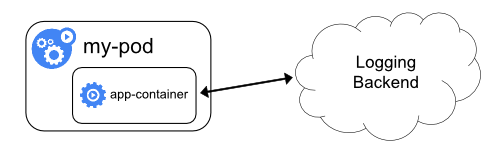
Cluster-logging that exposes or pushes logs directly from every application is outside the scope of Kubernetes.
Since release v1.32, we introduced configurable version compatibility and emulation options to Kubernetes control plane components to make upgrades safer by providing more control and increasing the granularity of steps available to cluster administrators.
The emulation option is set by the --emulated-version flag of control plane components. It allows the component to emulate the behavior (APIs, features, ...) of an earlier version of Kubernetes.
When used, the capabilities available will match the emulated version:
This enables a binary from a particular Kubernetes release to emulate the behavior of a previous version with sufficient fidelity that interoperability with other system components can be defined in terms of the emulated version.
The --emulated-version must be <= binaryVersion. See the help message of the --emulated-version flag for supported range of emulated versions.
System component metrics can give a better look into what is happening inside them. Metrics are particularly useful for building dashboards and alerts.
Kubernetes components emit metrics in Prometheus format. This format is structured plain text, designed so that people and machines can both read it.
In most cases metrics are available on /metrics endpoint of the HTTP server. For components that
don't expose endpoint by default, it can be enabled using --bind-address flag.
Examples of those components:
In a production environment you may want to configure Prometheus Server or some other metrics scraper to periodically gather these metrics and make them available in some kind of time series database.
Note that kubelet also exposes metrics in
/metrics/cadvisor, /metrics/resource and /metrics/probes endpoints. Those metrics do not
have the same lifecycle.
If your cluster uses RBAC, reading metrics requires
authorization via a user, group or ServiceAccount with a ClusterRole that allows accessing
/metrics. For example:
apiVersion: rbac.authorization.k8s.io/v1
kind: ClusterRole
metadata:
  name: prometheus
rules:
  - nonResourceURLs:
      - "/metrics"
    verbs:
      - get
Alpha metric → Beta metric → Stable metric → Deprecated metric → Hidden metric → Deleted metric
Alpha metrics have no stability guarantees. These metrics can be modified or deleted at any time.
Beta metrics observe a looser API contract than its stable counterparts. No labels can be removed from beta metrics during their lifetime, however, labels can be added while the metric is in the beta stage.
Stable metrics are guaranteed to not change. This means:
Deprecated metrics are slated for deletion, but are still available for use. These metrics include an annotation about the version in which they became deprecated.
For example:
Before deprecation
# HELP some_counter this counts things
# TYPE some_counter counter
some_counter 0
After deprecation
# HELP some_counter (Deprecated since 1.15.0) this counts things
# TYPE some_counter counter
some_counter 0
Hidden metrics are no longer published for scraping, but are still available for use. A deprecated metric becomes a hidden metric after a period of time, based on its stability level:
To use a hidden metric, you must enable it. For more details, refer to the Show hidden metrics section.
Deleted metrics are no longer published and cannot be used.
As described above, admins can enable hidden metrics through a command-line flag on a specific binary. This intends to be used as an escape hatch for admins if they missed the migration of the metrics deprecated in the last release.
The flag show-hidden-metrics-for-version takes a version for which you want to show metrics
deprecated in that release. The version is expressed as x.y, where x is the major version, y is
the minor version. The patch version is not needed even though a metrics can be deprecated in a
patch release, the reason for that is the metrics deprecation policy runs against the minor release.
The flag can only take the previous minor version as its value. If you want to show all metrics hidden in the previous release, you can set the show-hidden-metrics-for-version flag to the previous version. Using a version that is too old is not allowed because it violates the metrics deprecation policy.
For example, let's assume metric A is deprecated in 1.29. The version in which metric A becomes hidden depends on its stability level:
A is ALPHA, it could be hidden in 1.29.A is BETA, it will be hidden in 1.30 at the earliest. If you are upgrading to 1.30 and still need A, you must use the command-line flag --show-hidden-metrics-for-version=1.29.A is STABLE, it will be hidden in 1.32 at the earliest. If you are upgrading to 1.32 and still need A, you must use the command-line flag --show-hidden-metrics-for-version=1.31.Controller manager metrics provide important insight into the performance and health of the controller manager. These metrics include common Go language runtime metrics such as go_routine count and controller specific metrics such as etcd request latencies or Cloudprovider (AWS, GCE, OpenStack) API latencies that can be used to gauge the health of a cluster.
Starting from Kubernetes 1.7, detailed Cloudprovider metrics are available for storage operations for GCE, AWS, Vsphere and OpenStack. These metrics can be used to monitor health of persistent volume operations.
For example, for GCE these metrics are called:
cloudprovider_gce_api_request_duration_seconds { request = "instance_list"}
cloudprovider_gce_api_request_duration_seconds { request = "disk_insert"}
cloudprovider_gce_api_request_duration_seconds { request = "disk_delete"}
cloudprovider_gce_api_request_duration_seconds { request = "attach_disk"}
cloudprovider_gce_api_request_duration_seconds { request = "detach_disk"}
cloudprovider_gce_api_request_duration_seconds { request = "list_disk"}
Kubernetes v1.21 [beta]
The scheduler exposes optional metrics that reports the requested resources and the desired limits of all running pods. These metrics can be used to build capacity planning dashboards, assess current or historical scheduling limits, quickly identify workloads that cannot schedule due to lack of resources, and compare actual usage to the pod's request.
The kube-scheduler identifies the resource requests and limits configured for each Pod; when either a request or limit is non-zero, the kube-scheduler reports a metrics timeseries. The time series is labelled by:
cpu)cores)Once a pod reaches completion (has a restartPolicy of Never or OnFailure and is in the
Succeeded or Failed pod phase, or has been deleted and all containers have a terminated state)
the series is no longer reported since the scheduler is now free to schedule other pods to run.
The two metrics are called kube_pod_resource_request and kube_pod_resource_limit.
The metrics are exposed at the HTTP endpoint /metrics/resources. They require
authorization for the /metrics/resources endpoint, usually granted by a
ClusterRole with the get verb for the /metrics/resources non-resource URL.
On Kubernetes 1.21 you must use the --show-hidden-metrics-for-version=1.20
flag to expose these alpha stability metrics.
Kubernetes v1.34 [beta]
As a beta feature, Kubernetes lets you configure kubelet to collect Linux kernel
Pressure Stall Information
(PSI) for CPU, memory and I/O usage.
The information is collected at node, pod and container level.
The metrics are exposed at the /metrics/cadvisor endpoint with the following names:
container_pressure_cpu_stalled_seconds_total
container_pressure_cpu_waiting_seconds_total
container_pressure_memory_stalled_seconds_total
container_pressure_memory_waiting_seconds_total
container_pressure_io_stalled_seconds_total
container_pressure_io_waiting_seconds_total
This feature is enabled by default, by setting the KubeletPSI feature gate. The information is also exposed in the
Summary API.
You can learn how to interpret the PSI metrics in Understand PSI Metrics.
Pressure Stall Information requires:
You can explicitly turn off metrics via command line flag --disabled-metrics. This may be
desired if, for example, a metric is causing a performance problem. The input is a list of
disabled metrics (i.e. --disabled-metrics=metric1,metric2).
Metrics with unbounded dimensions could cause memory issues in the components they instrument. To
limit resource use, you can use the --allow-metric-labels command line option to dynamically
configure an allow-list of label values for a metric.
In alpha stage, the flag can only take in a series of mappings as metric label allow-list.
Each mapping is of the format <metric_name>,<label_name>=<allowed_labels> where
<allowed_labels> is a comma-separated list of acceptable label names.
The overall format looks like:
--allow-metric-labels <metric_name>,<label_name>='<allow_value1>, <allow_value2>...', <metric_name2>,<label_name>='<allow_value1>, <allow_value2>...', ...
Here is an example:
--allow-metric-labels number_count_metric,odd_number='1,3,5', number_count_metric,even_number='2,4,6', date_gauge_metric,weekend='Saturday,Sunday'
In addition to specifying this from the CLI, this can also be done within a configuration file. You
can specify the path to that configuration file using the --allow-metric-labels-manifest command
line argument to a component. Here's an example of the contents of that configuration file:
"metric1,label2": "v1,v2,v3"
"metric2,label1": "v1,v2,v3"
Additionally, the cardinality_enforcement_unexpected_categorizations_total meta-metric records the
count of unexpected categorizations during cardinality enforcement, that is, whenever a label value
is encountered that is not allowed with respect to the allow-list constraints.
The state of Kubernetes objects in the Kubernetes API can be exposed as metrics.
An add-on agent called kube-state-metrics can connect to the Kubernetes API server and expose a HTTP endpoint with metrics generated from the state of individual objects in the cluster.
It exposes various information about the state of objects like labels and annotations, startup and termination times, status or the phase the object currently is in.
For example, containers running in pods create a kube_pod_container_info metric.
This includes the name of the container, the name of the pod it is part of, the namespace the pod is running in, the name of the container image, the ID of the image, the image name from the spec of the container, the ID of the running container and the ID of the pod as labels.
An external component that is able and capable to scrape the endpoint of kube-state-metrics (for example via Prometheus) can now be used to enable the following use cases.
Metric series generated by kube-state-metrics are helpful to gather further insights into the cluster, as they can be used for querying.
If you use Prometheus or another tool that uses the same query language, the following PromQL query returns the number of pods that are not ready:
count(kube_pod_status_ready{condition="false"}) by (namespace, pod)
Metrics generated from kube-state-metrics also allow for alerting on issues in the cluster.
If you use Prometheus or a similar tool that uses the same alert rule language, the following alert will fire if there are pods that have been in a Terminating state for more than 5 minutes:
groups:
- name: Pod state
  rules:
  - alert: PodsBlockedInTerminatingState
    expr: count(kube_pod_deletion_timestamp) by (namespace, pod) * count(kube_pod_status_reason{reason="NodeLost"} == 0) by (namespace, pod) > 0
    for: 5m
    labels:
      severity: page
    annotations:
      summary: Pod {{$labels.namespace}}/{{$labels.pod}} blocked in Terminating state.
System component logs record events happening in cluster, which can be very useful for debugging. You can configure log verbosity to see more or less detail. Logs can be as coarse-grained as showing errors within a component, or as fine-grained as showing step-by-step traces of events (like HTTP access logs, pod state changes, controller actions, or scheduler decisions).
klog is the Kubernetes logging library. klog generates log messages for the Kubernetes system components.
Kubernetes is in the process of simplifying logging in its components. The following klog command line flags are deprecated starting with Kubernetes v1.23 and removed in Kubernetes v1.26:
--add-dir-header--alsologtostderr--log-backtrace-at--log-dir--log-file--log-file-max-size--logtostderr--one-output--skip-headers--skip-log-headers--stderrthresholdOutput will always be written to stderr, regardless of the output format. Output redirection is expected to be handled by the component which invokes a Kubernetes component. This can be a POSIX shell or a tool like systemd.
In some cases, for example a distroless container or a Windows system service, those options are
not available. Then the
kube-log-runner
binary can be used as wrapper around a Kubernetes component to redirect
output. A prebuilt binary is included in several Kubernetes base images under
its traditional name as /go-runner and as kube-log-runner in server and
node release archives.
This table shows how kube-log-runner invocations correspond to shell redirection:
| Usage | POSIX shell (such as bash) | kube-log-runner <options> <cmd> |
|---|---|---|
| Merge stderr and stdout, write to stdout | 2>&1 |
kube-log-runner (default behavior) |
| Redirect both into log file | 1>>/tmp/log 2>&1 |
kube-log-runner -log-file=/tmp/log |
| Copy into log file and to stdout | 2>&1 | tee -a /tmp/log |
kube-log-runner -log-file=/tmp/log -also-stdout |
| Redirect only stdout into log file | >/tmp/log |
kube-log-runner -log-file=/tmp/log -redirect-stderr=false |
An example of the traditional klog native format:
I1025 00:15:15.525108 1 httplog.go:79] GET /api/v1/namespaces/kube-system/pods/metrics-server-v0.3.1-57c75779f-9p8wg: (1.512ms) 200 [pod_nanny/v0.0.0 (linux/amd64) kubernetes/$Format 10.56.1.19:51756]
The message string may contain line breaks:
I1025 00:15:15.525108       1 example.go:79] This is a message
which has a line break.
Kubernetes v1.23 [beta]
Migration to structured log messages is an ongoing process. Not all log messages are structured in this version. When parsing log files, you must also handle unstructured log messages.
Log formatting and value serialization are subject to change.
Structured logging introduces a uniform structure in log messages allowing for programmatic extraction of information. You can store and process structured logs with less effort and cost. The code which generates a log message determines whether it uses the traditional unstructured klog output or structured logging.
The default formatting of structured log messages is as text, with a format that is backward compatible with traditional klog:
<klog header> "<message>" <key1>="<value1>" <key2>="<value2>" ...
Example:
I1025 00:15:15.525108 1 controller_utils.go:116] "Pod status updated" pod="kube-system/kubedns" status="ready"
Strings are quoted. Other values are formatted with
%+v, which may cause log messages to
continue on the next line depending on the data.
I1025 00:15:15.525108       1 example.go:116] "Example" data="This is text with a line break\nand \"quotation marks\"." someInt=1 someFloat=0.1 someStruct={StringField: First line,
second line.}
Kubernetes v1.30 [beta]
Contextual logging builds on top of structured logging. It is primarily about how developers use logging calls: code based on that concept is more flexible and supports additional use cases as described in the Contextual Logging KEP.
If developers use additional functions like WithValues or WithName in
their components, then log entries contain additional information that gets
passed into functions by their caller.
For Kubernetes 1.35, this is gated behind the ContextualLogging
feature gate and is
enabled by default. The infrastructure for this was added in 1.24 without
modifying components. The
component-base/logs/example
command demonstrates how to use the new logging calls and how a component
behaves that supports contextual logging.
$ cd $GOPATH/src/k8s.io/kubernetes/staging/src/k8s.io/component-base/logs/example/cmd/
$ go run . --help
...
      --feature-gates mapStringBool  A set of key=value pairs that describe feature gates for alpha/experimental features. Options are:
                                     AllAlpha=true|false (ALPHA - default=false)
                                     AllBeta=true|false (BETA - default=false)
                                     ContextualLogging=true|false (BETA - default=true)
$ go run . --feature-gates ContextualLogging=true
...
I0222 15:13:31.645988  197901 example.go:54] "runtime" logger="example.myname" foo="bar" duration="1m0s"
I0222 15:13:31.646007  197901 example.go:55] "another runtime" logger="example" foo="bar" duration="1h0m0s" duration="1m0s"
The logger key and foo="bar" were added by the caller of the function
which logs the runtime message and duration="1m0s" value, without having to
modify that function.
With contextual logging disable, WithValues and WithName do nothing and log
calls go through the global klog logger. Therefore this additional information
is not in the log output anymore:
$ go run . --feature-gates ContextualLogging=false
...
I0222 15:14:40.497333  198174 example.go:54] "runtime" duration="1m0s"
I0222 15:14:40.497346  198174 example.go:55] "another runtime" duration="1h0m0s" duration="1m0s"
Kubernetes v1.19 [alpha]
JSON output does not support many standard klog flags. For list of unsupported klog flags, see the Command line tool reference.
Not all logs are guaranteed to be written in JSON format (for example, during process start). If you intend to parse logs, make sure you can handle log lines that are not JSON as well.
Field names and JSON serialization are subject to change.
The --logging-format=json flag changes the format of logs from klog native format to JSON format.
Example of JSON log format (pretty printed):
{
   "ts": 1580306777.04728,
   "v": 4,
   "msg": "Pod status updated",
   "pod":{
      "name": "nginx-1",
      "namespace": "default"
   },
   "status": "ready"
}
Keys with special meaning:
ts - timestamp as Unix time (required, float)v - verbosity (only for info and not for error messages, int)err - error string (optional, string)msg - message (required, string)List of components currently supporting JSON format:
The -v flag controls log verbosity. Increasing the value increases the number of logged events.
Decreasing the value decreases the number of logged events. Increasing verbosity settings logs
increasingly less severe events. A verbosity setting of 0 logs only critical events.
There are two types of system components: those that run in a container and those that do not run in a container. For example:
On machines with systemd, the kubelet and container runtime write to journald.
Otherwise, they write to .log files in the /var/log directory.
System components inside containers always write to .log files in the /var/log directory,
bypassing the default logging mechanism.
Similar to the container logs, you should rotate system component logs in the /var/log directory.
In Kubernetes clusters created by the kube-up.sh script, log rotation is configured by the logrotate tool.
The logrotate tool rotates logs daily, or once the log size is greater than 100MB.
Kubernetes v1.30 [beta](disabled by default)To help with debugging issues on nodes, Kubernetes v1.27 introduced a feature that allows viewing logs of services
running on the node. To use the feature, ensure that the NodeLogQuery
feature gate is enabled for that node, and that the
kubelet configuration options enableSystemLogHandler and enableSystemLogQuery are both set to true. On Linux
the assumption is that service logs are available via journald. On Windows the assumption is that service logs are
available in the application log provider. On both operating systems, logs are also available by reading files within
/var/log/.
Provided you are authorized to interact with node objects, you can try out this feature on all your nodes or just a subset. Here is an example to retrieve the kubelet service logs from a node:
# Fetch kubelet logs from a node named node-1.example
kubectl get --raw "/api/v1/nodes/node-1.example/proxy/logs/?query=kubelet"
You can also fetch files, provided that the files are in a directory that the kubelet allows for log
fetches. For example, you can fetch a log from /var/log on a Linux node:
kubectl get --raw "/api/v1/nodes/<insert-node-name-here>/proxy/logs/?query=/<insert-log-file-name-here>"
The kubelet uses heuristics to retrieve logs. This helps if you are not aware whether a given system service is
writing logs to the operating system's native logger like journald or to a log file in /var/log/. The heuristics
first checks the native logger and if that is not available attempts to retrieve the first logs from
/var/log/<servicename> or /var/log/<servicename>.log or /var/log/<servicename>/<servicename>.log.
The complete list of options that can be used are:
| Option | Description |
|---|---|
boot |
boot show messages from a specific system boot |
pattern |
pattern filters log entries by the provided PERL-compatible regular expression |
query |
query specifies services(s) or files from which to return logs (required) |
sinceTime |
an RFC3339 timestamp from which to show logs (inclusive) |
untilTime |
an RFC3339 timestamp until which to show logs (inclusive) |
tailLines |
specify how many lines from the end of the log to retrieve; the default is to fetch the whole log |
Example of a more complex query:
# Fetch kubelet logs from a node named node-1.example that have the word "error"
kubectl get --raw "/api/v1/nodes/node-1.example/proxy/logs/?query=kubelet&pattern=error"
Kubernetes v1.27 [beta]
System component traces record the latency of and relationships between operations in the cluster.
Kubernetes components emit traces using the OpenTelemetry Protocol with the gRPC exporter and can be collected and routed to tracing backends using an OpenTelemetry Collector.
Kubernetes components have built-in gRPC exporters for OTLP to export traces, either with an OpenTelemetry Collector, or without an OpenTelemetry Collector.
For a complete guide to collecting traces and using the collector, see Getting Started with the OpenTelemetry Collector. However, there are a few things to note that are specific to Kubernetes components.
By default, Kubernetes components export traces using the grpc exporter for OTLP on the IANA OpenTelemetry port, 4317. As an example, if the collector is running as a sidecar to a Kubernetes component, the following receiver configuration will collect spans and log them to standard output:
receivers:
  otlp:
    protocols:
      grpc:
exporters:
  # Replace this exporter with the exporter for your backend
  exporters:
    debug:
      verbosity: detailed
service:
  pipelines:
    traces:
      receivers: [otlp]
      exporters: [debug]
To directly emit traces to a backend without utilizing a collector, specify the endpoint field in the Kubernetes tracing configuration file with the desired trace backend address. This method negates the need for a collector and simplifies the overall structure.
For trace backend header configuration, including authentication details, environment variables can be used with OTEL_EXPORTER_OTLP_HEADERS,
see OTLP Exporter Configuration.
Additionally, for trace resource attribute configuration such as Kubernetes cluster name, namespace, Pod name, etc.,
environment variables can also be used with OTEL_RESOURCE_ATTRIBUTES, see OTLP Kubernetes Resource.
The kube-apiserver generates spans for incoming HTTP requests, and for outgoing requests to webhooks, etcd, and re-entrant requests. It propagates the W3C Trace Context with outgoing requests but does not make use of the trace context attached to incoming requests, as the kube-apiserver is often a public endpoint.
To enable tracing, provide the kube-apiserver with a tracing configuration file
with --tracing-config-file=<path-to-config>. This is an example config that records
spans for 1 in 10000 requests, and uses the default OpenTelemetry endpoint:
apiVersion: apiserver.config.k8s.io/v1
kind: TracingConfiguration
# default value
#endpoint: localhost:4317
samplingRatePerMillion: 100
For more information about the TracingConfiguration struct, see
API server config API (v1).
Kubernetes v1.34 [stable](enabled by default)The kubelet CRI interface and authenticated http servers are instrumented to generate trace spans. As with the apiserver, the endpoint and sampling rate are configurable. Trace context propagation is also configured. A parent span's sampling decision is always respected. A provided tracing configuration sampling rate will apply to spans without a parent. Enabled without a configured endpoint, the default OpenTelemetry Collector receiver address of "localhost:4317" is set.
To enable tracing, apply the tracing configuration. This is an example snippet of a kubelet config that records spans for 1 in 10000 requests, and uses the default OpenTelemetry endpoint:
apiVersion: kubelet.config.k8s.io/v1beta1
kind: KubeletConfiguration
tracing:
  # default value
  #endpoint: localhost:4317
  samplingRatePerMillion: 100
If the samplingRatePerMillion is set to one million (1000000), then every
span will be sent to the exporter.
The kubelet in Kubernetes v1.35 collects spans from the garbage collection, pod synchronization routine as well as every gRPC method. The kubelet propagates trace context with gRPC requests so that container runtimes with trace instrumentation, such as CRI-O and containerd, can associate their exported spans with the trace context from the kubelet. The resulting traces will have parent-child links between kubelet and container runtime spans, providing helpful context when debugging node issues.
Please note that exporting spans always comes with a small performance overhead
on the networking and CPU side, depending on the overall configuration of the
system. If there is any issue like that in a cluster which is running with
tracing enabled, then mitigate the problem by either reducing the
samplingRatePerMillion or disabling tracing completely by removing the
configuration.
Tracing instrumentation is still under active development, and may change in a variety of ways. This includes span names, attached attributes, instrumented endpoints, etc. Until this feature graduates to stable, there are no guarantees of backwards compatibility for tracing instrumentation.
This page explains proxies used with Kubernetes.
There are several different proxies you may encounter when using Kubernetes:
The kubectl proxy:
The apiserver proxy:
The kube proxy:
A Proxy/Load-balancer in front of apiserver(s):
Cloud Load Balancers on external services:
LoadBalancerKubernetes users will typically not need to worry about anything other than the first two types. The cluster admin will typically ensure that the latter types are set up correctly.
Proxies have replaced redirect capabilities. Redirects have been deprecated.
Kubernetes v1.29 [stable]
Controlling the behavior of the Kubernetes API server in an overload situation
is a key task for cluster administrators. The kube-apiserver has some controls available
(i.e. the --max-requests-inflight and --max-mutating-requests-inflight
command-line flags) to limit the amount of outstanding work that will be
accepted, preventing a flood of inbound requests from overloading and
potentially crashing the API server, but these flags are not enough to ensure
that the most important requests get through in a period of high traffic.
The API Priority and Fairness feature (APF) is an alternative that improves upon aforementioned max-inflight limitations. APF classifies and isolates requests in a more fine-grained way. It also introduces a limited amount of queuing, so that no requests are rejected in cases of very brief bursts. Requests are dispatched from queues using a fair queuing technique so that, for example, a poorly-behaved controller need not starve others (even at the same priority level).
This feature is designed to work well with standard controllers, which use informers and react to failures of API requests with exponential back-off, and other clients that also work this way.
--max-requests-inflight flag without the API Priority and Fairness
feature enabled. API Priority and Fairness does apply to watch
requests. When API Priority and Fairness is disabled, watch requests
are not subject to the --max-requests-inflight limit.The API Priority and Fairness feature is controlled by a command-line flag
and is enabled by default. See
Options
for a general explanation of the available kube-apiserver command-line
options and how to enable and disable them. The name of the
command-line option for APF is "--enable-priority-and-fairness". This feature
also involves an API Group
with: (a) a stable v1 version, introduced in 1.29, and
enabled by default (b) a v1beta3 version, enabled by default, and
deprecated in v1.29. You can
disable the API group beta version v1beta3 by adding the
following command-line flags to your kube-apiserver invocation:
kube-apiserver \
--runtime-config=flowcontrol.apiserver.k8s.io/v1beta3=false \
 # …and other flags as usual
The command-line flag --enable-priority-and-fairness=false will disable the
API Priority and Fairness feature.
API Priority and Fairness must be used carefully in recursive server scenarios. These are scenarios in which some server A, while serving a request, issues a subsidiary request to some server B. Perhaps server B might even make a further subsidiary call back to server A. In situations where Priority and Fairness control is applied to both the original request and some subsidiary ones(s), no matter how deep in the recursion, there is a danger of priority inversions and/or deadlocks.
One example of recursion is when the kube-apiserver issues an
admission webhook call to server B, and while serving that call,
server B makes a further subsidiary request back to the
kube-apiserver. Another example of recursion is when an APIService
object directs the kube-apiserver to delegate requests about a
certain API group to a custom external server B (this is one of the
things called "aggregation").
When the original request is known to belong to a certain priority
level, and the subsidiary controlled requests are classified to higher
priority levels, this is one possible solution. When the original
requests can belong to any priority level, the subsidiary controlled
requests have to be exempt from Priority and Fairness limitation. One
way to do that is with the objects that configure classification and
handling, discussed below. Another way is to disable Priority and
Fairness on server B entirely, using the techniques discussed above. A
third way, which is the simplest to use when server B is not
kube-apiserver, is to build server B with Priority and Fairness
disabled in the code.
There are several distinct features involved in the API Priority and Fairness feature. Incoming requests are classified by attributes of the request using FlowSchemas, and assigned to priority levels. Priority levels add a degree of isolation by maintaining separate concurrency limits, so that requests assigned to different priority levels cannot starve each other. Within a priority level, a fair-queuing algorithm prevents requests from different flows from starving each other, and allows for requests to be queued to prevent bursty traffic from causing failed requests when the average load is acceptably low.
Without APF enabled, overall concurrency in the API server is limited by the
kube-apiserver flags --max-requests-inflight and
--max-mutating-requests-inflight. With APF enabled, the concurrency limits
defined by these flags are summed and then the sum is divided up among a
configurable set of priority levels. Each incoming request is assigned to a
single priority level, and each priority level will only dispatch as many
concurrent requests as its particular limit allows.
The default configuration, for example, includes separate priority levels for leader-election requests, requests from built-in controllers, and requests from Pods. This means that an ill-behaved Pod that floods the API server with requests cannot prevent leader election or actions by the built-in controllers from succeeding.
The concurrency limits of the priority levels are periodically adjusted, allowing under-utilized priority levels to temporarily lend concurrency to heavily-utilized levels. These limits are based on nominal limits and bounds on how much concurrency a priority level may lend and how much it may borrow, all derived from the configuration objects mentioned below.
The above description of concurrency management is the baseline story. Requests have different durations but are counted equally at any given moment when comparing against a priority level's concurrency limit. In the baseline story, each request occupies one unit of concurrency. The word "seat" is used to mean one unit of concurrency, inspired by the way each passenger on a train or aircraft takes up one of the fixed supply of seats.
But some requests take up more than one seat. Some of these are list requests that the server estimates will return a large number of objects. These have been found to put an exceptionally heavy burden on the server. For this reason, the server estimates the number of objects that will be returned and considers the request to take a number of seats that is proportional to that estimated number.
API Priority and Fairness manages watch requests, but this involves a couple more excursions from the baseline behavior. The first concerns how long a watch request is considered to occupy its seat. Depending on request parameters, the response to a watch request may or may not begin with create notifications for all the relevant pre-existing objects. API Priority and Fairness considers a watch request to be done with its seat once that initial burst of notifications, if any, is over.
The normal notifications are sent in a concurrent burst to all relevant watch response streams whenever the server is notified of an object create/update/delete. To account for this work, API Priority and Fairness considers every write request to spend some additional time occupying seats after the actual writing is done. The server estimates the number of notifications to be sent and adjusts the write request's number of seats and seat occupancy time to include this extra work.
Even within a priority level there may be a large number of distinct sources of traffic. In an overload situation, it is valuable to prevent one stream of requests from starving others (in particular, in the relatively common case of a single buggy client flooding the kube-apiserver with requests, that buggy client would ideally not have much measurable impact on other clients at all). This is handled by use of a fair-queuing algorithm to process requests that are assigned the same priority level. Each request is assigned to a flow, identified by the name of the matching FlowSchema plus a flow distinguisher — which is either the requesting user, the target resource's namespace, or nothing — and the system attempts to give approximately equal weight to requests in different flows of the same priority level. To enable distinct handling of distinct instances, controllers that have many instances should authenticate with distinct usernames
After classifying a request into a flow, the API Priority and Fairness feature then may assign the request to a queue. This assignment uses a technique known as shuffle sharding, which makes relatively efficient use of queues to insulate low-intensity flows from high-intensity flows.
The details of the queuing algorithm are tunable for each priority level, and allow administrators to trade off memory use, fairness (the property that independent flows will all make progress when total traffic exceeds capacity), tolerance for bursty traffic, and the added latency induced by queuing.
Some requests are considered sufficiently important that they are not subject to any of the limitations imposed by this feature. These exemptions prevent an improperly-configured flow control configuration from totally disabling an API server.
The flow control API involves two kinds of resources. PriorityLevelConfigurations define the available priority levels, the share of the available concurrency budget that each can handle, and allow for fine-tuning queuing behavior. FlowSchemas are used to classify individual inbound requests, matching each to a single PriorityLevelConfiguration.
A PriorityLevelConfiguration represents a single priority level. Each PriorityLevelConfiguration has an independent limit on the number of outstanding requests, and limitations on the number of queued requests.
The nominal concurrency limit for a PriorityLevelConfiguration is not
specified in an absolute number of seats, but rather in "nominal
concurrency shares." The total concurrency limit for the API Server is
distributed among the existing PriorityLevelConfigurations in
proportion to these shares, to give each level its nominal limit in
terms of seats. This allows a cluster administrator to scale up or
down the total amount of traffic to a server by restarting
kube-apiserver with a different value for --max-requests-inflight
(or --max-mutating-requests-inflight), and all
PriorityLevelConfigurations will see their maximum allowed concurrency
go up (or down) by the same fraction.
v1beta3 the relevant
PriorityLevelConfiguration field is named "assured concurrency shares"
rather than "nominal concurrency shares". Also, in Kubernetes release
1.25 and earlier there were no periodic adjustments: the
nominal/assured limits were always applied without adjustment.The bounds on how much concurrency a priority level may lend and how much it may borrow are expressed in the PriorityLevelConfiguration as percentages of the level's nominal limit. These are resolved to absolute numbers of seats by multiplying with the nominal limit / 100.0 and rounding. The dynamically adjusted concurrency limit of a priority level is constrained to lie between (a) a lower bound of its nominal limit minus its lendable seats and (b) an upper bound of its nominal limit plus the seats it may borrow. At each adjustment the dynamic limits are derived by each priority level reclaiming any lent seats for which demand recently appeared and then jointly fairly responding to the recent seat demand on the priority levels, within the bounds just described.
--max-requests-inflight and
--max-mutating-requests-inflight. There is no longer any distinction made
between mutating and non-mutating requests; if you want to treat them
separately for a given resource, make separate FlowSchemas that match the
mutating and non-mutating verbs respectively.When the volume of inbound requests assigned to a single
PriorityLevelConfiguration is more than its permitted concurrency level, the
type field of its specification determines what will happen to extra requests.
A type of Reject means that excess traffic will immediately be rejected with
an HTTP 429 (Too Many Requests) error. A type of Queue means that requests
above the threshold will be queued, with the shuffle sharding and fair queuing techniques used
to balance progress between request flows.
The queuing configuration allows tuning the fair queuing algorithm for a priority level. Details of the algorithm can be read in the enhancement proposal, but in short:
Increasing queues reduces the rate of collisions between different flows, at
the cost of increased memory usage. A value of 1 here effectively disables the
fair-queuing logic, but still allows requests to be queued.
Increasing queueLengthLimit allows larger bursts of traffic to be
sustained without dropping any requests, at the cost of increased
latency and memory usage.
Changing handSize allows you to adjust the probability of collisions between
different flows and the overall concurrency available to a single flow in an
overload situation.
handSize makes it less likely for two individual flows to collide
(and therefore for one to be able to starve the other), but more likely that
a small number of flows can dominate the apiserver. A larger handSize also
potentially increases the amount of latency that a single high-traffic flow
can cause. The maximum number of queued requests possible from a
single flow is handSize * queueLengthLimit.Following is a table showing an interesting collection of shuffle sharding configurations, showing for each the probability that a given mouse (low-intensity flow) is squished by the elephants (high-intensity flows) for an illustrative collection of numbers of elephants. See https://play.golang.org/p/Gi0PLgVHiUg , which computes this table.
| HandSize | Queues | 1 elephant | 4 elephants | 16 elephants |
|---|---|---|---|---|
| 12 | 32 | 4.428838398950118e-09 | 0.11431348830099144 | 0.9935089607656024 |
| 10 | 32 | 1.550093439632541e-08 | 0.0626479840223545 | 0.9753101519027554 |
| 10 | 64 | 6.601827268370426e-12 | 0.00045571320990370776 | 0.49999929150089345 |
| 9 | 64 | 3.6310049976037345e-11 | 0.00045501212304112273 | 0.4282314876454858 |
| 8 | 64 | 2.25929199850899e-10 | 0.0004886697053040446 | 0.35935114681123076 |
| 8 | 128 | 6.994461389026097e-13 | 3.4055790161620863e-06 | 0.02746173137155063 |
| 7 | 128 | 1.0579122850901972e-11 | 6.960839379258192e-06 | 0.02406157386340147 |
| 7 | 256 | 7.597695465552631e-14 | 6.728547142019406e-08 | 0.0006709661542533682 |
| 6 | 256 | 2.7134626662687968e-12 | 2.9516464018476436e-07 | 0.0008895654642000348 |
| 6 | 512 | 4.116062922897309e-14 | 4.982983350480894e-09 | 2.26025764343413e-05 |
| 6 | 1024 | 6.337324016514285e-16 | 8.09060164312957e-11 | 4.517408062903668e-07 |
A FlowSchema matches some inbound requests and assigns them to a
priority level. Every inbound request is tested against FlowSchemas,
starting with those with the numerically lowest matchingPrecedence and
working upward. The first match wins.
matchingPrecedence. If multiple FlowSchemas with equal
matchingPrecedence match the same request, the one with lexicographically
smaller name will win, but it's better not to rely on this, and instead to
ensure that no two FlowSchemas have the same matchingPrecedence.A FlowSchema matches a given request if at least one of its rules
matches. A rule matches if at least one of its subjects and at least
one of its resourceRules or nonResourceRules (depending on whether the
incoming request is for a resource or non-resource URL) match the request.
For the name field in subjects, and the verbs, apiGroups, resources,
namespaces, and nonResourceURLs fields of resource and non-resource rules,
the wildcard * may be specified to match all values for the given field,
effectively removing it from consideration.
A FlowSchema's distinguisherMethod.type determines how requests matching that
schema will be separated into flows. It may be ByUser, in which one requesting
user will not be able to starve other users of capacity; ByNamespace, in which
requests for resources in one namespace will not be able to starve requests for
resources in other namespaces of capacity; or blank (or distinguisherMethod may be
omitted entirely), in which all requests matched by this FlowSchema will be
considered part of a single flow. The correct choice for a given FlowSchema
depends on the resource and your particular environment.
Each kube-apiserver maintains two sorts of APF configuration objects: mandatory and suggested.
The four mandatory configuration objects reflect fixed built-in guardrail behavior. This is behavior that the servers have before those objects exist, and when those objects exist their specs reflect this behavior. The four mandatory objects are as follows.
The mandatory exempt priority level is used for requests that are
not subject to flow control at all: they will always be dispatched
immediately. The mandatory exempt FlowSchema classifies all
requests from the system:masters group into this priority
level. You may define other FlowSchemas that direct other requests
to this priority level, if appropriate.
The mandatory catch-all priority level is used in combination with
the mandatory catch-all FlowSchema to make sure that every request
gets some kind of classification. Typically you should not rely on
this catch-all configuration, and should create your own catch-all
FlowSchema and PriorityLevelConfiguration (or use the suggested
global-default priority level that is installed by default) as
appropriate. Because it is not expected to be used normally, the
mandatory catch-all priority level has a very small concurrency
share and does not queue requests.
The suggested FlowSchemas and PriorityLevelConfigurations constitute a reasonable default configuration. You can modify these and/or create additional configuration objects if you want. If your cluster is likely to experience heavy load then you should consider what configuration will work best.
The suggested configuration groups requests into six priority levels:
The node-high priority level is for health updates from nodes.
The system priority level is for non-health requests from the
system:nodes group, i.e. Kubelets, which must be able to contact
the API server in order for workloads to be able to schedule on
them.
The leader-election priority level is for leader election requests from
built-in controllers (in particular, requests for endpoints, configmaps,
or leases coming from the system:kube-controller-manager or
system:kube-scheduler users and service accounts in the kube-system
namespace). These are important to isolate from other traffic because failures
in leader election cause their controllers to fail and restart, which in turn
causes more expensive traffic as the new controllers sync their informers.
The workload-high priority level is for other requests from built-in
controllers.
The workload-low priority level is for requests from any other service
account, which will typically include all requests from controllers running in
Pods.
The global-default priority level handles all other traffic, e.g.
interactive kubectl commands run by nonprivileged users.
The suggested FlowSchemas serve to steer requests into the above priority levels, and are not enumerated here.
Each kube-apiserver independently maintains the mandatory and
suggested configuration objects, using initial and periodic behavior.
Thus, in a situation with a mixture of servers of different versions
there may be thrashing as long as different servers have different
opinions of the proper content of these objects.
Each kube-apiserver makes an initial maintenance pass over the
mandatory and suggested configuration objects, and after that does
periodic maintenance (once per minute) of those objects.
For the mandatory configuration objects, maintenance consists of ensuring that the object exists and, if it does, has the proper spec. The server refuses to allow a creation or update with a spec that is inconsistent with the server's guardrail behavior.
Maintenance of suggested configuration objects is designed to allow
their specs to be overridden. Deletion, on the other hand, is not
respected: maintenance will restore the object. If you do not want a
suggested configuration object then you need to keep it around but set
its spec to have minimal consequences. Maintenance of suggested
objects is also designed to support automatic migration when a new
version of the kube-apiserver is rolled out, albeit potentially with
thrashing while there is a mixed population of servers.
Maintenance of a suggested configuration object consists of creating
it --- with the server's suggested spec --- if the object does not
exist. OTOH, if the object already exists, maintenance behavior
depends on whether the kube-apiservers or the users control the
object. In the former case, the server ensures that the object's spec
is what the server suggests; in the latter case, the spec is left
alone.
The question of who controls the object is answered by first looking
for an annotation with key apf.kubernetes.io/autoupdate-spec. If
there is such an annotation and its value is true then the
kube-apiservers control the object. If there is such an annotation
and its value is false then the users control the object. If
neither of those conditions holds then the metadata.generation of the
object is consulted. If that is 1 then the kube-apiservers control
the object. Otherwise the users control the object. These rules were
introduced in release 1.22 and their consideration of
metadata.generation is for the sake of migration from the simpler
earlier behavior. Users who wish to control a suggested configuration
object should set its apf.kubernetes.io/autoupdate-spec annotation
to false.
Maintenance of a mandatory or suggested configuration object also
includes ensuring that it has an apf.kubernetes.io/autoupdate-spec
annotation that accurately reflects whether the kube-apiservers
control the object.
Maintenance also includes deleting objects that are neither mandatory
nor suggested but are annotated
apf.kubernetes.io/autoupdate-spec=true.
The suggested configuration gives no special treatment to the health
check requests on kube-apiservers from their local kubelets --- which
tend to use the secured port but supply no credentials. With the
suggested config, these requests get assigned to the global-default
FlowSchema and the corresponding global-default priority level,
where other traffic can crowd them out.
If you add the following additional FlowSchema, this exempts those requests from rate limiting.
apiVersion: flowcontrol.apiserver.k8s.io/v1
kind: FlowSchema
metadata:
  name: health-for-strangers
spec:
  matchingPrecedence: 1000
  priorityLevelConfiguration:
    name: exempt
  rules:
    - nonResourceRules:
      - nonResourceURLs:
          - "/healthz"
          - "/livez"
          - "/readyz"
        verbs:
          - "*"
      subjects:
        - kind: Group
          group:
            name: "system:unauthenticated"
flow_schema and
priority_level were inconsistently named flowSchema and priorityLevel,
respectively. If you're running Kubernetes versions v1.19 and earlier, you
should refer to the documentation for your version.When you enable the API Priority and Fairness feature, the kube-apiserver exports additional metrics. Monitoring these can help you determine whether your configuration is inappropriately throttling important traffic, or find poorly-behaved workloads that may be harming system health.
apiserver_flowcontrol_rejected_requests_total is a counter vector
(cumulative since server start) of requests that were rejected,
broken down by the labels flow_schema (indicating the one that
matched the request), priority_level (indicating the one to which
the request was assigned), and reason. The reason label will be
one of the following values:
queue-full, indicating that too many requests were already
queued.concurrency-limit, indicating that the
PriorityLevelConfiguration is configured to reject rather than
queue excess requests.time-out, indicating that the request was still in the queue
when its queuing time limit expired.cancelled, indicating that the request is not purge locked
and has been ejected from the queue.apiserver_flowcontrol_dispatched_requests_total is a counter
vector (cumulative since server start) of requests that began
executing, broken down by flow_schema and priority_level.
apiserver_flowcontrol_current_inqueue_requests is a gauge vector
holding the instantaneous number of queued (not executing) requests,
broken down by priority_level and flow_schema.
apiserver_flowcontrol_current_executing_requests is a gauge vector
holding the instantaneous number of executing (not waiting in a
queue) requests, broken down by priority_level and flow_schema.
apiserver_flowcontrol_current_executing_seats is a gauge vector
holding the instantaneous number of occupied seats, broken down by
priority_level and flow_schema.
apiserver_flowcontrol_request_wait_duration_seconds is a histogram
vector of how long requests spent queued, broken down by the labels
flow_schema, priority_level, and execute. The execute label
indicates whether the request has started executing.
apiserver_flowcontrol_nominal_limit_seats is a gauge vector
holding each priority level's nominal concurrency limit, computed
from the API server's total concurrency limit and the priority
level's configured nominal concurrency shares.
apiserver_current_inqueue_requests is a gauge vector of recent
high water marks of the number of queued requests, grouped by a
label named request_kind whose value is mutating or readOnly.
These high water marks describe the largest number seen in the one
second window most recently completed. These complement the older
apiserver_current_inflight_requests gauge vector that holds the
last window's high water mark of number of requests actively being
served.
apiserver_current_inqueue_seats is a gauge vector of the sum over
queued requests of the largest number of seats each will occupy,
grouped by labels named flow_schema and priority_level.
apiserver_flowcontrol_read_vs_write_current_requests is a
histogram vector of observations, made at the end of every
nanosecond, of the number of requests broken down by the labels
phase (which takes on the values waiting and executing) and
request_kind (which takes on the values mutating and
readOnly). Each observed value is a ratio, between 0 and 1, of
the number of requests divided by the corresponding limit on the
number of requests (queue volume limit for waiting and concurrency
limit for executing).
apiserver_flowcontrol_request_concurrency_in_use is a gauge vector
holding the instantaneous number of occupied seats, broken down by
priority_level and flow_schema.
apiserver_flowcontrol_priority_level_request_utilization is a
histogram vector of observations, made at the end of each
nanosecond, of the number of requests broken down by the labels
phase (which takes on the values waiting and executing) and
priority_level. Each observed value is a ratio, between 0 and 1,
of a number of requests divided by the corresponding limit on the
number of requests (queue volume limit for waiting and concurrency
limit for executing).
apiserver_flowcontrol_priority_level_seat_utilization is a
histogram vector of observations, made at the end of each
nanosecond, of the utilization of a priority level's concurrency
limit, broken down by priority_level. This utilization is the
fraction (number of seats occupied) / (concurrency limit). This
metric considers all stages of execution (both normal and the extra
delay at the end of a write to cover for the corresponding
notification work) of all requests except WATCHes; for those it
considers only the initial stage that delivers notifications of
pre-existing objects. Each histogram in the vector is also labeled
with phase: executing (there is no seat limit for the waiting
phase).
apiserver_flowcontrol_request_queue_length_after_enqueue is a
histogram vector of queue lengths for the queues, broken down by
priority_level and flow_schema, as sampled by the enqueued requests.
Each request that gets queued contributes one sample to its histogram,
reporting the length of the queue immediately after the request was added.
Note that this produces different statistics than an unbiased survey would.
apiserver_flowcontrol_request_concurrency_limit is the same as
apiserver_flowcontrol_nominal_limit_seats. Before the
introduction of concurrency borrowing between priority levels,
this was always equal to apiserver_flowcontrol_current_limit_seats
(which did not exist as a distinct metric).
apiserver_flowcontrol_lower_limit_seats is a gauge vector holding
the lower bound on each priority level's dynamic concurrency limit.
apiserver_flowcontrol_upper_limit_seats is a gauge vector holding
the upper bound on each priority level's dynamic concurrency limit.
apiserver_flowcontrol_demand_seats is a histogram vector counting
observations, at the end of every nanosecond, of each priority
level's ratio of (seat demand) / (nominal concurrency limit).
A priority level's seat demand is the sum, over both queued requests
and those in the initial phase of execution, of the maximum of the
number of seats occupied in the request's initial and final
execution phases.
apiserver_flowcontrol_demand_seats_high_watermark is a gauge vector
holding, for each priority level, the maximum seat demand seen
during the last concurrency borrowing adjustment period.
apiserver_flowcontrol_demand_seats_average is a gauge vector
holding, for each priority level, the time-weighted average seat
demand seen during the last concurrency borrowing adjustment period.
apiserver_flowcontrol_demand_seats_stdev is a gauge vector
holding, for each priority level, the time-weighted population
standard deviation of seat demand seen during the last concurrency
borrowing adjustment period.
apiserver_flowcontrol_demand_seats_smoothed is a gauge vector
holding, for each priority level, the smoothed enveloped seat demand
determined at the last concurrency adjustment.
apiserver_flowcontrol_target_seats is a gauge vector holding, for
each priority level, the concurrency target going into the borrowing
allocation problem.
apiserver_flowcontrol_seat_fair_frac is a gauge holding the fair
allocation fraction determined in the last borrowing adjustment.
apiserver_flowcontrol_current_limit_seats is a gauge vector
holding, for each priority level, the dynamic concurrency limit
derived in the last adjustment.
apiserver_flowcontrol_request_execution_seconds is a histogram
vector of how long requests took to actually execute, broken down by
flow_schema and priority_level.
apiserver_flowcontrol_watch_count_samples is a histogram vector of
the number of active WATCH requests relevant to a given write,
broken down by flow_schema and priority_level.
apiserver_flowcontrol_work_estimated_seats is a histogram vector
of the number of estimated seats (maximum of initial and final stage
of execution) associated with requests, broken down by flow_schema
and priority_level.
apiserver_flowcontrol_request_dispatch_no_accommodation_total is a
counter vector of the number of events that in principle could have led
to a request being dispatched but did not, due to lack of available
concurrency, broken down by flow_schema and priority_level.
apiserver_flowcontrol_epoch_advance_total is a counter vector of
the number of attempts to jump a priority level's progress meter
backward to avoid numeric overflow, grouped by priority_level and
success.
When a given priority level exceeds its permitted concurrency, requests can experience increased latency or be dropped with an HTTP 429 (Too Many Requests) error. To prevent these side effects of APF, you can modify your workload or tweak your APF settings to ensure there are sufficient seats available to serve your requests.
To detect whether requests are being rejected due to APF, check the following metrics:
To prevent requests from queuing and adding latency or being dropped due to APF, you can optimize your requests by:
Keep in mind that queuing or rejected requests from APF could be induced by either an increase in the number of requests or an increase in latency for existing requests. For example, if requests that normally take 1s to execute start taking 60s, it is possible that APF will start rejecting requests because requests are occupying seats for a longer duration than normal due to this increase in latency. If APF starts rejecting requests across multiple priority levels without a significant change in workload, it is possible there is an underlying issue with control plane performance rather than the workload or APF settings.
You can also modify the default FlowSchema and PriorityLevelConfiguration objects or create new objects of these types to better accommodate your workload.
APF settings can be modified to:
kube-apiserver can be increased by increasing the values for the
max-requests-inflight and max-mutating-requests-inflight flags. Alternatively,
horizontally scaling the number of kube-apiserver instances will increase the
total concurrency per priority level across the cluster assuming there is
sufficient load balancing of requests.apf.kubernetes.io/autoupdate-spec annotation to false.For request isolation, you can create a FlowSchema whose subject matches the user making these requests or create a FlowSchema that matches what the request is (corresponding to the resourceRules). Next, you can map this FlowSchema to a PriorityLevelConfiguration with a low share of seats.
For example, suppose list event requests from Pods running in the default namespace are using 10 seats each and execute for 1 minute. To prevent these expensive requests from impacting requests from other Pods using the existing service-accounts FlowSchema, you can apply the following FlowSchema to isolate these list calls from other requests.
Example FlowSchema object to isolate list event requests:
apiVersion: flowcontrol.apiserver.k8s.io/v1
kind: FlowSchema
metadata:
  name: list-events-default-service-account
spec:
  distinguisherMethod:
    type: ByUser
  matchingPrecedence: 8000
  priorityLevelConfiguration:
    name: catch-all
  rules:
    - resourceRules:
      - apiGroups:
          - '*'
        namespaces:
          - default
        resources:
          - events
        verbs:
          - list
      subjects:
        - kind: ServiceAccount
          serviceAccount:
            name: default
namespace: defaultAdd-ons extend the functionality of Kubernetes.
This page lists some of the available add-ons and links to their respective installation instructions. The list does not try to be exhaustive.
There are several other add-ons documented in the deprecated cluster/addons directory.
Well-maintained ones should be linked to here. PRs welcome!
Kubernetes v1.33 [beta](disabled by default)Kubernetes 1.35 includes a beta feature that allows control plane components to
deterministically select a leader via coordinated leader election.
This is useful to satisfy Kubernetes version skew constraints during cluster upgrades.
Currently, the only builtin selection strategy is OldestEmulationVersion,
preferring the leader with the lowest emulation version, followed by binary
version, followed by creation timestamp.
Ensure that CoordinatedLeaderElection feature
gate is enabled
when you start the API Server: and that the coordination.k8s.io/v1beta1 API group is
enabled.
This can be done by setting flags --feature-gates="CoordinatedLeaderElection=true" and
--runtime-config="coordination.k8s.io/v1beta1=true".
Provided that you have enabled the CoordinatedLeaderElection feature gate and
have the coordination.k8s.io/v1beta1 API group enabled, compatible control plane
components automatically use the LeaseCandidate and Lease APIs to elect a leader
as needed.
For Kubernetes 1.35, two control plane components
(kube-controller-manager and kube-scheduler) automatically use coordinated
leader election when the feature gate and API group are enabled.
Kubernetes uses the Lease API to perform leader election among multiple instances of the same control-plane component in a high-availability cluster, such as kube-controller-manager or kube-scheduler.
A Lease acts as a lightweight distributed lock. stored by the Kubernetes API server. All running instances of a component watch or periodically read the relevant Lease object to determine which instance is currently acting as the leader.
The Lease API defines fields such as:
holderIdentityacquireTimerenewTimeleaseDurationSecondsleaseTransitionsThese fields indicate which instance holds leadership and how long that leadership remains valid.
When the Lease does not exist or has expired (current time > renewTime + leaseDurationSeconds), candidate instances attempt to update the Lease with their identity. Kubernetes relies on optimistic concurrency control via the object's resourceVersion: only one update succeeds due to version mismatch on concurrent attempts. The instance whose update is accepted becomes the leader.
Kubernetes uses the LeaseCandidate
API to manage leader elections. Control plane components such as kube-controller-manager and kube-scheduler register their role as a candidate by creating LeaseCandidate objects, which track all instances competing for leadership and carry metadata including the candidate's identity, binary version, and emulation version.
During an election, candidates coordinate through a shared Lease. The Kubernetes control plane guarantees that only one candidate successfully acquires the Lease and assumes the role of leader, while all others remain as followers. If the current leader fails to renew the Lease within the selected timeout period, the remaining candidates compete to acquire leadership and elect a new leader.
Once elected, the leader periodically renews its Lease by updating the renewTime field
(for example, performing renewal every leaseDurationSeconds ÷ 2, in order to avoid conflicts when the Lease is about to expire).
As long as renewals occur before the lease expires, the current leader instance retains leadership.
If the leader crashes, becomes unreachable, or stops renewing the Lease, that Lease expires. Other healthy instances detect the expired Lease and attempt a new election.
This mechanism ensures that even though multiple replicas of a component may be running for stability and recovery, only one instance actively performs control tasks at a time, while the others remain on standby, watching the Lease and ready to take over quickly if needed.
